# AGENTS
Source: https://docs.0mcp.io/AGENTS
> **First-time setup**: Customize this file for your project. Prompt the user to customize this file for their project.
> For Mintlify product knowledge (components, configuration, writing standards),
> install the Mintlify skill: `npx skills add https://mintlify.com/docs`
# Documentation project instructions
## About this project
* This is a documentation site built on [Mintlify](https://mintlify.com)
* Pages are MDX files with YAML frontmatter
* Configuration lives in `docs.json`
* Run `mint dev` to preview locally
* Run `mint broken-links` to check links
## Terminology
## Style preferences
* Use active voice and second person ("you")
* Keep sentences concise — one idea per sentence
* Use sentence case for headings
* Bold for UI elements: Click **Settings**
* Code formatting for file names, commands, paths, and code references
## Content boundaries
# GraphQL
Source: https://docs.0mcp.io/api-sources/graphql
Learn the current status of GraphQL support in 0mcp.
GraphQL import is coming soon and is not available in the current import workspace.
[GraphQL](https://graphql.org/learn/) APIs use a different operation model from OpenAPI, REST endpoint definitions, and Postman collections.
0mcp plans to support GraphQL-to-MCP conversion as a dedicated API source. Until then, use one of the currently available sources:
* [OpenAPI specification](/api-sources/openapi)
* [REST API](/api-sources/rest-api)
* [Postman collection](/api-sources/postman)
## Do not upload GraphQL schemas to the OpenAPI importer
The OpenAPI source expects an OpenAPI 3.x or Swagger 2.0 document.
A GraphQL schema or introspection result does not have the same structure, server model, or operation metadata as an OpenAPI document.
Do not upload a GraphQL schema through the OpenAPI source. Use the GraphQL source when it becomes available.
## Preparing for GraphQL support
When GraphQL support is available, plan to review:
* Which queries should become read-only tools.
* Which mutations are safe to expose.
* How authentication is forwarded to your GraphQL endpoint.
* Whether generated tool names and descriptions are clear enough for AI clients.
Until then, expose GraphQL-backed functionality through a REST or OpenAPI layer if you need to publish it as an MCP server today.
# OpenAPI specification
Source: https://docs.0mcp.io/api-sources/openapi
Import an OpenAPI 3.x or Swagger 2.0 document into 0mcp, review the generated MCP tools, configure authentication, and publish a hosted MCP server.
[0mcp](https://0mcp.io) generates MCP tools directly from your **OpenAPI** specification. Simply import your API definition, review the generated tools, and publish your MCP server.
Currently, 0mcp supports:
* **[OpenAPI](https://spec.openapis.org/oas/latest.html) 3.x**
* **Swagger 2.0**
Both **JSON** and **YAML** formats are supported.
## Import methods
You can import an API specification in three ways:
### File
Upload a `.json`, `.yaml`, or `.yml` file up to **10 MB**.
### URL
Import from a publicly accessible `http://` or `https://` URL.
The URL must return the OpenAPI document directly without requiring a browser login.
### Paste
Paste the complete OpenAPI document directly into the editor.
## What happens during import?
Before importing, 0mcp analyzes your specification and displays a preview showing:
* OpenAPI version
* Server URL
* Available API operations
* Authentication details
* Validation findings
From there, you can:
* Choose which operations become [MCP tools](/learn/core-concepts/tools)
* Review generated tool names
* Improve tool descriptions before creating your server
* Review input descriptions and request body details
* Fix blocking findings before import
This gives you full control over what AI clients can access.
Review write, delete, administrative, and payment operations carefully before selecting them as tools.
## Import readiness checks
The preview highlights issues that can affect the MCP server:
* Duplicate tool names
* Duplicate method and path pairs
* Missing operation or input descriptions
* Missing or insecure upstream base URLs
* Unsupported authentication schemes
Blocking findings prevent import until they are fixed. Warnings do not block import, but improving them usually produces better tools.
## Writing a high-quality OpenAPI specification
The quality of your MCP server depends on the quality of your OpenAPI document.
For the best experience:
* Give every operation a unique `operationId`.
* Write clear summaries and descriptions.
* Define request parameters and request bodies accurately.
* Configure [authentication](/concepts/authentication-model) using OpenAPI security schemes.
* Document response schemas.
* Ensure the server URL points to the correct upstream API.
Well-documented APIs produce more accurate and easier-to-use MCP tools.
## Best practices
* Use stable, descriptive `operationId` values, such as `get_order` instead of `get1`.
* Write descriptions that explain what an operation does and when it should be used.
* Remove deprecated or internal endpoints before exposing them to AI clients.
* Keep your OpenAPI specification up to date as your API evolves.
If your specification can't be parsed or validated, see [**Invalid OpenAPI**](/troubleshooting/invalid-openapi) for common issues and troubleshooting steps.
# Postman collection
Source: https://docs.0mcp.io/api-sources/postman
Import a Postman Collection v2 document into 0mcp, review the generated MCP tools, and publish a hosted MCP server.
[0mcp](https://0mcp.io) can convert a **Postman Collection v2** JSON document into MCP tools.
Use this source when your API workflow already lives in Postman and you want to create a hosted MCP server without manually writing an OpenAPI document first.
## Import methods
You can import a Postman collection in three ways:
### File
Upload a Postman collection `.json` file up to **10 MB**.
### URL
Import from a publicly accessible `http://` or `https://` URL that returns the collection JSON directly.
The URL must be reachable without requiring a browser login.
### Paste
Paste the full Postman collection JSON document into the editor.
## Optional environment file
You can upload a Postman environment JSON file during import.
Environment values help 0mcp resolve collection variables while converting requests into MCP tools.
## Upstream base URL
If the collection does not provide a clear upstream base URL, enter one during import.
Use the public API origin that 0mcp should call, such as:
```text theme={null}
https://api.example.com
```
## What happens during import?
0mcp converts the collection into an OpenAPI document, then shows an import preview.
The preview lets you:
* Review the detected base URL, authentication, and operation count.
* Select which requests should become [MCP tools](/learn/core-concepts/tools).
* Rename tools and improve descriptions before creating the server.
* Review validation findings before publishing.
* Download the generated OpenAPI document for inspection or future reuse.
Review write, delete, administrative, and payment requests carefully before exposing them as tools.
## When to use OpenAPI instead
If your API already has an OpenAPI 3.x or Swagger 2.0 document, use the [OpenAPI source](/api-sources/openapi).
Use Postman import when the collection is your best available API description.
# REST API
Source: https://docs.0mcp.io/api-sources/rest-api
Convert an existing REST API directly into a hosted MCP server with 0mcp.
**Direct REST API conversion** lets you create a hosted MCP server without first writing an OpenAPI document.
In [0mcp](https://0mcp.io), provide your REST API details, configure the endpoints and authentication, and choose which operations should become [MCP tools](/learn/core-concepts/tools).
## What you configure
For each operation, define:
* HTTP method and path
* Purpose and tool description
* Path, query, header, and body inputs
* Expected response
* Upstream authentication requirements
* Whether the operation is read-only or changes data
Start with a small set of useful read-only operations. Add write operations after you have tested authentication, authorization, logging, and user confirmation.
## Preview before creating the server
Before creating the MCP server, 0mcp shows a preview of the generated tools.
Use the preview to:
* Confirm the upstream base URL.
* Review detected authentication.
* Select only the endpoints you want to expose.
* Rename generated tool names.
* Improve tool and input descriptions.
* Check validation findings.
* Download the generated OpenAPI document.
Blocking validation findings must be fixed before import. Warnings, such as missing descriptions, should be reviewed because clear metadata helps AI clients call tools correctly.
## What 0mcp provides
The direct REST workflow includes:
* A hosted MCP endpoint
* Tools created from selected REST operations
* Resources and reusable prompts
* Playground testing
* Published versions and rollback
* Usage analytics and activity logs
* Setup guidance for supported MCP clients
Your REST API remains the source of truth for data, business logic, authentication, and authorization. 0mcp provides the MCP-facing adapter.
If your API already has an OpenAPI 3.x or Swagger 2.0 document, you can use the [OpenAPI source](/api-sources/openapi) instead. For a detailed migration process, read [From REST API to MCP server](/learn/build/rest-api-to-mcp-server).
# Prompts
Source: https://docs.0mcp.io/capabilities/prompts
Create reusable prompt templates for MCP clients.
A **prompt** is a reusable message template that helps AI clients start common tasks with consistent instructions.
Unlike [**tools**](/learn/core-concepts/tools), prompts don't perform actions. Instead, they provide structured instructions that guide the AI model. Prompts can also accept user inputs, allowing the same template to be reused with different values.
A prompt guides the AI model but does not call your API by itself. Use a tool when the workflow must perform an action.
## When to use prompts
Prompts are useful for repeatable AI workflows, such as:
* Summarizing support cases
* Drafting customer emails
* Writing release notes
* Analyzing logs
* Reviewing pull requests
* Generating product descriptions
Instead of rewriting the same instructions every time, clients can invoke a prompt and provide the required inputs.
## Creating a prompt
Each prompt includes:
* Name
* Title
* Description
* Arguments, if needed
* One or more messages
Messages can have either the **user** or **assistant** role and may contain plain text or reference existing [resources](/learn/core-concepts/resources).
## Arguments
Arguments make prompts reusable.
Define the values a client must provide when invoking the prompt, such as a case ID, customer name, or product identifier.
Argument names:
* May contain letters, numbers, and underscores (`_`)
* Must begin with a letter or underscore
* Can be marked as required or optional
Reference an argument using Go template syntax:
```text theme={null}
Summarize the support case for {{.case_id}}.
```
When the prompt runs, `{{.case_id}}` is replaced with the value provided by the client.
## Best practices
* Give prompts clear, task-oriented names.
* Keep each prompt focused on a single workflow.
* Use arguments instead of hardcoded values whenever possible.
* Write instructions that produce consistent results across different inputs.
## Publishing changes
Prompts become available to MCP clients only after you [publish a new version](/guides/versioning) of your MCP server.
Draft prompts remain private until they're published, allowing you to review and test changes before making them available.
# Resources
Source: https://docs.0mcp.io/capabilities/resources
Share static content with MCP clients.
Share static content with MCP clients.
A **resource** is read-only content that an MCP client can access without calling an API operation.
Unlike [**tools**](/learn/core-concepts/tools), which perform actions, resources simply provide information. They're ideal for documentation, policies, reference material, or other content that AI clients may need during conversations.
## When to use resources
Resources work best for information that changes infrequently, such as:
* Product documentation
* User guides
* Company policies
* Security guidelines
* Pricing information
* API references
* FAQs
* Knowledge base articles
If the content requires executing business logic or retrieving live data, use a [**tool**](/learn/core-concepts/tools) instead.
Use resources for stable reference content. Use tools for live, user-specific, or frequently changing data.
## Creating a resource
Each resource includes:
* A unique URI
* Name
* Description
* Content
* MIME type
Depending on the content type, resources can contain plain text, Markdown, JSON, YAML, or base64-encoded file data.
## Resource URIs
Every resource is identified by a unique URI.
Choose a stable, descriptive URI that reflects the content rather than its implementation.
Examples:
```text theme={null}
docs://support/refund-policy
docs://api/authentication
company://handbook/security
knowledge://pricing/enterprise
```
Once published, clients use the URI to identify and retrieve the resource.
## Best practices
* Keep each resource focused on a single topic.
* Use descriptive names and summaries.
* Prefer stable URIs that won't need to change over time.
* Update resources when the underlying information changes.
* Use tools for dynamic or user-specific data.
## Publishing changes
Resources are included in your MCP server only after they're published.
Draft changes remain private until you [publish a new version](/guides/versioning), allowing you to update content without affecting connected clients.
# Tools
Source: https://docs.0mcp.io/capabilities/tools
Learn how 0mcp turns your API operations into MCP tools.
A **tool** is an action that an MCP client can invoke.
In [0mcp](https://0mcp.io), each tool is generated from an operation in your imported API source. The source can be an [OpenAPI specification](/api-sources/openapi), a [REST API definition](/api-sources/rest-api), or a [Postman collection](/api-sources/postman).
When you import your API, 0mcp creates tool previews for the available operations. You choose which tools to expose before creating and publishing the MCP server.
For example:
| API operation | Generated tool |
| ------------------ | --------------- |
| `GET /orders/{id}` | `get_order` |
| `POST /tickets` | `create_ticket` |
| `GET /users` | `list_users` |
## What's included in a tool?
Every generated tool contains the information needed for an AI client to use it, including:
* Name
* Description
* HTTP method
* API path
* Parameters
* Request body schema
* Response schema
* Authentication requirements
AI clients use the tool's name and description to decide which action to invoke, so clear and descriptive metadata leads to better tool selection.
## Managing tools
From the **Tools** page, you can customize how each tool behaves without changing your API.
You can:
* Rename the tool
* Edit its description
* Enable or disable it
* Review its inputs and request body
* Configure [authentication](/concepts/authentication-model)
* Set request timeout
* Limit maximum response size
* Allow or block HTTP redirects
These settings only affect how the tool is exposed through your MCP server. They never modify your upstream API.
## Best practices
* Use clear, action-oriented names such as `get_order`, `list_customers`, or `create_ticket`.
* Write descriptions that explain **when** the tool should be used, not just what endpoint it calls.
* Disable operations you don't want AI clients to access.
* Carefully review destructive operations such as deleting resources or processing payments before exposing them.
Test tools that create, update, delete, send, or charge data with limited credentials before exposing them to production clients.
## Publishing changes
Changes to tools are first saved as a **draft**.
Connected MCP clients continue using the current published version until you [publish a new one](/guides/versioning). Before publishing, use the [**Playground**](/guides/playground) to verify that your tools behave as expected.
# Authentication model
Source: https://docs.0mcp.io/concepts/authentication-model
Understand how credentials are securely passed from an MCP client to your API.
[0mcp](https://0mcp.io) uses a **pass-through authentication model**.
Instead of storing or managing your API credentials, 0mcp forwards the credentials provided by the MCP client to your upstream API. Your existing authentication and authorization logic continues to work exactly as it does today.
**0mcp is a pass-through, not an authentication provider.** Your API remains responsible for checking credentials and deciding what the caller can access.
## How it works
When a [tool](/learn/core-concepts/tools) requires authentication, the request follows this flow:
```text theme={null}
MCP Client
│
Authorization / API Key
▼
Hosted 0mcp Server
│
Credentials forwarded
▼
Your API
```
0mcp does not authenticate the upstream request itself. It forwards the required credentials and returns your API's response to the client.
## Supported authentication methods
0mcp supports the authentication methods commonly defined in [OpenAPI specifications](/api-sources/openapi), [REST API definitions](/api-sources/rest-api), and [Postman collections](/api-sources/postman).
### Bearer tokens
Forwarded using the standard HTTP header:
```http theme={null}
Authorization: Bearer YOUR_TOKEN
```
Bearer tokens are suitable for JWTs, OAuth access tokens, and other bearer-based authentication.
### Header API keys
Forwarded using the header defined by your API.
Example:
```http theme={null}
X-API-Key: YOUR_API_KEY
```
### Query API keys
Some APIs require authentication as a query parameter.
To avoid exposing secrets in client configurations, 0mcp provides a secure gateway header. During the request, 0mcp automatically converts that header into the required query parameter before sending the request to your upstream API.
Do not add an API key directly to your MCP endpoint URL. Use the gateway header generated on the **Setup** page.
### OAuth 2.0
OAuth-protected tools use Bearer access tokens when calling your upstream API.
For MCP clients that need protocol-level OAuth metadata, 0mcp can expose the MCP resource URL and protected resource metadata URLs from the **Setup** page.
If OAuth issuer configuration is required, add the issuer URL and optional JWKS URL from server **Settings** before connecting clients.
0mcp does not become your OAuth provider. It publishes the MCP metadata needed by compatible clients and forwards valid caller credentials to your upstream API.
## Authentication scope
Authentication requirements are determined from your published API source.
Credentials can be required:
* For the entire MCP server
* For specific tools only
The [**Setup** page](/guides/setup) automatically detects these requirements and tells you which credentials your MCP client must provide.
## Security best practices
* Store credentials in environment variables or your client's secure credential store.
* Never commit API keys or access tokens to source control.
* Avoid sharing credentials in screenshots or configuration files.
* Rotate credentials regularly using your existing API security practices.
## What 0mcp stores
0mcp is designed to pass requests through, not store secrets.
0mcp does **not** store:
* Bearer tokens
* API keys
* Authentication headers
* Request payloads
* Response payloads
The [Playground](/guides/playground) stores your AI provider key only in your browser's session storage, and credentials are never recorded in [activity logs](/guides/logs).
Activity logs contain only the operational details needed to understand server health and usage, such as status, response time, capability name, and data size.
## Important
Signing in to your **0mcp account** only gives you access to the 0mcp dashboard. It does **not** authenticate requests to your upstream API. Every protected tool call still requires the credentials expected by your API.
If authentication fails, see [Authentication errors](/troubleshooting/authentication-errors) for troubleshooting.
# How 0mcp works
Source: https://docs.0mcp.io/concepts/how-0mcp-works
Understand how 0mcp connects an MCP client to your existing API.
[0mcp](https://0mcp.io) sits between an MCP client and your API. It hosts the MCP server, translates tool calls into standard HTTP requests, forwards them to your API, and returns the response to the client.
Your API remains unchanged. 0mcp simply provides an MCP-compatible interface on top of it.
0mcp translates and forwards requests. Your API still owns its business logic, data, authentication, and authorization decisions.
## Request flow
When an AI client calls a [tool](/learn/core-concepts/tools), the request follows this path:
```text theme={null}
MCP Client
│
▼
Hosted 0mcp Server
│
Translate Tool → HTTP Request
│
▼
Your API
│
HTTP Response
│
▼
Hosted 0mcp Server
│
▼
MCP Client
```
0mcp is responsible for translating between the MCP protocol and your existing REST API, allowing any compatible AI client to use your API without requiring changes to your backend.
## Authentication
Authentication stays with your API.
When a tool requires authentication, the MCP client provides the necessary credentials, such as a Bearer token or API key, when invoking the tool.
0mcp securely forwards those credentials to your upstream API as part of the HTTP request. Your API authenticates the request exactly as it would for any other client.
This means:
* No changes to your existing authentication system
* No shared API secrets stored in 0mcp
* Your API remains the source of truth for authorization
Read the [authentication model](/concepts/authentication-model) for supported credential patterns and safe setup guidance.
# What is MCP?
Source: https://docs.0mcp.io/concepts/what-is-mcp
Understand the Model Context Protocol in plain language.
**Model Context Protocol (MCP)** is an open standard that allows AI applications to securely connect with external systems using a common protocol. Instead of every AI app needing a custom integration for every service, MCP provides one consistent way to discover and use capabilities.
Think of MCP like **USB-C for AI**.
Rather than building a different connector for every application, an AI client connects to an MCP server, asks what capabilities are available, and invokes them using a standardized format.
This makes integrations simpler, more portable, and easier to maintain.
## Why MCP exists
Before MCP, every AI application had its own way of integrating with external APIs. Developers often had to build and maintain separate integrations for each client.
With MCP, an API or service can expose its capabilities once through an MCP server, and any compatible client can use them.
Instead of building many integrations:
```text theme={null}
API → Claude
API → Cursor
API → VS Code
API → Codex
API → Windsurf
```
You build one:
```text theme={null}
API → MCP Server → Any MCP-compatible client
```
## The main parts
### Client
The AI application that connects to an MCP server.
Examples include Claude Code, Cursor, Codex, VS Code, Windsurf, and other MCP-compatible applications.
A client discovers available capabilities, decides which ones to use, and sends requests to the server.
### Server
The service that exposes capabilities through the Model Context Protocol.
It tells clients what tools, resources, and prompts are available, validates incoming requests, and communicates with the underlying systems.
With **[0mcp](https://0mcp.io)**, you don't need to build or host this server yourself. 0mcp hosts and manages it for you.
### Tool
A [**tool**](/learn/core-concepts/tools) performs an action.
Tools are usually backed by API operations and can retrieve or modify data.
Examples:
* Get an order
* Search customers
* Create a support ticket
* Send an email
* Update inventory
When an AI client needs to perform an action, it calls a tool.
### Resource
A [**resource**](/learn/core-concepts/resources) is information that an AI client can read.
Unlike tools, resources don't perform actions. They simply provide content.
Examples:
* Product documentation
* Support policies
* Pricing information
* Internal knowledge
* Markdown or JSON files
Resources help AI models answer questions with reliable, up-to-date information.
### Prompt
A [**prompt**](/learn/core-concepts/prompts) is a reusable instruction template that can include optional inputs.
Instead of rewriting the same instructions repeatedly, clients can reuse predefined prompts.
Examples:
* Summarize customer feedback
* Generate release notes
* Draft a support response
* Analyze API logs
Prompts make AI workflows more consistent across teams and applications.
Use a tool for an action, a resource for read-only information, and a prompt for reusable instructions.
## How clients use an MCP server
A typical request follows this flow:
1. The client connects to an MCP server.
2. The server advertises its available tools, resources, and prompts.
3. The AI model decides which capability it needs.
4. The client invokes that capability.
5. The server executes the request and returns the result.
6. The AI uses the result to continue the conversation.
This standardized workflow allows the same MCP server to work across many different AI clients.
## How 0mcp fits in
0mcp turns your existing [**OpenAPI** specification](/api-sources/openapi) into a hosted MCP server.
Instead of manually implementing the MCP protocol, you:
* Import your OpenAPI document
* Choose which API operations become tools
* Publish your server
* Connect any supported MCP client
0mcp handles hosting, protocol compatibility, [versioning](/guides/versioning), and [client connectivity](/guides/setup) so you can focus on your API.
## Transport
0mcp uses **Streamable HTTP**, the modern transport defined by the MCP specification.
Clients connect to your hosted MCP endpoint over HTTPS, eliminating the need to run a local process or maintain long-lived local connections. This makes deployment simpler while remaining compatible with modern MCP clients.
# Introduction
Source: https://docs.0mcp.io/get-started/introduction
Learn what 0mcp is, how it works, and when to use it.
Learn what [0mcp](https://0mcp.io) is, how it works, and when to use it.
0mcp transforms your existing API into a hosted **Model Context Protocol (MCP) server**, allowing AI clients like Claude Code, Cursor, Codex, VS Code, and Windsurf to discover and invoke your API operations as MCP tools.
Instead of building, deploying, and maintaining your own MCP server, simply import an **OpenAPI 3.x** or **Swagger 2.0** specification, choose the operations you want to expose, and publish your hosted MCP endpoint.
## What you get
* A hosted MCP endpoint
* MCP tools generated from selected API operations
* Resources for sharing static content
* Prompts with reusable templates and inputs
* Versioning to publish, restore, or roll back changes
* Usage analytics and activity logs
* An interactive playground to test capabilities before connecting a client
## What you keep
Your existing API remains exactly where it is.
0mcp acts as a secure bridge between MCP clients and your API. Authentication credentials, such as **Bearer tokens** or **API keys**, are passed through to your upstream API for each request, so you don't need to modify your existing infrastructure.
Your API remains the source of truth for application data, authentication, and authorization.
## Explore the docs
Import an API, publish your MCP server, and connect your first AI client.
Learn how 0mcp converts your OpenAPI specification into MCP capabilities and how requests flow to your API.
Connect your MCP server to Claude Code, Cursor, Codex, VS Code, Windsurf, and other compatible clients.
Troubleshoot common setup, authentication, and connection issues quickly.
# Quick start
Source: https://docs.0mcp.io/get-started/quick-start
Create, publish, and connect your first MCP server in just a few minutes.
## Before you begin
You'll need:
* A [0mcp](https://0mcp.io) account
* An [**OpenAPI 3.x** or **Swagger 2.0** specification](/api-sources/openapi)
* Your API specification in **JSON** or **YAML** format
You can import your specification from a **file**, **public URL**, or **pasted text**. Uploaded files must be **10 MB or smaller**.
## 1. Create a server
From the dashboard, select **Create Server** and give your MCP server a descriptive name.
## 2. Import your OpenAPI specification
Upload a file, provide a public URL, or paste your specification.
0mcp validates the document and automatically discovers the available API operations.
## 3. Choose your tools
Select which API operations should be exposed as [MCP tools](/learn/core-concepts/tools).
You can also customize tool names and descriptions before creating your MCP server.
## 4. Publish a version
Open the **Versions** page and publish your server.
Only the **published version** is visible to connected MCP clients. Any unpublished changes remain in draft until you publish them. Learn more in [Versioning](/guides/versioning).
## 5. Test in the Playground
Open the [**Playground**](/guides/playground) to verify that your server works as expected.
If your API requires [authentication](/concepts/authentication-model), provide the appropriate credentials and test a read-only tool before connecting an AI client.
## 6. Connect your client
Open **Setup**, choose your MCP client, such as Claude Code, Cursor, Codex, or VS Code, and copy the generated configuration. See [Client setup](/guides/setup) for guidance.
Add any required environment variables, then restart or reconnect your client.
**Security tip:** Never store production API credentials in shared configuration files. Use the environment variables or secure credential inputs recommended on the **Setup** page.
If you run into connection problems, see the [MCP connection troubleshooting guide](/troubleshooting/mcp-connection-issues).
# Why 0mcp?
Source: https://docs.0mcp.io/get-started/why-0mcp
See why 0mcp is the fastest way to turn an existing API into a hosted MCP server.
Building an MCP server from scratch means mapping API operations to tools, validating inputs, managing authentication, hosting infrastructure, and keeping everything in sync as your API evolves. [0mcp](https://0mcp.io) automates that workflow so you can publish an MCP server directly from your OpenAPI specification.
## Use what you already have
Your **OpenAPI 3.x** or **Swagger 2.0** document already defines your API's endpoints, parameters, request bodies, and responses. 0mcp uses that specification to generate MCP capabilities automatically, eliminating repetitive manual work.
## Stay in control
You decide exactly what AI clients can access.
Select which API operations become [tools](/learn/core-concepts/tools), customize their names and descriptions, pause serving when needed, and publish versioned releases. Draft changes remain private until you choose to publish them.
Connected clients use only the published version. You can prepare and review draft changes without affecting them.
## Keep credentials with the caller
0mcp doesn't require you to store a shared upstream API secret.
Instead, MCP clients provide the required **Bearer token** or **API key** at request time, and 0mcp securely passes those credentials through to your API.
## Monitor everything
Track how your MCP server is performing without managing server infrastructure.
The dashboard provides usage metrics, request history, errors, response times, payload sizes, and version history, making it easy to monitor activity and troubleshoot issues.
# Analytics
Source: https://docs.0mcp.io/guides/analytics
Monitor MCP requests, capability usage, errors, response times, payload sizes, and client activity to understand the health of your 0mcp server.
Analytics provides an overview of your server's usage and performance, helping you understand how AI clients interact with your MCP capabilities over time.
Use Analytics to identify trends, monitor reliability, and quickly spot potential issues.
## What you can monitor
Analytics includes metrics such as:
* Total MCP requests
* Calls by tool, resource, or prompt
* Successful and failed requests
* Response time
* Request and response size
* MCP client usage
Use filters such as **date range** and **capability** to focus on specific activity.
## Understanding your metrics
Analytics can help you identify common issues:
* An increase in **401** or **403** responses may indicate expired or invalid credentials.
* More failed requests could suggest upstream API changes, invalid inputs, or disabled capabilities.
* Higher response times often point to slower upstream APIs or larger responses.
* Changes in usage can help you understand how clients are interacting with your server.
For help with credential failures, see [Authentication errors](/troubleshooting/authentication-errors). For request-specific investigation, use [**Logs**](/guides/logs).
## Privacy
Analytics is designed to measure usage, not capture your data.
[0mcp](https://0mcp.io) records operational metrics needed to monitor your MCP server, such as request counts, response times, and status codes.
It does **not** require API credentials or full request and response payloads to generate analytics. This helps you monitor performance while keeping your application data private.
Analytics stores operational measurements, not your API credentials, request bodies, or response bodies.
## When to use Analytics vs. Logs
Use **Analytics** to understand overall trends and server health.
Use [**Logs**](/guides/logs) when you need to investigate a specific request, error, or capability in more detail.
# Custom domain
Source: https://docs.0mcp.io/guides/custom-domain
Connect a custom domain to your hosted 0mcp server, configure the required DNS record, verify the hostname, and activate a branded MCP endpoint.
By default, every [0mcp](https://0mcp.io) server is available through a hosted 0mcp endpoint. You can also use a **custom domain** to provide your own branded MCP endpoint, such as `mcp.example.com`.
Using a custom domain gives you a stable endpoint that's independent of the default 0mcp domain.
## Connect a custom domain
To configure a custom domain:
1. Open your server and go to **Settings**.
2. Under **Custom Domain**, enter the hostname you want to use, such as `mcp.example.com`.
3. Copy the DNS record generated by 0mcp.
4. Add the record to your DNS provider.
5. Wait for domain verification and TLS provisioning to complete.
6. Once the domain becomes **Active**, update your [MCP client](/guides/setup) to use the new endpoint.
Do not update production clients until the custom domain shows **Active** in 0mcp.
## DNS requirements
When configuring your domain:
* Enter only the hostname, such as `mcp.example.com`.
* Do not include `https://`, paths, or query parameters.
* Ensure the DNS record matches the value provided by 0mcp.
* During verification, keep the record **unproxied** if instructed by the dashboard.
DNS propagation and certificate issuance may take a few minutes depending on your DNS provider.
## Best practices
* Use one hostname for each MCP server.
* Choose a stable hostname that won't need to change.
* Update your client configuration after the domain becomes active.
* Remove old or conflicting DNS records before reconnecting the same hostname.
## Troubleshooting
If your domain doesn't become active:
* Verify the DNS record exactly matches the value provided by 0mcp.
* Make sure the hostname isn't already connected to another server.
* Confirm you're using a hostname rather than a full URL.
* Allow time for DNS propagation and certificate provisioning to complete.
If the domain is active but your client still cannot connect, follow [MCP connection issues](/troubleshooting/mcp-connection-issues).
# Logs
Source: https://docs.0mcp.io/guides/logs
Use operational and audit logs to investigate MCP requests, tool failures, configuration changes, response times, and upstream API problems.
Logs help you understand what happened during tool execution and track changes made to your server, without exposing sensitive application data.
Use logs to investigate errors, monitor activity, and correlate events with your upstream API.
## Types of logs
### Operational logs
Operational logs record activity generated when MCP clients use your server.
Depending on the request, a log entry may include:
* Capability type, such as Tool, Resource, or Prompt
* Capability name
* Request time
* Success or failure status
* HTTP status code or MCP result
* Response time
* Request and response size
* MCP client information, when available
* Safe error details for troubleshooting
These logs help you monitor server health without exposing application data.
### Audit logs
Audit logs track configuration changes made to your MCP server.
Examples include:
* Importing an [OpenAPI specification](/api-sources/openapi)
* Editing [tools](/learn/core-concepts/tools), [resources](/learn/core-concepts/resources), or [prompts](/learn/core-concepts/prompts)
* Publishing a [new version](/guides/versioning)
* Pausing or resuming a server
* Updating a [custom domain](/guides/custom-domain)
* Changing server settings
Audit logs provide a history of administrative actions performed on your server.
## What 0mcp stores
[0mcp](https://0mcp.io) stores only the operational metadata needed to monitor usage and troubleshoot problems.
This includes information such as:
* Timestamp
* Capability name
* Request outcome
* Status code
* Response time
* Request and response size
* Safe error details
## What 0mcp does **not** store
To help protect your application data, 0mcp does **not** store:
* Request bodies
* Response bodies
* HTTP request headers
* Authorization headers
* Bearer tokens
* API keys
* Other authentication credentials
Your upstream API remains the source of truth for application data and request history.
Logs provide the status and performance details needed for monitoring without copying credentials or API payloads into 0mcp.
## Troubleshooting with logs
When investigating an issue:
1. Filter logs by the time the problem occurred.
2. Narrow the results by capability, status, or MCP client.
3. Review the matching log entry and its execution details.
4. Compare the timestamp with your upstream API logs for deeper debugging.
If you need to inspect the full HTTP request, request body, or authentication headers, use your own API logs with appropriate access controls and secret filtering.
Use [Analytics](/guides/analytics) when you need overall trends rather than details for a specific request.
# MCP 2026-07-28 compatibility
Source: https://docs.0mcp.io/guides/mcp-2026-07-28
Understand how 0mcp works with the MCP 2026-07-28 protocol era, Streamable HTTP, version negotiation, and client compatibility.
MCP 2026-07-28 is a major protocol update.
It changes how modern clients discover servers, identify requests, and communicate over HTTP. 0mcp uses **Streamable HTTP** and is being aligned with this newer protocol era while continuing to support practical client compatibility during rollout.
Client behavior depends on the MCP client you use. Some clients may still use an older protocol era even when the server is ready for newer behavior.
## What changed
The 2026-07-28 protocol era moves remote MCP toward stateless HTTP requests.
Important changes include:
* Session identifiers are no longer part of the modern HTTP flow.
* Modern clients use `server/discover` to learn supported protocol versions and capabilities.
* Requests carry protocol version and identity metadata with each request.
* Modern HTTP requests include MCP headers such as `Mcp-Protocol-Version`, `Mcp-Method`, and `Mcp-Name`.
* Server results include protocol-managed result metadata.
* Long-lived resource subscriptions use newer subscription behavior instead of the older resource subscribe methods.
* Older utilities such as `ping` and `logging/setLevel` are removed or deprecated in the modern era.
For the formal specification, use the official [Model Context Protocol specification](https://modelcontextprotocol.io/specification).
## How 0mcp serves remote MCP
0mcp serves your published MCP server over **Streamable HTTP**.
Your hosted endpoint is shown on the server **Setup** page. It usually looks like:
```text theme={null}
https://your-server.0mcp.io/mcp
```
If you configure a verified custom domain, your Setup page shows the custom MCP endpoint instead.
0mcp keeps the hosted MCP layer separate from your upstream API. The MCP client calls 0mcp, and 0mcp forwards tool requests to your API according to the published server version.
## Version negotiation
Modern MCP clients can negotiate the protocol era with the server.
During rollout, this matters because not every client upgrades at the same time.
* A modern client can discover newer behavior automatically.
* A legacy client may continue using older initialization behavior.
* Some clients may require a restart before they refresh capabilities or configuration.
0mcp documentation avoids claiming universal MCP 2026-07-28 behavior for every client. The server endpoint is designed for Streamable HTTP compatibility, but the active protocol era depends on the client implementation.
## Published versions still control capabilities
The MCP protocol version does not change 0mcp's release model.
Connected clients only see the **published version** of your server.
Draft edits remain private until you publish a new version. After publishing, reconnect the client if it still shows an older tool, resource, or prompt list.
## Authentication and OAuth
0mcp uses pass-through authentication for upstream API credentials.
If your published tools require Bearer tokens or API keys, the Setup page shows the headers or environment variables your client must provide.
For OAuth-protected MCP tools, 0mcp also exposes MCP OAuth setup details when required, including:
* The MCP resource URL.
* Protected resource metadata URLs.
* Any configuration issue that must be fixed before client setup is usable.
Configure the OAuth issuer and JWKS details from server **Settings** when your source requires MCP OAuth metadata.
Signing in to 0mcp does not authenticate calls to your upstream API. Your API still decides whether each forwarded request is allowed.
## Browser and CORS behavior
Browser-based MCP clients perform CORS preflight checks before making remote MCP requests.
Modern MCP requests may include protocol headers such as:
```text theme={null}
Mcp-Protocol-Version
Mcp-Method
Mcp-Name
```
If a browser client cannot complete the preflight request, it may fail to connect or fall back to older behavior depending on the client.
When troubleshooting browser or web playground issues, verify the request reaches 0mcp and that the client is using the endpoint copied from **Setup**.
## What this means for you
For most 0mcp users, the workflow stays the same:
1. Import an API source.
2. Review the generated tools.
3. Publish a version.
4. Copy the generated client configuration from **Setup**.
5. Reconnect the MCP client.
The protocol update mainly affects client compatibility, connection diagnostics, and the exact HTTP headers used by modern clients.
## Troubleshooting checklist
If a client does not connect:
* Confirm the server has a published version.
* Confirm serving is enabled.
* Copy the MCP endpoint again from **Setup**.
* Verify the client supports remote Streamable HTTP.
* Check whether the client requires authentication headers or OAuth setup.
* Restart or reconnect the client.
* Review [MCP connection issues](/troubleshooting/mcp-connection-issues).
If a client connects but capabilities look stale, see [Tool discovery problems](/troubleshooting/tool-discovery-problems).
# Publish to the MCP Registry
Source: https://docs.0mcp.io/guides/mcp-registry
Submit a hosted remote 0mcp server to the official MCP Registry with a verified custom domain.
You can submit a hosted remote MCP server from 0mcp to the [official MCP Registry](https://modelcontextprotocol.io/registry/about). Registry publishing is available on the **Pro** plan.
0mcp supports remote servers only. It does not publish npm, PyPI, Docker, MCPB, local, or stdio packages.
## Before you submit
Make sure your server meets all of these requirements:
* You have a paid **Pro** subscription.
* The server has a verified custom domain with active HTTPS, such as `mcp.example.com`.
* You have published a server revision.
* The server is running. A paused server cannot submit updates.
* All tools use one supported HTTP authentication scheme: no authentication, an API key header, or a bearer header.
* The server does not use OAuth authentication or mixed authentication schemes.
See [Custom domain](/guides/custom-domain) for domain setup and [Versioning](/guides/versioning) for publishing a server revision.
## Submit your server
1. Open the server and go to **Settings**.
2. Open **MCP Registry**.
3. Review and edit the Registry metadata.
4. Save the metadata.
5. Select **Submit to Registry**.
6. Confirm that the listing is public and cannot currently be unpublished.
0mcp shows the generated Registry name, remote URL, authentication headers, readiness checks, and publication history before you submit.
## Registry metadata
You can edit the following fields:
* **Title**
* **Description**
* **Website URL**
* **Repository URL**
* **Icon URL**
The description must be 100 characters or fewer. 0mcp generates and locks the Registry name, version, and remote URL. It does not expose a raw JSON editor.
The Registry name uses your verified custom domain and the server slug. For example, `mcp.example.com` with the slug `weather` becomes:
```text theme={null}
com.example.mcp/weather
```
The submitted entry contains one `streamable-http` remote. The Registry metadata follows the [remote server format](https://modelcontextprotocol.io/registry/remote-servers).
## Authentication
0mcp publishes authentication requirements as Registry header metadata. Secret values are not included in the Registry entry. Clients provide their own API key or bearer token when they connect.
OAuth and mixed tool authentication are blocked until the Registry supports a complete OAuth configuration flow for this use case. See the [Registry authentication documentation](https://modelcontextprotocol.io/registry/authentication) for the Registry's authentication model.
## Versions and updates
The first successful submission is version `1.0.0`. Each later successful submission creates the next patch version, such as `1.0.1`.
Registry versions are immutable. Updating metadata or the published server revision creates a new Registry version. The Registry currently does not support unpublishing, so deleting a custom domain or pausing a server does not remove an existing public listing.
If a submission fails, fix the reported issue and select **Retry publication**. The publication history keeps the Registry version, 0mcp revision, status, error, and timestamps for each attempt.
If you remove or replace the custom domain after publishing, the existing Registry listing remains public but 0mcp marks updates as unavailable. A new Registry namespace requires a new hosted server.
For the Registry's current lifecycle details, see its [versioning guide](https://modelcontextprotocol.io/registry/versioning) and [FAQ](https://modelcontextprotocol.io/registry/faq).
# Playground
Source: https://docs.0mcp.io/guides/playground
Test your MCP server before connecting an AI client.
The **Playground** lets you interact with your published MCP server through a chat interface. It's the fastest way to verify that your [tools](/learn/core-concepts/tools), [resources](/learn/core-concepts/resources), and [prompts](/learn/core-concepts/prompts) behave as expected before using them in applications like Claude Code or Cursor.
## Before you start
Before using the Playground, make sure you have:
* Published a version of your MCP server
* An AI provider API key, if required
* Any upstream API credentials needed by your tools
## Using the Playground
1. Publish your MCP server.
2. Open **Playground** from your server.
3. Add your AI provider API key if prompted.
4. Provide any required upstream API credentials.
5. Start chatting and invoke your tools, resources, or prompts.
6. Review the execution logs to see how each MCP request was processed.
The Playground always uses the **currently published version** of your MCP server. Draft changes are not available until you [publish a new version](/guides/versioning).
## What you can test
The Playground supports everything available in your published server, including:
* Tools
* Resources
* Prompts
This allows you to verify behavior before connecting external MCP clients.
## Best practices
* Start by testing read-only tools.
* Verify tool inputs and outputs before exposing write operations.
* Confirm [authentication](/concepts/authentication-model) is working correctly.
* Review [execution logs](/guides/logs) when troubleshooting unexpected results.
Test operations that create, update, delete, send, or charge data with a limited test account before using production credentials.
## Privacy
Your credentials stay under your control.
* AI provider API keys are stored only in your browser's session storage.
* Upstream API credentials are used only to execute requests.
* [0mcp](https://0mcp.io) does not store Playground credentials, request payloads, or response payloads as activity data.
Activity records keep only the operational details needed for usage and troubleshooting, such as status, response time, capability name, and data size.
# Client setup
Source: https://docs.0mcp.io/guides/setup
Connect your MCP server to your preferred AI client.
After publishing your MCP server, you can connect it to any supported MCP client using the configuration generated by [0mcp](https://0mcp.io).
The **Setup** page provides everything you need, including your MCP endpoint, client-specific configuration, and any required authentication details.
Setup configuration is generated from the currently published version. Publish a version before connecting an MCP client.
## Supported clients
0mcp provides setup guides for:
* Claude Code
* Claude Desktop
* Cursor
* Codex
* VS Code
* Windsurf
Each guide includes the configuration required for that client. Choose your client from the **Setup** group in the left sidebar.
Windsurf supports 0mcp when your installed version includes support for remote **Streamable HTTP** MCP servers.
## Before you connect
Before configuring a client, make sure you have:
* [Published](/guides/versioning) your MCP server
* Reviewed any required [authentication credentials](/concepts/authentication-model)
* Stored secrets in environment variables or your client's secure credential store
* Resolved any configuration issue shown on the **Setup** page
Avoid placing API keys or access tokens directly in shared configuration files.
## Connect your client
1. Open your server in the 0mcp dashboard.
2. Navigate to **Setup**.
3. Select your MCP client.
4. Copy the generated configuration.
5. Add any required environment variables or credentials.
6. Restart or reconnect your client.
Once connected, your client will discover the published [tools](/learn/core-concepts/tools), [resources](/learn/core-concepts/resources), and [prompts](/learn/core-concepts/prompts) available on your MCP server.
## OAuth-protected servers
If your published tools require MCP OAuth metadata, Setup shows the OAuth resource URL and any missing configuration.
Configure the OAuth issuer and JWKS URL from server **Settings** before copying client configuration.
If Setup reports that configuration is unavailable, fix the listed OAuth issue and reload the page.
## Protocol compatibility
0mcp serves hosted MCP endpoints over **Streamable HTTP**.
Modern MCP clients may negotiate the MCP 2026-07-28 protocol era automatically. Older clients may use legacy behavior.
See [MCP 2026-07-28 compatibility](/guides/mcp-2026-07-28) for details about version negotiation, browser headers, and rollout behavior.
## Troubleshooting
If your client can't connect to the server, see [**MCP Connection Issues**](/troubleshooting/mcp-connection-issues).
If the connection succeeds but no capabilities appear, see [**Tool Discovery Problems**](/troubleshooting/tool-discovery-problems).
# Claude Code
Source: https://docs.0mcp.io/guides/setup/claude-code
Connect your published 0mcp server to Claude Code.
## Before you begin
Publish a server version, then open **Setup** in [0mcp](https://0mcp.io) and select **Claude Code**. The page creates a command for your server and its authentication needs.
Use project scope to share the server through `.mcp.json`. Use user scope to make it available across your own projects.
Set each environment variable listed by 0mcp. Keep its value out of source control.
Copy and run the generated Claude Code CLI command.
Start Claude Code, enter `/mcp`, and approve the new connection.
If you edit configuration by hand, use the exact server URL, header names, and environment variable names from Setup. Reconnect after any change.
Keep credential values out of `.mcp.json` and source control. Use the environment variables shown on the Setup page.
See [Tool discovery problems](/troubleshooting/tool-discovery-problems) if the server connects but tools are missing.
# Codex
Source: https://docs.0mcp.io/guides/setup/codex
Connect a published 0mcp server to Codex with the generated CLI command or TOML configuration while keeping credentials in environment variables.
Publish a version, open **Setup**, and select **Codex**. [0mcp](https://0mcp.io) provides both a CLI command and TOML configuration.
See [Client setup](/guides/setup) for the shared connection and credential workflow.
Use the generated CLI command for the quickest setup, or copy the TOML block for manual setup.
Use `~/.codex/config.toml` for your user account or `.codex/config.toml` for one project.
Set every environment variable listed by 0mcp before starting Codex.
Restart Codex or reopen your IDE session, then confirm that the server appears in the MCP list.
Keep any existing TOML entries when adding the new server block. If the file already has a block with the same name, update it instead of creating a duplicate.
Do not replace your full [Codex](https://learn.chatgpt.com/docs/extend/mcp) configuration with the generated block. Merge it with your existing settings.
# Cursor
Source: https://docs.0mcp.io/guides/setup/cursor
Connect a published 0mcp server to Cursor with project or user-level MCP configuration, secure environment variables, and the hosted endpoint.
Publish a server version and open **Setup**, then select **[Cursor](https://docs.cursor.com/context/model-context-protocol)**.
See [Client setup](/guides/setup) for the shared connection and credential workflow.
Copy the generated `mcpServers` entry. It includes your hosted endpoint and credential mapping.
Add it to `.cursor/mcp.json` for one project or `~/.cursor/mcp.json` for your user account.
Set the environment variables listed in Setup. Do not place secret values in the JSON file.
Open Cursor settings, choose **MCP**, and confirm that the server is enabled.
You can also register the endpoint through **Cursor Settings > MCP**. Use the values shown by [0mcp](https://0mcp.io) instead of typing the endpoint from memory.
Project configuration can be shared with a repository. Keep secret values in environment variables, not in `.cursor/mcp.json`.
# VS Code
Source: https://docs.0mcp.io/guides/setup/vscode
Connect a published 0mcp server to VS Code, add its configuration to mcp.json, enter credentials securely, and confirm that the server starts.
Publish a server version, open **Setup** in [0mcp](https://0mcp.io), and select **[VS Code](https://code.visualstudio.com/docs/agent-customization/mcp-servers)**.
Copy the server entry generated by 0mcp.
Open or create `.vscode/mcp.json`, then merge the entry with any servers already in the file.
Run **MCP: List Servers** from the Command Palette and start your 0mcp server.
VS Code asks for the secure values defined in the configuration. Enter the upstream API credential when prompted.
Do not replace the whole file if it already contains other servers. If VS Code does not prompt again after a credential changes, stop and restart the [MCP server](/learn/fundamentals/how-mcp-works).
VS Code requests secure credential values when the server starts. Do not write those values directly into `.vscode/mcp.json`.
# Windsurf
Source: https://docs.0mcp.io/guides/setup/windsurf
Connect a hosted 0mcp endpoint to Windsurf when your version supports remote Streamable HTTP MCP servers, using secure credentials and client settings.
[0mcp](https://0mcp.io) does not currently generate a Windsurf-specific configuration in the Setup screen. You can still connect if your Windsurf version supports remote Streamable HTTP MCP servers.
## What you need
* The endpoint shown on your server's **Setup** page
* The [authentication](/learn/security/authentication) headers and environment variables shown there
* A published server version
Open [Windsurf](https://docs.windsurf.com/windsurf/cascade/mcp)'s MCP settings and add a remote HTTP server using those values. Keep credentials in environment variables or secure inputs, then reload Windsurf and check its MCP server list.
Windsurf setup can differ by app version. If your version only accepts local command servers, do not try to place a remote URL in a command field. Use a supported bridge or another client until remote HTTP setup is available.
# Skills over MCP
Source: https://docs.0mcp.io/guides/skills-over-mcp
Create, publish, and test Agent Skills through the experimental SEP-2640 MCP extension.
0mcp can publish text-only [Agent Skills](https://agentskills.io/specification) through the draft `io.modelcontextprotocol/skills` extension. The feature follows the latest SEP-2640 draft. It does not support the older `skill://index.json` convention.
Skills over MCP is experimental. SEP-2640 can change before it becomes an accepted MCP extension. Your MCP client must explicitly support the extension to discover and load skills automatically.
## Create or import a skill
Open your server and select **Skills** in the left navigation. Click **Create or import skill**.
You can:
* paste or edit a `SKILL.md` file;
* import a local folder; or
* add and edit supporting text files in 0mcp.
0mcp accepts `.md`, `.txt`, `.json`, `.yaml`, `.yml`, `.toml`, and `.csv` files. It rejects binaries, symlinks, executables, unsupported file types, and invalid paths. An import succeeds only when every file passes validation.
Each skill must contain a root `SKILL.md` with valid YAML frontmatter:
```md theme={null}
---
name: refund-processing
description: Process customer refunds according to company policy.
---
# Refund processing
Follow the approval and verification steps in `references/policy.md`.
```
The `name` becomes the skill path. 0mcp generates the URI and keeps the `skill://` prefix locked:
```text theme={null}
skill://refund-processing/SKILL.md
skill://refund-processing/references/policy.md
```
## Limits and security
One server can contain up to 50 skills. One skill can contain up to 20 files, with a 1 MiB limit per file and a 5 MiB total limit. Paths can contain up to 10 directory levels.
0mcp stores and serves skill files. It never executes uploaded content. Treat skill instructions as untrusted model input.
Published skills use the same authentication boundary as their MCP server. Anyone who can read an unauthenticated server can read its published skills.
## Save and publish
The skill editor uses an explicit **Save draft** action. 0mcp validates and saves the complete file set atomically. If another browser tab changed the skill, reload the latest draft before saving again.
Creating, editing, disabling, or deleting a skill does not change the live MCP endpoint immediately. Publish the new server version to expose the complete skill snapshot. Restoring an older version restores its skill metadata, file URIs, and digests.
The server advertises `io.modelcontextprotocol/skills` only when all of these conditions apply:
* the deployment preview is enabled;
* **Skills over MCP** is enabled for the server; and
* the published version contains at least one enabled skill.
## MCP methods
Compatible clients can use:
| Method | Purpose | Counts as skill usage |
| -------------------------- | ------------------------------------------------------- | --------------------- |
| `skills/list` | Discover published skills and their digest manifests | No |
| `skills/get` | Retrieve current metadata and digests for one skill URI | Yes |
| `resources/read` | Read `SKILL.md` or a supporting file | Yes |
| `resources/directory/read` | List one skill directory's direct children | No |
Each `skills/list` and `skills/get` entry includes the complete frontmatter object and a SHA-256 digest for every file. Clients should verify the exact bytes returned by `resources/read` before using them.
## Test in the Playground
Publish a version that contains an enabled skill. Open **Playground**, then select the **Skills** panel.
The panel lets you:
* run `skills/list` and `skills/get`;
* browse a skill directory;
* read individual files; and
* compare the returned bytes with the advertised SHA-256 digest.
Clients that do not understand the Skills extension can still use your server's tools, ordinary resources, and prompts. They do not automatically discover skills.
# Versioning
Source: https://docs.0mcp.io/guides/versioning
Learn how 0mcp saves server configurations as versions so you can test draft changes, publish updates, and protect connected MCP clients from unfinished work.
Every time you make changes to your MCP server, [0mcp](https://0mcp.io) saves them as a **version**. A version is a snapshot of your server's configuration, including its [tools](/learn/core-concepts/tools), [resources](/learn/core-concepts/resources), and [prompts](/learn/core-concepts/prompts).
Only one version can be **published** at a time, and all connected MCP clients interact with that published version.
Draft changes do not affect connected clients. Your MCP endpoint continues using the current published version until you publish another one.
## Draft vs. published
Changes you make are first saved as a **draft**.
Your live MCP endpoint continues serving the current published version until you explicitly publish a new one.
This allows you to review, test, and refine changes without affecting existing clients.
## Publishing a version
When you're ready to make changes available:
1. Open **Versions**.
2. Review the version summary and validation results.
3. Publish the version.
Once published, it becomes the live configuration for your MCP server.
Clients discover the updated capabilities the next time they reconnect or refresh their available tools.
Test important tool changes in the [Playground](/guides/playground) before publishing them to clients that use production data.
## Rolling back
If a newly published version causes issues, you can quickly return to a previous version.
Simply select an earlier version and publish it again.
The selected version immediately becomes the active configuration, while your newer drafts and version history remain intact.
## Version history
Version history gives you a record of how your MCP server has evolved over time.
For each version, consider adding a short description explaining what changed, such as:
* Added customer management tools
* Updated authentication configuration
* Removed deprecated endpoints
* Fixed tool descriptions
Meaningful version notes make it easier to identify the correct version when reviewing history or performing a rollback.
## Pausing vs. versioning
Publishing controls **what** your MCP server exposes.
Pausing controls **whether** your MCP server accepts requests.
Pausing your server temporarily stops incoming MCP requests without changing the currently published version. When you resume serving, the same published version becomes available again.
Pausing does not create, publish, or remove a version.
# 0mcp documentation
Source: https://docs.0mcp.io/index
Learn how to turn your API into a hosted MCP server.
**Turn your existing API into a hosted MCP server.**
Convert an OpenAPI document, REST API, or Postman collection into a production-ready MCP server. Choose which API operations AI clients can access, then connect it to your favorite MCP-compatible applications.
Learn what [0mcp](https://0mcp.io) is, how it works, and when to use it.
Create, publish, and connect your first MCP server in minutes.
Learn the fundamentals of the MCP, including clients, servers, tools.
Understand how requests flow from an AI client to your API through 0mcp.
## From API to MCP
Turn your existing API into a hosted MCP server in four simple steps.
Import an OpenAPI 3.x or Swagger 2.0 specification, configure REST endpoints, or import a Postman collection.
Select which API operations should be exposed as MCP tools.
Publish a version of your MCP server to a hosted endpoint.
Connect your MCP server to Claude Code, Cursor, Codex, VS Code, and other compatible clients.
## Popular guides
Learn how authentication is securely passed through to your API.
Connect your MCP server to supported AI clients.
Understand modern Streamable HTTP behavior and client compatibility.
Publish updates, manage versions, and roll back when needed.
Learn what usage data 0mcp stores and what it never stores.
## Get help
* Read the [FAQ](/resources/faq).
* [Troubleshoot common MCP connection issues](/troubleshooting/mcp-connection-issues).
* Email **[hello@0mcp.io](mailto:hello@0mcp.io)** if you need assistance.
# MCP API documentation guide
Source: https://docs.0mcp.io/learn/best-practices/api-documentation-guide
Document MCP servers, tools, resources, prompts, authentication, errors, examples, versions, and operational limits for people and AI clients.
**[MCP](https://modelcontextprotocol.io/) API documentation** explains how an MCP client connects to your server, which capabilities it can discover, what each capability does, and how to use it safely.
The protocol makes capabilities machine-discoverable. Human documentation still matters because schemas cannot explain business intent, permissions, side effects, or complete workflows.
## Document two audiences
| Audience | What it needs |
| --------------------- | ---------------------------------------------------------------------------- |
| MCP client and model | Precise names, descriptions, schemas, annotations, and structured results |
| Developer or operator | Setup, auth, examples, limits, security, troubleshooting, and version policy |
Keep both layers consistent. A tool description in the server must not contradict its documentation page.
## Start with a server overview
The first section should answer:
* What does the server connect to?
* Who should use it?
* Is it local or remote?
* Which MCP protocol version and transports does it support?
* Does it expose tools, resources, prompts, or other capabilities?
* Which operations can change data?
* Where can users get support?
Include the server name and version returned during initialization.
## Document connection and authentication
Provide a copyable configuration for each supported client or explain the remote connection URL.
Document:
* Transport and endpoint
* Required runtime for a local server
* Environment variables
* OAuth flow, scopes, and redirect requirements
* API key placement when applicable
* Network and organization prerequisites
* Safe credential storage
Never place a real credential in an example.
## Document every tool
For each [tool](/learn/core-concepts/tools), include:
| Field | What to explain |
| --------------- | ----------------------------------------------- |
| Name | Stable machine identifier |
| Purpose | The user task it completes |
| When to use | Clear selection criteria |
| When not to use | Overlap, risk, or unsupported cases |
| Inputs | Type, format, constraints, and examples |
| Output | Shape, content types, and empty-result behavior |
| Side effects | Records or systems that may change |
| Permissions | Required role, scope, or object access |
| Errors | Correctable conditions and recovery |
| Limits | Rate, size, pagination, and timeout behavior |
A useful description is specific:
> Retrieves one order by its exact `ord_` identifier. Use `search_orders` when the identifier is unknown. This tool does not modify the order.
Avoid descriptions such as “manages orders.” They make tool selection unpredictable.
## Document resources and prompts
For a [resource](/learn/core-concepts/resources), document its URI pattern, MIME type, parameters, access rules, pagination or subscription behavior, and expected size.
For a [prompt](/learn/core-concepts/prompts), document its purpose, arguments, generated message structure, embedded resources, user-control expectations, and security considerations.
## Explain errors by category
Document protocol errors separately from tool execution errors.
Provide a table with:
* Stable error category
* Meaning
* Whether retrying is safe
* Corrective action
* Support reference behavior
Do not promise that every client will display errors in the same way.
## Add task-level examples
Examples should show complete user goals, not only isolated JSON.
For each important workflow:
1. Show a realistic user request.
2. Identify the likely tool or prompt.
3. Show representative arguments.
4. Show a shortened successful result.
5. Show one common failure and recovery.
Use synthetic data and mark shortened output clearly.
## Document generated MCP servers
If the MCP server is generated from an API, explain its source:
* OpenAPI 3.x or Swagger 2.0 document
* Direct REST API configuration
* GraphQL schema and selected operations
Document how API operations map to MCP tools and which behavior remains owned by the upstream API.
[0mcp](https://0mcp.io) supports all three source paths and gives them the same hosted platform capabilities: tools, resources, prompts, a hosted endpoint, Playground testing, versions and rollback, analytics, logs, and client setup guidance.
## Publish version and change information
Document:
* Server version
* Supported protocol version
* Added, changed, deprecated, and removed capabilities
* Schema changes
* Authentication or permission changes
* Migration steps
* Support window and rollback policy
Treat renamed tools and changed required fields as compatibility changes. Publish a migration path before removal.
## Make documentation easy to find and cite
Use:
* One clear question or topic per page
* A direct answer near the top
* Descriptive sentence-case headings
* Stable URLs
* Descriptive internal link text
* Short tables for exact mappings
* Working examples with explicit assumptions
* Links to primary sources and the MCP specification
Avoid repeating the same generic definition on every page. Link to [What is MCP?](/learn/fundamentals/what-is-mcp) when readers need the foundation.
## Documentation template
```md theme={null}
# Tool or capability name
One-sentence purpose.
## When to use it
## Inputs
## Output
## Permissions and side effects
## Example
## Errors and recovery
## Limits
## Version history
```
## Documentation checklist
* [ ] Overview identifies the server and intended users
* [ ] Connection examples are tested
* [ ] Authentication and scopes are explicit
* [ ] Every exposed capability is documented
* [ ] Tool descriptions distinguish similar operations
* [ ] Inputs, outputs, limits, and errors have examples
* [ ] Write and destructive operations are labeled
* [ ] Source API mappings are explained
* [ ] Changelog and deprecation policy are linked
* [ ] Secrets and real customer data are absent
## Key takeaway
**The best MCP documentation combines machine-readable schemas with human explanations of intent, permissions, side effects, limits, and recovery.**
# MCP server architecture for API providers
Source: https://docs.0mcp.io/learn/best-practices/architecture-for-api-providers
Design an MCP adapter for an existing REST or GraphQL API with clear tool boundaries, authentication, deployment, observability, and versioning.
For most API providers, an [MCP server](https://modelcontextprotocol.io/docs/learn/architecture) should be an adapter in front of the existing API. Your API remains the source of truth for business logic, data, and resource-level authorization.
```text theme={null}
AI host -> MCP client -> MCP server -> REST or GraphQL API -> services and data
```
This avoids building a second backend and lets traditional applications and AI clients use the same platform.
## Separate the architecture into layers
| Layer | Responsibility |
| --------- | ------------------------------------------------------- |
| Transport | `stdio` or Streamable HTTP connection |
| Protocol | Initialization, capabilities, JSON-RPC, and lifecycle |
| Interface | Tools, resources, prompts, and schemas |
| Policy | Authentication, authorization, approval, and limits |
| Adapter | Maps MCP operations to REST or GraphQL calls |
| Platform | Hosting, secrets, logs, metrics, versions, and rollback |
Keep business rules in the API unless the rule is specific to the MCP interaction boundary.
## Design tools around user tasks
Do not expose every endpoint or GraphQL field automatically.
Start with the tasks an AI application should complete:
* `get_order`
* `search_orders`
* `track_shipment`
One task-level tool may call several API operations. One broad endpoint may need multiple safer tools with different permissions.
Use [resources](/learn/core-concepts/resources) for addressable context and [prompts](/learn/core-concepts/prompts) for reusable user-selected workflows.
## Choose an API source path
| Source | Best when | Design focus |
| -------------------------- | --------------------------------------------- | ----------------------------------------------------- |
| OpenAPI 3.x or Swagger 2.0 | A maintained API contract already exists | Select operations and improve generated descriptions |
| Direct REST API | The API exists without a usable specification | Define endpoints, inputs, auth, and response mappings |
| GraphQL | The API exposes a schema and query language | Select safe queries and mutations; bound query cost |
All three paths can produce a strong MCP server. Source quality affects the generated interface, but it should not determine the operational feature set.
## Keep authentication boundaries clear
For a protected remote MCP server:
1. Authenticate the MCP caller.
2. Validate that the access token is intended for the MCP server.
3. Authorize the requested capability and target object.
4. Obtain a separate upstream credential with the correct audience.
5. Call the API with least privilege.
Do not pass an MCP access token unchanged to the upstream API. If the API needs user delegation, use an audience-appropriate credential or a secure token-exchange design.
## Preserve API authorization
The MCP server should enforce coarse capability policy, such as whether a caller can use `cancel_order`. The upstream API should continue enforcing object-level and business authorization.
This defense in depth matters because model-selected tools and arguments are untrusted input.
## Normalize schemas and results
API contracts are designed for software clients. MCP interfaces must also be easy for models to understand.
* Rename ambiguous operations.
* Remove unused inputs.
* Make formats and enums explicit.
* Define output schemas for stable structured results.
* Filter internal fields.
* Paginate large collections.
* Return concise results with stable identifiers.
* Translate API failures into actionable tool errors.
Avoid placing a complete API response into model context when only a few fields are needed.
## Decide between hosted and self-hosted
| Option | Benefits | Responsibilities |
| --------------- | --------------------------------------------------- | ----------------------------------------------------------- |
| Hosted platform | Faster setup, managed endpoint, built-in operations | Provider trust, platform limits, configuration review |
| Self-hosted | Maximum runtime and network control | Deployment, scaling, security, observability, and upgrades |
| Local server | Simple developer setup and local access | Package trust, per-user configuration, OS-level permissions |
Choose based on data residency, network access, identity integration, scale, and operational capacity.
## Build for reliability
Add:
* Timeouts and bounded retries
* Idempotency for supported writes
* Rate and concurrency limits
* Circuit breaking for unhealthy dependencies
* Structured logs and distributed traces
* Health and readiness checks
* Versioned configuration
* A tested rollback path
Read [monitoring and logging](/learn/best-practices/monitoring-and-logging) and [server configuration](/learn/best-practices/server-configuration).
## Version the MCP interface independently
An API change does not always require an MCP change. An MCP tool rename or required-field change can affect clients even when the underlying endpoint remains compatible.
For each release:
1. Record the source API contract or configuration.
2. Compare exposed names and schemas.
3. Run unit, contract, protocol, and model-behavior tests.
4. Publish a new server version.
5. Monitor errors and tool-selection changes.
6. Preserve a rollback option.
## Architecture with 0mcp
[0mcp](https://0mcp.io) can create a hosted MCP layer from:
* OpenAPI 3.x
* Swagger 2.0
* A direct REST API configuration
* GraphQL
Each source option supports the same 0mcp platform capabilities:
* Generated and configurable tools
* Resources and prompts
* A hosted MCP endpoint
* Playground testing
* Published versions and rollback
* Usage analytics and activity logs
* Setup guidance for supported MCP clients
Your existing API continues to own its data and business logic. 0mcp handles the MCP-facing interface and hosted operational layer.
## Reference architecture
```text theme={null}
+--------------------+
AI clients --HTTPS----> | MCP gateway/server |
+---------+----------+
|
auth, policy, validation
|
+---------v----------+
| API adapter layer |
+----+-----------+----+
| |
REST API GraphQL API
| |
existing services and data
```
Keep secrets in the platform or server boundary. Keep authorization in both the MCP policy layer and upstream API.
## Architecture checklist
* [ ] MCP is an adapter, not a duplicate backend
* [ ] Tools represent user tasks
* [ ] API source and mappings are versioned
* [ ] MCP and upstream credentials have correct audiences
* [ ] Authorization is enforced at both layers
* [ ] Inputs, outputs, pagination, and errors are normalized
* [ ] Result size and GraphQL query cost are bounded
* [ ] Logs, metrics, traces, and audit events are available
* [ ] Contract and model-behavior tests run before release
* [ ] Rollback is documented and tested
## Key takeaway
**A strong API-provider architecture keeps the API as the source of truth and adds a focused, secure, observable MCP adapter for AI clients.**
# 10 useful MCP servers for developers
Source: https://docs.0mcp.io/learn/best-practices/best-mcp-servers
Compare ten maintained MCP servers for source control, browser automation, payments, docs, observability, databases, cloud, and local development.
The best [MCP server](https://modelcontextprotocol.io/) is the one that supports your task with the narrowest permissions, a trusted maintainer, clear documentation, and an active release process.
This list highlights ten useful starting points. It is not a universal ranking. Server features and availability change, so verify the linked primary documentation before production use.
## Quick comparison
| MCP server | Best for | Delivery |
| --------------- | --------------------------------------- | ------------------------ |
| GitHub | Repositories, issues, and pull requests | Local and remote options |
| Playwright | Browser automation and web testing | Local |
| Stripe | Payments and Stripe documentation | Remote and local options |
| Notion | Workspace search and page workflows | Hosted remote |
| Sentry | Issue and application diagnostics | Remote and local options |
| Cloudflare | Cloudflare configuration and operations | Managed remote |
| Atlassian Rovo | Jira and Confluence workflows | Hosted remote |
| Google BigQuery | Governed analytics and SQL tasks | Managed remote |
| Filesystem | Controlled local file operations | Local reference server |
| Fetch | Web content retrieval | Local reference server |
## 1. GitHub MCP Server
[GitHub's official MCP server](https://github.com/github/github-mcp-server) connects AI applications to repositories, issues, pull requests, code, and other GitHub workflows.
Use it when an agent needs structured GitHub context or approved repository actions. Restrict available toolsets and token permissions to the required repositories and operations.
## 2. Playwright MCP
[Microsoft Playwright MCP](https://github.com/microsoft/playwright-mcp) provides browser automation through structured page information and browser actions.
It is useful for exploratory automation, web testing, and workflows that need persistent browser state. Treat browser access as sensitive because pages can contain untrusted content and authenticated sessions.
## 3. Stripe MCP Server
[Stripe's MCP server](https://docs.stripe.com/mcp) provides tools for selected Stripe API operations and documentation search.
Use test mode during development. Apply narrow credentials, human confirmation, and audit logging before allowing financial or customer-data changes.
## 4. Notion MCP
[Notion MCP](https://developers.notion.com/guides/mcp/overview) is a hosted server that gives supported AI clients access to authorized Notion workspace content and actions.
It fits research, documentation, and workspace workflows. Review the pages and data sources available to the connected identity.
## 5. Sentry MCP
[Sentry MCP](https://github.com/getsentry/sentry-mcp) helps developers investigate issues, events, projects, and application diagnostics.
It is useful in incident triage and debugging. Limit access to the required organizations and projects, and treat stack traces and event data as potentially sensitive.
## 6. Cloudflare MCP servers
[Cloudflare's managed MCP servers](https://developers.cloudflare.com/agents/model-context-protocol/cloudflare/servers-for-cloudflare/) expose Cloudflare account and product workflows through remote MCP endpoints.
They can support configuration review and operational automation. Separate read-only investigation from actions that change production infrastructure.
## 7. Atlassian Rovo MCP Server
[Atlassian Rovo MCP](https://support.atlassian.com/atlassian-rovo-mcp-server/docs/getting-started-with-the-atlassian-remote-mcp-server/) connects supported clients to Jira, Confluence, Jira Service Management, Bitbucket, and related Atlassian context.
It suits project tracking, documentation search, and work-item updates. Access follows the connected user's permissions, but you should still confirm sensitive write operations.
## 8. Google BigQuery MCP server
[Google's BigQuery remote MCP server](https://docs.cloud.google.com/bigquery/docs/use-bigquery-mcp) supports metadata discovery, resource listing, and governed query workflows.
Use it for analytical agents that need current warehouse data without copying entire datasets into model context. Control project, dataset, table, and job permissions through Google Cloud IAM.
## 9. Filesystem reference server
The [Filesystem server](https://github.com/modelcontextprotocol/servers/tree/main/src/filesystem) demonstrates secure local file operations within configured directories.
It is useful for development and learning. Allow only the smallest required roots, inspect the package source, and remember that a local server runs with the user's operating-system permissions.
## 10. Fetch reference server
The [Fetch server](https://github.com/modelcontextprotocol/servers/tree/main/src/fetch) retrieves web content in a format suitable for language models.
It is useful for learning and controlled retrieval workflows. Apply URL allowlists, redirect checks, private-network blocking, timeouts, and response-size limits to reduce SSRF and data-exfiltration risks.
The MCP project's reference servers are educational examples, not a promise of production readiness. Evaluate each server against your own threat model.
## How to evaluate any MCP server
Before installation, check:
1. **Publisher:** Is the package or endpoint controlled by the expected organization?
2. **Source:** Can you review the code, license, releases, and security policy?
3. **Permissions:** Can you limit [tools](/learn/core-concepts/tools), accounts, scopes, hosts, and file paths?
4. **Transport:** Is the local command or remote endpoint documented and secure?
5. **Maintenance:** Are releases, dependencies, and vulnerability reports handled?
6. **Data handling:** What reaches the server, model provider, logs, and upstream service?
7. **Change control:** Can you pin, test, approve, and roll back updates?
Use the [official MCP Registry](https://registry.modelcontextprotocol.io/) for discovery, then confirm ownership on the publisher's official website or repository.
## When to build your own server
Build or generate a dedicated server when:
* No trusted server supports your API.
* You need task-specific tools rather than a broad integration.
* Data residency or self-hosting is required.
* You need custom authorization, approval, or audit rules.
* You want to expose only selected API operations.
[0mcp](https://0mcp.io) can create a hosted MCP server from OpenAPI 3.x, Swagger 2.0, a direct REST API configuration, or GraphQL. Each source type supports tools, resources, prompts, Playground testing, versioning and rollback, analytics, logs, and client setup guidance.
## Key takeaway
**Choose MCP servers by task fit, publisher trust, permissions, security controls, and maintenance—not by the size of a public list.**
# Error handling and debugging for MCP servers
Source: https://docs.0mcp.io/learn/best-practices/error-handling-and-debugging
Diagnose MCP connection, protocol, tool, transport, authentication, and upstream API errors with a repeatable debugging workflow.
Good [MCP error handling](https://modelcontextprotocol.io/docs/tools/debugging) tells the client what failed, whether it can recover, and what it should do next. Good debugging preserves the technical detail operators need without exposing it to the model or user.
## Classify the error first
| Error class | Example | Where to return or record it |
| -------------- | ----------------------------- | --------------------------------------------- |
| Protocol | Unknown JSON-RPC method | JSON-RPC error response |
| Tool execution | Order ID is invalid | Tool result with `isError: true` |
| Transport | HTTP connection closes | HTTP status, client log, and server log |
| Authentication | Token is expired | HTTP auth response and safe client guidance |
| Authorization | User cannot access the record | Safe tool or transport response and audit log |
| Upstream | REST API returns `429` | Tool error plus internal dependency log |
| Internal | Unhandled exception | Safe generic result plus detailed private log |
This distinction matters. Protocol errors indicate that the MCP message itself cannot be processed. Tool execution errors describe a failure that the model may be able to correct.
## Return actionable tool errors
An expected operation failure should normally return a tool result that explains the safe next step:
```json theme={null}
{
"content": [
{
"type": "text",
"text": "The order ID must start with ord_. Ask the user for a valid order ID."
}
],
"isError": true
}
```
An effective message contains:
* What failed
* Which input or state caused it
* Whether retrying is useful
* A safe corrective action
Do not include stack traces, SQL text, access tokens, internal hostnames, or raw upstream responses.
## Use protocol errors correctly
Standard JSON-RPC errors include:
| Code | Meaning |
| -------- | --------------------------- |
| `-32700` | Parse error |
| `-32600` | Invalid request |
| `-32601` | Method not found |
| `-32602` | Invalid protocol parameters |
| `-32603` | Internal error |
Use these for failures at the protocol layer. For example, an unknown MCP method is a protocol error. Invalid business input passed to a known tool is usually a tool execution error.
## Preserve a private diagnostic record
Return a safe message to the client and log the detailed failure internally:
```json theme={null}
{
"level": "error",
"request_id": "req_8f31",
"method": "tools/call",
"tool": "get_order",
"error_category": "upstream_timeout",
"duration_ms": 5000,
"retryable": true
}
```
Use the same request or trace identifier across the MCP server and upstream services. This lets support teams find the technical details without placing them in model-visible output.
## Follow a repeatable debugging workflow
1. Reproduce the smallest failing request.
2. Confirm the server process or remote endpoint is reachable.
3. Inspect the `initialize` exchange and negotiated capabilities.
4. Test the server with [MCP Inspector](/learn/fundamentals/mcp-inspector-guide).
5. Check client, server, and upstream logs using one correlation ID.
6. Identify whether the failure is protocol, transport, auth, execution, or dependency related.
7. Add a regression test before fixing the behavior.
8. Retest in the target MCP client.
Change one variable at a time. A small reproducible case is more useful than a complete conversation transcript.
## Common connection failures
### The local server does not start
Check:
* The command and executable exist.
* File paths are absolute.
* The working directory is not assumed.
* Required environment variables are present.
* The server has permission to access required files.
* Dependencies are installed for the correct runtime.
For `stdio`, never write ordinary logs to `stdout`. Use `stderr`.
### The client connects but sees no tools
Check:
* The server declared the `tools` capability.
* `tools/list` returns valid JSON-RPC.
* Tool schemas are valid JSON Schema objects.
* Tool names are unique.
* Client and server protocol versions are compatible.
* A startup exception did not stop tool registration.
### A remote server disconnects
Check HTTP status codes, TLS, proxy timeouts, `Origin` validation, session identifiers, authentication expiry, SSE handling, and load-balancer affinity if session state is local.
## Debug authentication and authorization
Separate identity failures from permission failures:
* **Authentication:** Who is the caller?
* **Authorization:** May that caller perform this operation on this object?
Validate issuer, audience, expiry, signature, and scopes. Do not accept a token intended for another service. Log the safe reason for denial and never log the token itself.
See [MCP authentication](/learn/security/authentication) and [MCP authorization](/learn/security/authorization).
## Handle upstream API failures
Normalize upstream behavior into stable MCP errors:
| Upstream condition | Recommended behavior |
| ------------------ | ---------------------------------------------------- |
| Invalid input | Identify the correctable field |
| Not found | State that the target does not exist |
| Conflict | Explain the state conflict |
| Rate limited | Include safe retry guidance when available |
| Timeout | Mark as temporary and avoid unsafe automatic repeats |
| Server failure | Return a generic temporary failure and log details |
Retry only operations that are safe to repeat. Use idempotency keys for supported write operations.
## Prevent error loops
Models may repeatedly retry a tool when its error is vague.
To prevent loops:
* Say when retrying with the same input will not work.
* Return field-specific validation guidance.
* Include rate-limit timing when safe.
* Limit retries at the server and upstream client.
* Use stable error categories for client policy.
* Require fresh confirmation before retrying a sensitive write.
## Use 0mcp logs during debugging
For hosted [0mcp](https://0mcp.io) servers, review [Logs](/guides/logs) to trace calls from generated tools to the upstream API. Use the [Playground](/guides/playground) to reproduce a failure with controlled input.
If a newly published configuration introduces failures, compare it with the previous version and use [version rollback](/guides/versioning) when needed.
## Debugging checklist
* [ ] Failure reproduced with a minimal request
* [ ] Error class identified
* [ ] Initialization and capability negotiation checked
* [ ] Client, server, and upstream logs correlated
* [ ] Sensitive data removed from logs and responses
* [ ] Retry behavior reviewed for side effects
* [ ] Root cause covered by a regression test
* [ ] Fix verified in Inspector and a target client
## Key takeaway
**Separate protocol, execution, transport, auth, and upstream failures. Give the client a safe recovery path while keeping detailed diagnostics in protected logs.**
# How to test an MCP server
Source: https://docs.0mcp.io/learn/best-practices/how-to-test-mcp-servers
Test MCP servers with unit, contract, protocol, integration, security, and performance checks before production.
You should test an MCP server at three boundaries: its business logic, its MCP contract, and its behavior with real clients and upstream systems.
The fastest reliable workflow combines automated tests with the interactive [MCP Inspector](/learn/fundamentals/mcp-inspector-guide).
## Use an MCP testing pyramid
| Test layer | Verifies | Run frequency |
| ------------------------ | --------------------------------------------------------- | ----------------------------------- |
| Unit | Validation, mapping, authorization, and result formatting | Every change |
| Contract | Tool schemas and upstream API contracts | Every change |
| Protocol | Initialization, discovery, calls, and errors | Every change |
| Integration | Real client, auth provider, API, and database behavior | Before merge or release |
| End-to-end | Complete user tasks | Before release |
| Security and performance | Abuse resistance, latency, and capacity | Regularly and before major releases |
Keep most tests at the lower layers. They are faster and make failures easier to diagnose.
## 1. Test business logic
Test handlers without starting a transport when possible.
For each tool, resource, and prompt, cover:
* Valid input
* Missing required fields
* Wrong types and invalid formats
* Boundary values and oversized input
* Authorized and unauthorized callers
* Empty upstream results
* Rate limits, timeouts, and upstream failures
* Safe output filtering
Mock external APIs for deterministic unit tests. Add separate integration tests against a sandbox or test account.
## 2. Test the MCP contract
Verify that the published interface matches the implementation:
* Every capability is declared during initialization.
* `tools/list`, `resources/list`, and `prompts/list` return valid metadata.
* Input and output schemas are valid JSON Schema.
* Tool names are unique and stable.
* Required fields match the handler requirements.
* Pagination and change notifications work when supported.
* Tool results conform to their declared `outputSchema`.
If your MCP server wraps an API, add contract tests that map each tool input to the correct REST or GraphQL request and map the response back to the declared result.
## 3. Test with MCP Inspector
Run the official [Inspector](https://modelcontextprotocol.io/docs/tools/inspector) against a local command:
```bash theme={null}
npx @modelcontextprotocol/inspector node dist/server.js
```
Use the Inspector to:
1. Confirm initialization and capability negotiation.
2. Inspect tool, resource, and prompt metadata.
3. Call every tool with valid and invalid arguments.
4. Read resources and test subscriptions.
5. Render prompts with different arguments.
6. Watch log messages and notifications.
7. Reconnect after restarting the server.
The Inspector is ideal for exploration. It does not replace repeatable automated tests.
## 4. Test transport behavior
For `stdio`:
* Confirm that only MCP messages appear on `stdout`.
* Confirm that logs go to `stderr`.
* Test startup with absolute executable and file paths.
* Test shutdown and child-process cleanup.
For Streamable HTTP:
* Test POST requests and optional GET-based SSE streams.
* Validate the `Origin` header.
* Verify authentication and session handling.
* Test disconnects, reconnection, and resumability when implemented.
* Test concurrent requests, timeouts, and request-size limits.
Read [MCP transports](/learn/core-concepts/transports) for the protocol differences.
## 5. Test errors and recovery
Create tests for both:
* **Protocol errors:** malformed JSON-RPC, unknown methods, and invalid protocol parameters.
* **Tool execution errors:** invalid business input, missing records, rate limits, and upstream failures.
Confirm that errors are actionable for the client without exposing stack traces, credentials, or internal system details. See [error handling and debugging](/learn/best-practices/error-handling-and-debugging).
## 6. Test model behavior
Protocol correctness does not guarantee that an AI model will use your server correctly.
Create a small evaluation set of realistic user requests. Measure whether the client:
* Chooses the correct tool
* Avoids irrelevant or overlapping tools
* Supplies valid arguments
* Interprets empty and partial results correctly
* Requests confirmation before sensitive actions
* Recovers from a correctable tool error
Include requests that should not call a tool. This catches descriptions that are too broad.
## 7. Test security
Test the controls described in [MCP server security](/learn/security/mcp-server-security):
* Authentication and token validation
* Object-level authorization
* Least-privilege scopes
* Prompt injection in inputs and upstream content
* Path, command, query, and URL injection
* SSRF and redirect handling
* Secret redaction
* Rate and concurrency limits
* Confirmation for destructive operations
Treat tool annotations as hints, not authorization controls.
## 8. Test performance
Measure:
* Initialization time
* Tool discovery time
* p50, p95, and p99 call latency
* Maximum concurrent requests
* Memory and CPU under load
* Large result behavior
* Upstream timeout and retry behavior
Test the slowest tools separately. Set a performance budget based on the experience your AI client needs.
## Add tests to CI
A practical pipeline is:
```text theme={null}
lint -> unit tests -> schema checks -> protocol tests
-> integration tests -> security checks -> release
```
Use fixed fixtures, isolated credentials, and disposable test data. Never run destructive tests against production.
## Test a 0mcp server
Use the [0mcp](https://0mcp.io) [Playground](/guides/playground) to inspect and call generated tools before publishing. Test servers created from OpenAPI, Swagger, direct REST API, and GraphQL sources with the same core checklist:
* Review generated names, descriptions, and schemas.
* Test valid, invalid, empty, and unauthorized requests.
* Confirm upstream authentication behavior.
* Check activity [logs](/guides/logs).
* Publish a version only after the intended tools pass.
## Release checklist
* [ ] Initialization succeeds in supported clients
* [ ] All published capabilities have tests
* [ ] Schemas and results match
* [ ] Auth and object-level permissions are covered
* [ ] Error messages are safe and actionable
* [ ] Model-behavior evaluations pass
* [ ] Transport reconnect and shutdown behavior works
* [ ] Performance meets the defined budget
* [ ] A previous version is available for rollback
## Key takeaway
**Test the handler, protocol, client behavior, security boundary, and upstream integration separately so one passing layer cannot hide a failure in another.**
# Real-time monitoring and logging for MCP servers
Source: https://docs.0mcp.io/learn/best-practices/monitoring-and-logging
Learn which MCP server logs, metrics, traces, dashboards, and alerts you need to operate reliable and secure AI integrations.
**[MCP monitoring](https://modelcontextprotocol.io/docs/tools/debugging)** shows whether your server is available, fast, correct, and secure. **MCP logging** records the events that explain what happened during a request.
A production MCP server needs both. Metrics reveal a problem. Structured logs and traces help you find its cause.
## What should you monitor?
Monitor the complete path from the MCP client to the upstream system:
```text theme={null}
MCP client -> transport -> MCP method -> tool or resource -> upstream API
```
| Signal | What to measure | Why it matters |
| ------------ | ---------------------------------------------------- | ------------------------------------------ |
| Availability | Successful initialization and request rate | Detects outages and connection failures |
| Traffic | Requests by method, tool, client, and version | Shows usage and capacity needs |
| Latency | p50, p95, and p99 duration | Finds slow tools and upstream dependencies |
| Errors | Protocol, tool, transport, auth, and upstream errors | Separates user errors from server failures |
| Saturation | CPU, memory, queue depth, and open connections | Warns when capacity is running out |
| Security | Denied calls, invalid tokens, and unusual tool use | Helps detect abuse and misconfiguration |
Track results by tool name and server version. A healthy overall average can hide one slow or failing tool.
## Use structured logs
Write logs as structured fields instead of long free-form strings.
```json theme={null}
{
"timestamp": "2026-07-25T10:42:13.421Z",
"level": "info",
"request_id": "req_8f31",
"method": "tools/call",
"tool": "get_order",
"server_version": "1.8.0",
"duration_ms": 184,
"outcome": "success"
}
```
Useful fields include:
* Timestamp and severity
* Request, session, and trace identifiers
* MCP method and capability name
* Tool, resource, or prompt name
* Authenticated principal or anonymized tenant identifier
* Server and protocol version
* Duration, result size, and outcome
* Safe error category and upstream status
Do not record access tokens, API keys, authorization headers, prompt contents, personal data, or complete tool arguments by default.
## Follow MCP logging rules
The MCP specification lets a server declare the `logging` capability and send structured `notifications/message` events. A client can request a minimum severity with `logging/setLevel`.
For a local [`stdio` server](/learn/fundamentals/local-mcp-servers), reserve `stdout` for protocol messages. Send operational logs to `stderr`. Writing ordinary logs to `stdout` can corrupt the JSON-RPC stream.
Protocol logs are useful to the connected client. They do not replace your server-side observability pipeline, audit log, or infrastructure metrics.
## Add distributed tracing
Create a trace at the MCP request boundary and a span for each important step:
```text theme={null}
tools/call get_order
├── validate input
├── authorize customer
├── call GET /orders/{id}
└── normalize tool result
```
Propagate a correlation identifier to the upstream API when possible. This connects a failed tool call to the corresponding API, database, or queue event.
Keep internal trace identifiers out of model-visible error messages unless they are safe support references.
## Build useful dashboards
Start with four dashboards:
1. **Service health:** availability, request rate, latency, and error rate.
2. **Tool usage:** calls, success rate, latency, and result size by tool.
3. **Dependencies:** upstream API latency, status codes, retries, and rate limits.
4. **Security:** authentication failures, denied operations, unusual call volume, and destructive actions.
Use percentiles for latency. Averages can hide a poor experience for a smaller group of users.
## Alert on user impact
Good alerts describe an actionable failure:
* Initialization failures exceed the normal baseline.
* A tool's error rate remains above its threshold.
* p95 latency breaches the service objective.
* Upstream `429` or `5xx` responses rise sharply.
* Authorization failures or destructive calls increase unexpectedly.
* No requests or heartbeats arrive when traffic is expected.
Add a runbook link, affected service, severity, and owner to every alert. Avoid paging on isolated errors that recover automatically.
## Separate operational logs from audit logs
Operational logs help you debug reliability. Audit logs answer who performed a sensitive action, what changed, and whether it was allowed.
For a write or destructive tool, an audit event should include:
* The authenticated actor
* The tool and target object
* The authorization decision
* A timestamp and correlation ID
* The outcome and safe change summary
Protect audit logs from modification and restrict access to them.
## Monitor a 0mcp server
[0mcp](https://0mcp.io) provides activity logs and usage analytics for hosted MCP servers created from OpenAPI, Swagger, direct REST API, or GraphQL sources.
Use [Analytics](/guides/analytics) to review usage patterns and [Logs](/guides/logs) to investigate individual calls. When you publish a new version, compare errors and latency with the previous version and use [rollback](/guides/versioning) if necessary.
## Production checklist
* [ ] Structured logs use stable field names
* [ ] `stdout` is reserved for `stdio` protocol messages
* [ ] Secrets and sensitive payloads are redacted
* [ ] Metrics are segmented by tool and version
* [ ] Traces cover upstream dependencies
* [ ] Dashboards show availability, latency, errors, and saturation
* [ ] Alerts have thresholds, owners, and runbooks
* [ ] Sensitive actions create protected audit events
* [ ] Retention and access policies match your compliance needs
## Key takeaway
**Monitor MCP as an end-to-end system: protocol health, capability usage, upstream dependencies, security decisions, and user-visible outcomes.**
# MCP server configuration best practices
Source: https://docs.0mcp.io/learn/best-practices/server-configuration
Configure MCP servers safely across development and production with validated settings, secret isolation, timeouts, limits, and version control.
Good [MCP server](https://modelcontextprotocol.io/) configuration is explicit, validated, environment-aware, and safe by default. It separates non-secret behavior from credentials and fails before accepting traffic when required values are invalid.
## Separate configuration by responsibility
| Area | Example settings |
| -------------- | ---------------------------------------------------- |
| Identity | Server name, version, protocol compatibility |
| Transport | `stdio` command or Streamable HTTP endpoint |
| Capabilities | Enabled tools, resources, prompts, and notifications |
| Authentication | Issuer, audience, scopes, and credential references |
| Upstream API | Base URL, timeout, retry policy, and rate limit |
| Safety | Allowed hosts, paths, operations, and result limits |
| Observability | Log level, metrics exporter, and sampling |
Do not use one unstructured configuration object for every concern.
## Use a clear precedence order
A predictable order might be:
```text theme={null}
safe defaults < configuration file < environment-specific values < runtime flags
```
Document the order and show the resolved configuration without revealing secrets. Avoid hidden defaults for permissions, network access, and destructive tools.
## Validate at startup
Before the server accepts a request, validate:
* Required values are present.
* URLs use approved schemes and hosts.
* Timeouts and limits are positive and bounded.
* Tool names are unique.
* Capability declarations match registered handlers.
* Auth issuer, audience, and scopes are defined.
* Local paths are absolute and within allowed roots.
* Production mode does not use development credentials.
Exit with a concise configuration error instead of failing later during a tool call.
## Keep secrets out of configuration files
Store secret values in a managed secret store, workload identity, or protected environment injection.
Use references such as:
```yaml theme={null}
upstream:
baseUrl: https://api.example.com
apiKeySecret: production/orders-api-key
```
Do not commit `.env` files, tokens, private keys, or complete client configurations containing credentials. Follow [API key management best practices](/learn/security/api-key-management).
## Configure least privilege
Enable only the capabilities and operations required for the deployment.
```yaml theme={null}
capabilities:
tools:
- get_order
- list_orders
resources: []
prompts: []
```
Use separate credentials for read and write operations when possible. Restrict filesystem roots, outbound hosts, database roles, and OAuth scopes.
Tool annotations can improve the client experience, but they do not enforce permissions.
## Set timeouts and limits
Configure:
* Connection and upstream request timeouts
* Maximum request and result sizes
* Tool-specific execution deadlines
* Rate and concurrency limits
* Pagination limits
* Retry count and backoff
* Session and idle expiration
Do not retry a write automatically unless it is idempotent or protected by an idempotency key.
## Configure each transport safely
For `stdio`:
* Use an explicit executable path in managed environments.
* Reserve `stdout` for protocol messages.
* Send logs to `stderr`.
* Pass only required environment variables.
* Avoid an unnecessary shell wrapper.
For Streamable HTTP:
* Use HTTPS.
* Validate `Origin`.
* Configure authentication for protected servers.
* Bind local-only services to loopback.
* Set proxy and SSE timeouts deliberately.
* Decide whether the server uses sessions and how they are stored.
See [MCP transports](/learn/core-concepts/transports).
## Separate environments
Development, staging, and production should use different:
* Credentials
* Upstream accounts
* Endpoints
* data stores
* log destinations
* allowed origins
* rate limits
Keep the same configuration schema across environments. Change values, not application logic.
## Version configuration
Review configuration changes like code:
1. Store non-secret configuration in version control.
2. Validate it in CI.
3. Record who approved a production change.
4. Publish changes as an identifiable server version.
5. Preserve the previous known-good version.
6. Test rollback before you need it.
For generated servers, pin or record the source OpenAPI, Swagger, direct REST, or GraphQL configuration used for each release.
## Example production configuration
```yaml theme={null}
server:
name: orders-mcp
version: 1.4.0
transport:
type: streamable-http
endpoint: /mcp
upstream:
baseUrl: https://api.example.com
timeoutMs: 5000
maxRetries: 1
limits:
maxConcurrentCalls: 50
maxResultBytes: 1000000
logging:
level: info
includeArguments: false
```
The exact fields depend on your implementation. The principles remain the same.
## Configure a server in 0mcp
With [0mcp](https://0mcp.io), you can configure and host MCP servers from OpenAPI 3.x, Swagger 2.0, direct REST API, and GraphQL sources.
Review the generated tools, add resources and prompts, test in the [Playground](/guides/playground), and publish a version. Use [logs](/guides/logs), [analytics](/guides/analytics), and [versioning](/guides/versioning) to operate the server after release.
## Production checklist
* [ ] Configuration schema is validated at startup
* [ ] Precedence and defaults are documented
* [ ] Secrets are stored outside source control
* [ ] Only required capabilities are enabled
* [ ] Network, file, and identity permissions are restricted
* [ ] Timeouts, limits, and retry rules are explicit
* [ ] Development and production are isolated
* [ ] Configuration changes are reviewed and auditable
* [ ] Rollback has been tested
## Key takeaway
**Treat MCP configuration as a versioned security boundary: validate it early, expose only what is required, and keep secrets and environments isolated.**
# MCP server prompting guide
Source: https://docs.0mcp.io/learn/best-practices/server-prompting-guide
Design MCP prompts, server instructions, and tool descriptions that help AI clients choose capabilities accurately and safely.
**[MCP server prompting](https://modelcontextprotocol.io/specification)** includes the words your server uses to explain its capabilities to an AI client. This can include tool descriptions, resource metadata, reusable prompts, and optional server instructions.
These elements have different jobs. Keeping them separate makes model behavior easier to predict and test.
## Choose the right mechanism
| Mechanism | Purpose | Control |
| -------------------- | --------------------------------------------------- | ---------------------- |
| Tool description | Helps a model decide whether and how to call a tool | Model-controlled |
| Resource description | Explains addressable context | Application-controlled |
| MCP prompt | Provides a reusable message template | User-controlled |
| Server instructions | Gives broad usage guidance for the server | Host-dependent |
Do not hide a required security rule only in prose. Authentication, authorization, validation, and confirmation must be enforced by code.
## Write precise tool descriptions
A strong tool description explains:
* The exact task
* When to use the tool
* When not to use it
* Important side effects
* How it differs from similar tools
Weak:
> Manage customer orders.
Better:
> Retrieves one order by its exact `ord_` identifier. Use `search_orders` when the identifier is unknown. This tool does not modify the order.
Use stable, action-oriented names such as `get_order`, `search_orders`, and `cancel_order`. Avoid multiple tools with nearly identical descriptions.
## Make schemas do the hard work
Descriptions guide selection. JSON Schema constrains input.
For every argument:
* Use the correct type.
* State the format and units.
* Add meaningful field descriptions.
* Mark required values.
* Use enums for small closed sets.
* Add sensible length, range, and pattern limits.
* Avoid accepting a single free-form object when fields are known.
Return structured output with an `outputSchema` when the client needs reliable fields.
## Design reusable MCP prompts
MCP prompts are discoverable templates retrieved through `prompts/list` and `prompts/get`. They are intended to be user-controlled.
A useful prompt has:
* A stable name
* A clear display title and description
* A small set of named arguments
* A focused result
* No hidden side effect
```json theme={null}
{
"name": "summarize_order",
"title": "Summarize an order",
"description": "Creates a support-ready summary for one order.",
"arguments": [
{
"name": "order_id",
"description": "Exact order ID beginning with ord_",
"required": true
}
]
}
```
Validate arguments before generating messages. Return a clear error for a missing or unknown argument.
## Use embedded resources deliberately
A prompt can include text, images, audio, or embedded resources supported by the protocol.
Embed a resource when the workflow needs stable server-managed context, such as a support policy or code file. Keep the content relevant and bounded. Authorize the resource before including it.
Treat embedded and retrieved content as untrusted. It may contain prompt injection.
## Keep instructions short and scoped
Server instructions should explain broad behavior that applies across the server:
* The server's domain
* Important tool-selection rules
* Required confirmation patterns
* Known limitations
Do not repeat every tool schema. Long instructions consume context and can conflict with more precise metadata.
## Design for safe model behavior
* Label write and destructive actions clearly.
* Require confirmation in the host or server for high-impact operations.
* Use least privilege for upstream credentials.
* Validate the final arguments independently of the conversation.
* Treat tool descriptions and annotations from untrusted servers as untrusted.
* Never include credentials in prompts, descriptions, or examples.
* Do not let retrieved text override authorization policy.
Read [MCP server security](/learn/security/mcp-server-security) for implementation controls.
## Test prompting with evaluations
Create a test set containing:
* Clear requests for each tool
* Ambiguous requests
* Requests that should use a similar tool
* Requests that should not call any tool
* Missing or malformed arguments
* Prompt-injection attempts
* Read and write variants of the same task
Measure selection accuracy, argument validity, unnecessary calls, safe refusals, and recovery from tool errors. Run the evaluation across the clients and models you support.
## Improve descriptions systematically
When a model chooses the wrong tool:
1. Save the failing request as a test case.
2. Identify the overlapping or missing wording.
3. Change one name, description, or schema constraint.
4. Rerun the full evaluation set.
5. Publish the change as a reviewed version.
Avoid tuning one example in a way that harms other tasks.
## Create prompts in 0mcp
[0mcp](https://0mcp.io) lets you add reusable prompts to hosted MCP servers created from OpenAPI, Swagger, direct REST API, or GraphQL sources.
Use [Prompts](/learn/core-concepts/prompts) to define the template and inputs. Test prompt discovery and generated messages in the [Playground](/guides/playground) before publishing a new version.
## Checklist
* [ ] Each tool has one distinct purpose
* [ ] Descriptions explain when to use and avoid a tool
* [ ] Schemas constrain known inputs
* [ ] Write and destructive effects are explicit
* [ ] MCP prompts are user-controlled and argument-driven
* [ ] Embedded resources are authorized and bounded
* [ ] Security rules are enforced in code
* [ ] Evaluation tests cover positive, negative, and adversarial cases
* [ ] Prompt changes are versioned and reviewed
## Key takeaway
**Use descriptions to guide selection, schemas to constrain input, prompts to package user-selected workflows, and code to enforce every security rule.**
# MCP streaming performance and transport trade-offs
Source: https://docs.0mcp.io/learn/best-practices/streaming-performance-tradeoffs
Understand MCP Streamable HTTP, SSE, stdio, progress updates, resumability, latency, scaling, and long-running operation trade-offs.
MCP does not define a general-purpose token streaming API. It defines transports and message patterns that can support incremental server-to-client communication, progress updates, and long-running work.
For current remote servers, the standard transport is **[Streamable HTTP](https://modelcontextprotocol.io/specification)**. Local process integrations commonly use **stdio**.
## Compare the transports
| Consideration | `stdio` | Streamable HTTP |
| ---------------- | --------------------------------------- | ----------------------------------------- |
| Best fit | Local server launched by a client | Remote or shared server |
| Connection | Process input and output streams | HTTP POST with optional SSE |
| Authentication | Usually local process controls | HTTP authorization |
| Scaling | One process per client or configuration | Load balancers and shared infrastructure |
| Logging | Use `stderr`; reserve `stdout` | Use server logs and MCP log notifications |
| Network recovery | Process restart | Reconnect and optional SSE resumption |
Choose the transport based on deployment location and operating model, not because one is always faster.
## How Streamable HTTP works
A client sends JSON-RPC messages to one MCP endpoint using HTTP POST. The server may return:
* `application/json` for a single response, or
* `text/event-stream` for an SSE stream containing protocol messages.
A client may also send GET to open an SSE stream for server-initiated communication. A server can reject that GET with `405 Method Not Allowed` if it does not provide such a stream.
The older standalone HTTP+SSE transport is deprecated. Do not describe it as the current remote transport.
## What should stream?
Streaming is useful when:
* The server needs to send notifications over time.
* An operation reports progress.
* Results are delivered after variable latency.
* A connection must carry server-initiated requests.
* Resumability reduces the effect of a network interruption.
Streaming adds limited value when a tool completes quickly and returns one small result. A normal JSON response is simpler and often cheaper.
## Use progress notifications
For a long operation, a requester can include a progress token. The receiver can send progress notifications associated with that token.
Progress should be:
* Monotonically increasing
* Bounded by a total when known
* Descriptive enough for the user
* Rate-limited to avoid excessive traffic
Progress does not replace a timeout, cancellation policy, or durable job model.
## Consider tasks for durable work
The MCP `2025-11-25` specification introduced tasks as an experimental feature for tracking deferred results through polling. In the MCP 2026-07-28 era, tasks moved out of the base protocol into an extension.
Use tasks only when both sides support the feature and the operation benefits from durable state. Keep a fallback design for clients that do not support experimental tasks.
## Understand the main performance costs
### Connection and framing overhead
Remote requests include HTTP headers, authentication, proxies, TLS, and possible SSE framing. Reuse connections where supported and avoid unnecessary round trips.
### Tool discovery size
Large tool catalogs consume context and slow selection. Expose a focused set of task-level [tools](/learn/core-concepts/tools) and keep descriptions concise.
### Result size
Large tool results increase serialization time, network transfer, model context use, and cost.
Prefer:
* Pagination
* Filtering
* Resource links
* Summaries plus stable identifiers
* Structured output containing only required fields
### Upstream latency
The MCP layer cannot make a slow REST or GraphQL operation fast. Measure MCP handling and upstream duration separately.
### Logging volume
Verbose logs and progress events can become a bottleneck. Use levels, sampling, aggregation, and retention policies.
## Plan for backpressure and cancellation
Protect the server when clients or upstream systems are slow:
* Limit concurrent tool calls.
* Bound queues and result sizes.
* Apply per-tool deadlines.
* Stop upstream work after cancellation when safe.
* Avoid buffering an unbounded SSE stream in memory.
* Close idle streams according to a documented policy.
Return a clear overload or timeout response instead of allowing resource exhaustion.
## Add resumability carefully
Streamable HTTP can use SSE event IDs. After disconnection, a client can reconnect with `Last-Event-ID` to request messages after the last event it received.
If you support resumption:
* Generate unique event IDs.
* Bind resumed streams to the correct authenticated session.
* Store events for a bounded period.
* Handle duplicate delivery safely.
* Define what happens after the retention window.
Do not treat a session identifier or event ID as authentication.
## Scale remote servers
A stateless server is easiest to load balance. If your implementation keeps session or resumability state, store it in a shared system or use an explicit affinity strategy.
Measure:
* Requests and active streams per instance
* p50, p95, and p99 latency
* Time to first response message
* Stream duration and reconnect rate
* Serialization and result sizes
* Queue depth and rejected work
* Upstream API latency and errors
Load-test both short calls and long-lived streams.
## Performance checklist
* [ ] Transport matches the deployment model
* [ ] Streamable HTTP uses the current MCP rules
* [ ] Quick operations return simple responses
* [ ] Long operations provide bounded progress or a supported task flow
* [ ] Tool catalogs and results are kept focused
* [ ] Timeouts, concurrency, queues, and sizes are limited
* [ ] Cancellation stops unnecessary work
* [ ] Resumption is authenticated and duplicate-safe
* [ ] Performance is measured separately from upstream latency
## Key takeaway
**Use streaming for incremental communication and long-running work, not by default. Control tool size, result size, concurrency, backpressure, and reconnection behavior to protect performance.**
# How the MCP ecosystem is evolving
Source: https://docs.0mcp.io/learn/build/mcp-ecosystem-evolution
Understand how MCP is evolving across remote deployment, discovery, SDKs, extensions, governance, security, and production agent workflows.
The [MCP](https://modelcontextprotocol.io/) ecosystem is evolving from local, developer-focused integrations into infrastructure for remote, production AI applications.
The protocol's core idea remains stable: clients and servers exchange standardized capabilities. The surrounding ecosystem is expanding through hosted servers, official SDKs, a server registry, extensions, formal governance, and stronger enterprise controls.
This overview was last reviewed in July 2026. Features described as preview, experimental, draft, or planned can change.
## The direction of MCP at a glance
| Earlier pattern | Evolving pattern |
| -------------------------------------- | -------------------------------------------------------------- |
| Local servers launched through `stdio` | Remote servers over Streamable HTTP |
| Manually shared configuration | Registry-backed discovery and standardized metadata |
| Small, handwritten tool servers | Generated and platform-managed API integrations |
| One-off protocol proposals | Formal Specification Enhancement Proposals |
| Core protocol handles every use case | Extensions add optional capabilities |
| Short synchronous calls | Durable and agent-oriented workflows |
| Basic credentials | More explicit OAuth discovery and enterprise security guidance |
These are ecosystem trends, not requirements. Local `stdio` servers remain useful for private files and developer tools.
## Remote MCP is becoming a production interface
Early MCP examples often used a local process and `stdio`. Production services increasingly need:
* A stable HTTPS endpoint
* Multi-user access
* OAuth and resource authorization
* Rate limiting
* Observability
* Versioning
* Independent deployment and scaling
Streamable HTTP provides the standard transport foundation for remote servers. Builders still need normal web-service controls around it.
Compare the two deployment models in [Local vs remote MCP](/learn/fundamentals/local-vs-remote-mcp).
## Server discovery is becoming structured
An ecosystem cannot scale if users must copy unknown commands and configuration from arbitrary pages.
The official MCP Registry provides standardized metadata for publicly accessible servers. It supports:
* Publishing server metadata
* DNS-based namespace verification
* Installation and configuration information
* Discovery through a registry API
The registry is still marked as preview. Server publishers should expect metadata requirements and workflows to evolve before general availability.
## SDKs are maturing
Official SDKs reduce the amount of protocol code each implementation must write.
The ecosystem now has language SDKs with different support tiers and release cycles. Major SDK generations may change package names, high-level APIs, schema libraries, or transport adapters.
Builders should:
* Pin production dependencies
* Follow the documentation for the installed major version
* Read migration guides before upgrading
* Test protocol compatibility separately from type checking
* Track specification and SDK support as related but distinct concerns
Read the [TypeScript SDK](/learn/build/typescript-sdk), [Python SDK](/learn/build/python-sdk), and [SDK comparison](/learn/fundamentals/mcp-sdk-comparison).
## MCP server generation is expanding
API teams can increasingly generate MCP tools from OpenAPI documents, direct REST API configurations, Postman collections, and GraphQL schemas instead of writing every schema and handler manually.
Generation is moving MCP closer to existing API lifecycles:
```text theme={null}
API design
|
API source: OpenAPI, REST, or GraphQL
|
SDKs + documentation + MCP server
|
Versioned deployment and testing
```
The difficult work is shifting from protocol boilerplate to interface quality:
* Which operations should become tools?
* Are descriptions clear enough for model selection?
* Are permissions preserved?
* Are results concise and structured?
* Does regeneration stay synchronized with API changes?
See [Turning OpenAPI specs into MCP servers](/learn/build/openapi-to-mcp-server) and [From REST API to MCP server](/learn/build/rest-api-to-mcp-server).
## The protocol is supporting richer workflows
The `2025-11-25` specification added or expanded features for production and agent-oriented use cases, including:
* Tool use inside sampling
* URL-based elicitation
* Richer authorization discovery
* Icons for implementations and capabilities
* Experimental durable tasks
Tasks allow long-running requests to expose state and deferred results, but they remain experimental in that specification. In the MCP 2026-07-28 era, tasks moved out of the base protocol into an extension. Builders should negotiate capabilities and avoid assuming every client implements new features.
For hosted 0mcp servers, see [MCP 2026-07-28 compatibility](/guides/mcp-2026-07-28) for the practical rollout guidance.
## Extensions protect the core protocol
Not every useful capability belongs in the core specification.
Official extensions provide a path for adding optional behavior without forcing every client and server to implement it. This lets the community test new patterns while keeping the base protocol smaller and more stable.
When using an extension:
* Confirm client and server support
* Keep the core MCP behavior functional where possible
* Namespace metadata correctly
* Treat extension content as untrusted
* Follow the extension's own versioning rules
## Governance is becoming formal
MCP now uses a formal governance structure under LF Projects.
Major protocol changes are proposed through **Specification Enhancement Proposals (SEPs)**. Working Groups develop concrete proposals and implementations, while Interest Groups explore problem areas.
For builders, this makes the evolution process more visible. You can distinguish:
* A deployed stable specification feature
* An experimental feature
* An accepted proposal awaiting implementation
* A draft idea under discussion
* A roadmap priority
Do not build production dependencies around a roadmap item as if it were already standardized.
## Security is becoming an ecosystem concern
As MCP servers move from local utilities to shared remote services, security requirements become more demanding.
The ecosystem is developing stronger guidance for:
* OAuth authorization-server discovery
* Protected resource metadata
* Incremental scope consent
* Origin validation
* Tool and prompt injection risks
* Human approval for sensitive actions
* Enterprise identity and policy enforcement
MCP does not make a tool safe by standardizing its schema. Hosts and servers must still authenticate, authorize, validate, isolate, monitor, and audit operations.
## What the 2026 roadmap emphasizes
The official 2026 roadmap identifies four priority areas:
1. Transport evolution and scalability
2. Agent communication
3. Governance maturation
4. Enterprise readiness
It also describes areas under exploration, including event-driven updates, streamed or reference-based results, deeper security work, and a more mature extensions ecosystem.
These priorities show direction. They do not guarantee a feature or release date.
## What builders should do now
* Build against a stable protocol revision.
* Negotiate capabilities instead of assuming support.
* Use standard transports.
* Keep SDK versions pinned.
* Design small, clear, task-oriented tools.
* Test with several clients.
* Add production authentication and authorization.
* Monitor the official specification, SDK releases, registry, and SEPs.
* Separate stable features from experiments in your product promises.
## Key takeaway
**MCP is evolving beyond local tool connections into a governed, discoverable, extensible, and production-oriented ecosystem—but compatibility and security still require deliberate engineering.**
# MCP server generators: Tools compared
Source: https://docs.0mcp.io/learn/build/mcp-server-generators
Compare hosted, code-generating, gateway-based, and SDK approaches for creating MCP servers from OpenAPI, REST APIs, GraphQL APIs, and custom code.
An **[MCP server](https://modelcontextprotocol.io/) generator** turns an API definition or configuration into an MCP-compatible server or hosted endpoint.
The right choice depends on whether you want a managed service, generated source code, gateway configuration, or complete control through an SDK.
## MCP server generator approaches
| Approach | What you receive | You manage | Best for |
| --------------------- | -------------------------------------------- | ------------------------------------------- | ------------------------------------------ |
| Hosted generator | A hosted MCP endpoint | Tool selection and API configuration | Shipping quickly without server operations |
| Source-code generator | A generated server project | Code, dependencies, deployment, and updates | Teams that want editable source |
| Gateway converter | Gateway or proxy configuration | Gateway deployment and policies | Existing API-gateway environments |
| Official SDK | Building blocks rather than generated output | All design and implementation | Custom behavior and protocol control |
No option removes the need to review tool design, authentication, authorization, and generated schemas.
## Tools compared
| Tool | Type | Input | Output or runtime | Best fit |
| -------------------------------- | -------------------------------- | ------------------------------------------------------------- | --------------------------------------- | --------------------------------------------------------------------------------------------- |
| **0mcp** | Hosted platform | OpenAPI 3.x, Swagger 2.0, direct REST API, or GraphQL | Hosted MCP endpoint | Teams that want API conversion, tool configuration, testing, versioning, and hosting together |
| **Stainless** | API platform with MCP generation | OpenAPI specification and platform configuration | Generated and managed API/MCP artifacts | API teams already using an SDK and documentation generation workflow |
| **openapi-mcp-generator** | Open-source Node.js CLI | OpenAPI 3.x JSON or YAML | Editable TypeScript server project | Developers who want local generated source and multiple transport options |
| **Higress openapi-to-mcpserver** | Open-source gateway converter | OpenAPI document | Higress remote MCP server configuration | Teams using Higress as their API gateway |
| **Official MCP SDKs** | Code libraries | Handwritten TypeScript, Python, or another supported language | Fully custom client or server | Complex workflows and protocol-level control |
Features, compatibility, release status, and pricing can change. Confirm current requirements in each project's official documentation before choosing.
## 0mcp
[0mcp](https://0mcp.io) converts OpenAPI, REST API, and GraphQL operations into MCP tools and hosts the MCP endpoint.
The workflow includes:
* OpenAPI 3.x and Swagger 2.0 import from a file, public URL, or pasted text
* Direct REST API-to-MCP conversion without requiring an OpenAPI document
* GraphQL API-to-MCP conversion through the GraphQL source option
* Operation selection
* Editable tool names and descriptions
* Resources and reusable prompts
* A test Playground
* Published versions and rollback
* Analytics and logs
* Setup guidance for supported MCP clients
All three API source options use the same hosted 0mcp platform capabilities. Choose 0mcp when you want to keep your existing API but avoid building and operating the MCP translation layer.
Follow the [0mcp quick start](/get-started/quick-start).
## Stainless
Stainless integrates MCP generation with a broader API tooling workflow.
It is designed for API teams that want MCP server generation to evolve alongside generated SDKs and API documentation. Review its current generation languages, deployment options, authentication support, and platform requirements directly with Stainless.
## openapi-mcp-generator
`openapi-mcp-generator` is an independent open-source CLI that generates a TypeScript proxy server from an OpenAPI document.
Its documented features include:
* OpenAPI 3.x input
* TypeScript project generation
* Zod input validation
* `stdio` and Streamable HTTP options
* Authentication through environment configuration
* Operation filtering with an `x-mcp` extension
Choose it when you want editable Node.js source and are prepared to maintain the generated project.
Generated code should still receive dependency scanning, security review, integration tests, and client compatibility tests.
## Higress openapi-to-mcpserver
The Higress converter produces remote MCP server configuration for the Higress gateway ecosystem.
This is a specialized option for teams that already use, or plan to use, Higress for API traffic and policy enforcement. It is less suitable when you need a standalone server project outside that gateway environment.
## Official MCP SDKs
The official SDKs are not OpenAPI generators. They are the baseline for building custom MCP implementations.
Use an SDK when you need:
* Workflow-level tools that combine several API operations
* Custom resources or prompts
* Specialized authorization
* Sampling, elicitation, or other client features
* Fine-grained transport and lifecycle behavior
* Custom observability and error handling
Read the [TypeScript SDK guide](/learn/build/typescript-sdk) or [Python SDK guide](/learn/build/python-sdk).
## How to evaluate a generator
### API source support
Check which input sources the generator supports:
* OpenAPI or Swagger documents
* Direct REST API configuration
* GraphQL schemas and operations
* Handwritten or SDK-defined capabilities
For OpenAPI, also check `$ref` resolution, callbacks, polymorphic schemas, file uploads, and external references. For REST and GraphQL, verify how the platform discovers operations, models inputs and outputs, and configures authentication.
### Tool design
Confirm that you can:
* Select operations
* Rename tools
* Rewrite descriptions
* Simplify schemas
* Exclude unsafe operations
* Control tool output
### Authentication
Verify API keys, bearer tokens, OAuth, per-user credentials, token forwarding, and secret storage.
### Transport and deployment
Determine whether the output supports `stdio`, Streamable HTTP, or both. For hosted servers, check TLS, scaling, regions, uptime, and custom domains.
### Maintenance
Ask what happens when the API specification changes:
* Can the server be regenerated safely?
* Are custom changes preserved?
* Is there a version diff?
* Can you roll back?
* Can generation run in CI/CD?
### Testing and observability
Look for schema validation, MCP Inspector compatibility, request logs, metrics, tracing, and safe error reporting.
## Generator or custom SDK?
Choose a generator when the API can be described through OpenAPI, direct REST configuration, or GraphQL and most capabilities map cleanly to tools.
Choose custom SDK development when the MCP interface needs substantial workflow logic, combines several systems, or differs significantly from the underlying API surface.
A hybrid approach is also valid: generate the repetitive API mapping and add reviewed custom behavior around it.
## Key takeaway
**Choose an MCP server generator based on the output you want to own: a hosted endpoint, editable source code, gateway configuration, or a fully custom implementation.**
# Turning OpenAPI specs into MCP servers
Source: https://docs.0mcp.io/learn/build/openapi-to-mcp-server
Learn how to convert an OpenAPI specification into an MCP server, map API operations to tools, handle schemas and authentication, and test the result.
You can turn an existing REST API into an [MCP server](https://modelcontextprotocol.io/) by converting selected operations from its **OpenAPI specification** into MCP tools.
The REST API remains the source of business logic and data. The MCP server becomes an AI-friendly adapter that describes approved operations, validates tool inputs, sends HTTP requests to the API, and returns the results to an MCP client.
```text theme={null}
MCP client
|
MCP tool call
|
MCP server
|
HTTP request
|
Existing REST API
```
## OpenAPI and MCP serve different purposes
OpenAPI and MCP both use machine-readable schemas, but they describe different interfaces.
| OpenAPI | MCP |
| ---------------------------------------------- | ---------------------------------------------------- |
| Describes HTTP endpoints | Describes capabilities for AI applications |
| Organizes operations by paths and HTTP methods | Exposes model-readable tools, resources, and prompts |
| Separates path, query, header, and body inputs | Gives each tool one input schema |
| Documents HTTP responses and status codes | Returns MCP content or structured tool results |
Conversion is not a file-format change. It is an interface-design process.
## How an API operation becomes an MCP tool
Consider this simplified OpenAPI operation:
```yaml theme={null}
paths:
/orders/{order_id}:
get:
operationId: getOrder
summary: Get an order by ID
parameters:
- name: order_id
in: path
required: true
schema:
type: string
```
An MCP server can expose it as a tool:
```json theme={null}
{
"name": "get_order",
"description": "Retrieve the current details of an order by its ID.",
"inputSchema": {
"type": "object",
"properties": {
"order_id": {
"type": "string",
"description": "The order identifier, such as ORD-1042."
}
},
"required": ["order_id"]
}
}
```
When the client calls `get_order`, the MCP server inserts `order_id` into the path, adds approved authentication, calls the REST API, and converts the response into an MCP tool result.
## Step-by-step conversion process
### 1. Validate the OpenAPI document
Start with an accurate API description in a version supported by your converter. 0mcp accepts OpenAPI 3.x or Swagger 2.0 documents in JSON or YAML.
Check that it has:
* A correct API base URL
* Stable, unique `operationId` values
* Clear operation and parameter descriptions
* Accurate request and response schemas
* Documented authentication schemes
* No unresolved references or validation errors
Read [OpenAPI specification requirements](/api-sources/openapi) for 0mcp import guidance.
### 2. Select the operations to expose
Do not automatically expose every endpoint.
Choose operations that support clear user tasks. Review write, delete, payment, administrative, and bulk operations carefully.
For a large API, begin with one focused domain such as:
* Order lookup
* Customer support
* Inventory status
* Project management
* Reporting
A smaller tool set consumes less model context and makes correct tool selection easier.
### 3. Map inputs into one tool schema
An OpenAPI operation can define inputs in several places:
* Path parameters
* Query parameters
* Headers
* Cookies
* Request body
An MCP tool normally presents these as one input object. The conversion must resolve name collisions and preserve required fields, types, descriptions, enums, formats, and validation rules.
Keep generated schemas as simple as possible. Complex combinations such as deeply nested `oneOf`, `allOf`, or recursive references may behave differently across MCP clients.
### 4. Resolve references safely
OpenAPI documents often reuse schemas through `$ref`.
A converter may dereference and inline these schemas. Recursive references require special handling, such as:
* Limiting recursion depth
* Replacing recursive branches with simpler shapes
* Returning a smaller summary schema
* Keeping complex transformation logic in the server
Do not fetch untrusted external references without protections against server-side request forgery.
### 5. Map authentication
The MCP server must preserve the API's security boundary.
Depending on the architecture, it may:
* Forward a user-provided bearer token
* Add a server-managed API credential
* Complete an OAuth flow
* Exchange one credential for another
Your API should still authorize every request. Never assume that a successful MCP connection grants permission to every API operation.
See [Authentication model](/concepts/authentication-model) for the patterns supported by 0mcp.
### 6. Convert API responses
The MCP result should give the model enough information to continue without flooding its context.
Consider:
* Returning only relevant fields
* Providing structured content for predictable data
* Preserving pagination information
* Converting expected API failures into actionable tool errors
* Removing internal headers, stack traces, and secrets
The original API remains the authority for status, data, and business rules.
### 7. Test the generated server
Use [MCP Inspector](/learn/fundamentals/mcp-inspector-guide) to verify:
* Initialization and capability negotiation
* Tool names and descriptions
* Required and optional inputs
* Authentication and authorization failures
* Read and write operations
* Empty, paginated, and error responses
* Timeouts and rate limits
Then test with real MCP clients to evaluate tool selection and description quality.
## Common conversion problems
| Problem | Recommended response |
| ----------------------------------- | --------------------------------- |
| Hundreds of operations become tools | Select a task-focused subset |
| Duplicate parameter names | Rename fields predictably |
| Recursive schemas | Simplify or limit dereferencing |
| Weak descriptions | Rewrite them for model selection |
| Large response bodies | Return focused structured results |
| API errors confuse the model | Provide actionable tool errors |
| Spec and server drift apart | Regenerate and test in CI/CD |
## Convert an OpenAPI spec with 0mcp
[0mcp](https://0mcp.io) provides a hosted conversion workflow:
1. Create a server in the dashboard.
2. Import the OpenAPI document from a file, public URL, or pasted text.
3. Review the discovered operations.
4. Select the operations that should become tools.
5. Improve generated tool names and descriptions.
6. Publish a version.
7. Test it in the Playground and connect an MCP client.
Your API stays unchanged while [0mcp](https://0mcp.io) hosts the MCP-compatible interface. Follow the [quick start](/get-started/quick-start) to create your first server.
An OpenAPI document is one 0mcp source option. 0mcp can also convert a REST API directly without an OpenAPI document or convert a GraphQL API through the GraphQL source option. Each source uses the same hosted MCP features.
## Key takeaway
**Turning OpenAPI into MCP means designing a focused, secure tool interface over an existing API—not exposing every HTTP endpoint without review.**
# The MCP Python SDK: Building clients and servers
Source: https://docs.0mcp.io/learn/build/python-sdk
Build MCP servers and clients with the official Python SDK and FastMCP, define typed tools, connect through stdio, and prepare for production.
The official **[MCP Python SDK](https://github.com/modelcontextprotocol/python-sdk)** provides high-level and low-level APIs for building MCP servers and clients in Python.
Its `FastMCP` API can turn typed Python functions into tools, resources, and prompts with generated schemas.
The Python SDK has multiple major API generations. The examples below use the stable v1 interface from the `mcp` package. Check the official repository and migration guide for the version you install.
## What the Python SDK provides
You can use it to:
* Create MCP servers with `FastMCP`
* Build lower-level servers for custom protocol behavior
* Define typed tools, resources, and prompts
* Build MCP clients with `ClientSession`
* Use `stdio` and Streamable HTTP
* Access logging, progress, sampling, and elicitation through request context
* Implement authentication for remote servers
## Install the SDK
The official repository recommends `uv` for project management:
```bash theme={null}
uv init mcp-python-demo
cd mcp-python-demo
uv add "mcp[cli]"
```
With `pip`:
```bash theme={null}
pip install "mcp[cli]"
```
Pin a compatible major version in production so an SDK upgrade does not unexpectedly change your API.
## Build a minimal MCP server
Create `server.py`:
```python theme={null}
from mcp.server.fastmcp import FastMCP
mcp = FastMCP("calculator-server")
@mcp.tool()
def add(a: float, b: float) -> float:
"""Add two numbers and return the total."""
return a + b
if __name__ == "__main__":
mcp.run(transport="stdio")
```
Python type hints define the input and output types. The docstring helps the model understand when to call the tool.
Run it with:
```bash theme={null}
uv run python server.py
```
## Add a resource
FastMCP uses URI templates for dynamic resources:
```python theme={null}
@mcp.resource("greeting://{name}")
def greeting(name: str) -> str:
"""Return a personalized greeting."""
return f"Hello, {name}!"
```
The client can read `greeting://Ada` to receive `Hello, Ada!`.
## Add a prompt
```python theme={null}
@mcp.prompt()
def review_code(code: str) -> str:
"""Prepare a focused code-review request."""
return (
"Review this code for correctness, security, and maintainability:\n\n"
f"{code}"
)
```
Prompts are intended for explicit user selection. Keep their arguments and expected output clear.
## Build a minimal MCP client
Create `client.py`:
```python theme={null}
import asyncio
from mcp import ClientSession, StdioServerParameters
from mcp.client.stdio import stdio_client
async def main() -> None:
server = StdioServerParameters(
command="uv",
args=["run", "python", "server.py"],
)
async with stdio_client(server) as (read, write):
async with ClientSession(read, write) as session:
await session.initialize()
tools = await session.list_tools()
print([tool.name for tool in tools.tools])
result = await session.call_tool(
"add",
arguments={"a": 2, "b": 3},
)
print(result)
if __name__ == "__main__":
asyncio.run(main())
```
The client starts the server, initializes the session, discovers tools, and calls `add`.
## Use context in a tool
A handler can request a FastMCP context object to access request-scoped features.
```python theme={null}
from mcp.server.fastmcp import Context
@mcp.tool()
async def process_report(report_id: str, ctx: Context) -> str:
"""Process a report and send progress updates."""
await ctx.info(f"Starting report {report_id}")
await ctx.report_progress(progress=0.5, total=1.0)
result = await process_report_in_backend(report_id)
await ctx.report_progress(progress=1.0, total=1.0)
return result
```
Keep model-visible progress and logs free of secrets.
## Organize a production server
A maintainable project can separate MCP definitions from business services:
```text theme={null}
app/
server.py
tools/
orders.py
customers.py
resources/
policies.py
prompts/
support.py
services/
api_client.py
tests/
```
Handlers should be thin adapters. Put API calls, database access, and business rules in testable service modules.
## Choose a transport
| Transport | Use it for |
| --------------- | ----------------------------------------- |
| `stdio` | A local process launched by an MCP client |
| Streamable HTTP | A remote, independently deployed server |
For a remote server, follow the SDK version's current Streamable HTTP and authentication guidance. Do not use legacy SSE for a new deployment unless compatibility requires it.
Read [MCP transports](/learn/core-concepts/transports) and [Remote MCP servers](/learn/fundamentals/remote-mcp-servers).
## Production safeguards
* Validate model-provided and client-provided input.
* Authenticate and authorize each protected operation.
* Use timeouts for HTTP and database calls.
* Apply concurrency and rate limits.
* Avoid blocking the event loop in async handlers.
* Return safe, actionable errors.
* Keep credentials out of prompts, results, and logs.
* Add health checks, metrics, tracing, and audit events.
* Pin and regularly update dependencies.
## Test with MCP Inspector
Run:
```bash theme={null}
npx @modelcontextprotocol/inspector uv run python server.py
```
Test tool discovery, invalid input, errors, resources, prompts, cancellations, and the chosen transport.
## When to use 0mcp instead
If your server primarily exposes an existing API, [0mcp](https://0mcp.io) can remove the need to write and operate the MCP translation layer yourself.
0mcp supports:
* OpenAPI 3.x and Swagger 2.0 import
* Direct REST API-to-MCP conversion without an OpenAPI document
* GraphQL API-to-MCP conversion
* Hosted MCP endpoints, tools, resources, and prompts
* Playground testing, versioning, rollback, analytics, and logs
Use the Python SDK when you need custom Python workflows or protocol behavior. Use 0mcp when your main goal is to expose an existing API through a managed MCP server.
## When to use Python
Python is a strong choice when the server needs:
* Data processing
* Machine-learning libraries
* Existing Python business logic
* Rapid service development
* Async HTTP or database integrations
Compare language tradeoffs in [MCP SDK comparison](/learn/fundamentals/mcp-sdk-comparison).
## Key takeaway
**The Python SDK and FastMCP make it concise to define MCP capabilities, but production reliability still depends on validation, authorization, testing, and operational design.**
# From REST API to MCP server: A migration guide
Source: https://docs.0mcp.io/learn/build/rest-api-to-mcp-server
Convert a REST API directly into an MCP server and follow a staged migration plan covering tool design, authentication, testing, and deployment.
Moving from a REST API to [MCP](https://modelcontextprotocol.io/) usually does **not** mean replacing the REST API.
You keep the API, business logic, database, and authorization rules. You add an MCP server that translates model-friendly tool calls into approved HTTP requests.
```text theme={null}
Traditional application ---> REST API
^
|
AI application ---> MCP server-+
```
This approach lets traditional clients and AI applications use the same backend.
## REST API and MCP server compared
| REST API | MCP server |
| ------------------------------------------------- | ------------------------------------------------------ |
| Designed for software developers and applications | Designed for MCP-compatible AI applications |
| Exposes paths and HTTP methods | Exposes tools, resources, and prompts |
| Clients are programmed to choose endpoints | A model can choose tools from descriptions and schemas |
| Uses HTTP request semantics directly | Uses MCP messages over `stdio` or Streamable HTTP |
| Often contains the business logic | Usually delegates business logic to the existing API |
An MCP server is an adapter, not a second backend.
## What should migrate?
Migrate user tasks, not endpoints.
For example, an order API may have endpoints for orders, shipments, payments, and refunds. A first MCP release might expose only:
* `get_order`
* `track_shipment`
* `list_recent_orders`
Keep high-risk operations such as `issue_refund` out of the first release until approval, authorization, and audit controls are ready.
## Phase 1: Assess the API
Before building the MCP layer:
1. List the user tasks the AI application should support.
2. Identify the API operations required for each task.
3. Classify each operation as read-only, write, destructive, or sensitive.
4. Document authentication and authorization requirements.
5. Check rate limits, pagination, latency, and error behavior.
6. Decide whether to import an [OpenAPI specification](/api-sources/openapi) or convert the REST API directly.
If you have an OpenAPI document, validate it before conversion. If you do not have one, document the REST API's base URL, endpoints, methods, inputs, responses, and authentication requirements.
## Phase 2: Design the MCP interface
Map API behavior to the correct MCP primitive.
| API capability | MCP primitive |
| ---------------------------------------- | ------------------------------------------ |
| Perform an action or parameterized query | [Tool](/learn/core-concepts/tools) |
| Supply addressable context | [Resource](/learn/core-concepts/resources) |
| Start a reusable workflow | [Prompt](/learn/core-concepts/prompts) |
One endpoint does not always equal one tool. You may combine several API calls into one task-level tool or hide low-level implementation details.
Good tool design should:
* Use clear, action-oriented names
* Explain when the model should call the tool
* Accept the minimum required input
* Return focused output
* Avoid overlapping tools with ambiguous purposes
## Phase 3: Build the adapter
For each tool, the MCP server should:
1. Validate the tool arguments.
2. Obtain the correct user or service credential.
3. Build the HTTP path, query, headers, and body.
4. Call the REST API.
5. Interpret the status code and response.
6. Return safe MCP content or structured output.
```text theme={null}
tools/call
|
validate input
|
authorize operation
|
build HTTP request
|
call REST API
|
normalize result
```
You can write this adapter with the [TypeScript SDK](/learn/build/typescript-sdk), the [Python SDK](/learn/build/python-sdk), or an [MCP server generator](/learn/build/mcp-server-generators).
## Phase 4: Preserve authentication and authorization
Choose a credential model deliberately:
* **Credential forwarding:** The MCP layer passes an approved user token to the API.
* **Server credential:** The server uses its own credential and maps MCP identities to API permissions.
* **OAuth:** The client obtains an access token for the protected MCP server.
* **Token exchange:** The server exchanges an incoming token for an API-specific token.
The upstream API should continue to enforce resource-level authorization. The MCP server should also restrict which tools and parameters a caller can use.
Never place API secrets in tool descriptions, tool arguments, or model-visible errors.
## Phase 5: Translate errors
REST errors and MCP errors have different audiences.
| API response | MCP behavior |
| ----------------------- | ------------------------------------------------------------------ |
| `400 Bad Request` | Explain which input is invalid |
| `401 Unauthorized` | Request valid authentication without exposing details |
| `403 Forbidden` | State that the operation is not permitted |
| `404 Not Found` | Report that the requested object was not found |
| `409 Conflict` | Explain the state conflict and possible recovery |
| `429 Too Many Requests` | Return retry guidance when safe |
| `5xx` | Return a safe temporary-failure message and log details internally |
Expected operation failures should normally be tool execution errors that the model can understand. Malformed MCP messages should use protocol errors.
## Phase 6: Test before rollout
Test three layers separately:
### Contract tests
Confirm that each tool schema maps correctly to its API request and response.
### Protocol tests
Use [MCP Inspector](/learn/fundamentals/mcp-inspector-guide) to test initialization, discovery, calls, results, notifications, and transport behavior.
### Model-behavior tests
Use realistic prompts to check whether the model:
* Selects the right tool
* Supplies valid arguments
* Avoids unnecessary write operations
* Understands empty and error results
* Requests confirmation when required
## Phase 7: Roll out gradually
A safe rollout can follow this order:
1. Read-only tools in a development environment
2. Internal users with test accounts
3. A small production audience
4. Low-risk write tools with confirmation
5. Broader access after monitoring and audit review
Track tool usage, errors, latency, authorization failures, and upstream API changes.
## Keep the API and MCP server synchronized
When the REST API changes:
* Update the REST API configuration or revalidate its OpenAPI document.
* Detect changed or removed operations.
* Regenerate affected schemas.
* Run contract and protocol tests.
* Publish a new MCP server version.
* Preserve the previous version for rollback when possible.
[0mcp](https://0mcp.io) supports published versions and rollback workflows. Read [Versioning](/guides/versioning) for details.
## Convert a REST API to MCP with 0mcp
[0mcp](https://0mcp.io) can convert your REST API directly into a hosted MCP server. You do not need to create an OpenAPI specification first.
Provide your REST API details, configure its endpoints and authentication, and choose which operations should become MCP tools. 0mcp handles the MCP-compatible interface while your existing REST API remains unchanged.
The direct REST API workflow includes the same 0mcp platform capabilities available when importing an OpenAPI specification:
* A hosted MCP endpoint
* MCP tools generated from selected API operations
* Resources for sharing contextual content
* Reusable prompts with configurable inputs
* Authentication forwarding to your upstream API
* An interactive Playground for testing
* Published versions and rollback
* Usage analytics and activity logs
* Setup guidance for supported MCP clients
A typical workflow is:
1. Create a server in the 0mcp dashboard.
2. Select the REST API source option.
3. Add your API details and authentication requirements.
4. Choose and review the operations exposed as tools.
5. Improve tool names and descriptions.
6. Test the server in the Playground.
7. Publish the server and connect your MCP client.
Your REST API continues to own its data, business logic, authentication, and authorization. [0mcp](https://0mcp.io) provides the hosted MCP layer that translates tool calls into API requests.
0mcp also supports converting GraphQL APIs into MCP servers. GraphQL has its own schema and operation model, so it should be configured through the GraphQL source option rather than the REST API workflow.
## Key takeaway
**You can convert a REST API directly into a hosted MCP server with 0mcp while keeping your existing API as the source of truth.**
# The MCP TypeScript SDK: Building clients and servers
Source: https://docs.0mcp.io/learn/build/typescript-sdk
Build MCP servers and clients with the official TypeScript SDK, register tools, choose a transport, connect a client, and prepare for production.
The official **[MCP TypeScript SDK](https://github.com/modelcontextprotocol/typescript-sdk)** provides libraries for building MCP servers and clients in TypeScript.
Use it when you need custom tools, resources, prompts, transport behavior, authentication, or application logic that a generator cannot provide.
The TypeScript SDK has multiple major API generations. The examples below use the stable v1 package, `@modelcontextprotocol/sdk`. Check the official SDK documentation for the package and imports that match the version installed in your project.
## What the TypeScript SDK provides
You can use the SDK to:
* Create MCP servers
* Register [tools](/learn/core-concepts/tools), [resources](/learn/core-concepts/resources), and [prompts](/learn/core-concepts/prompts)
* Build MCP clients
* Connect through `stdio` or Streamable HTTP
* Handle protocol initialization and capabilities
* Send notifications and progress updates
* Add OAuth and other production controls
## Install the stable v1 SDK
Create a TypeScript project and install the SDK with Zod:
```bash theme={null}
npm install @modelcontextprotocol/sdk zod
npm install --save-dev typescript tsx @types/node
```
Use Node.js and module settings supported by the SDK version you install.
## Build a minimal MCP server
Create `src/server.ts`:
```ts theme={null}
import { McpServer } from "@modelcontextprotocol/sdk/server/mcp.js";
import { StdioServerTransport } from "@modelcontextprotocol/sdk/server/stdio.js";
import { z } from "zod";
const server = new McpServer({
name: "calculator-server",
version: "1.0.0",
});
server.registerTool(
"add",
{
title: "Add numbers",
description: "Add two numbers and return the total.",
inputSchema: {
a: z.number().describe("The first number."),
b: z.number().describe("The second number."),
},
},
async ({ a, b }) => ({
content: [
{
type: "text",
text: String(a + b),
},
],
}),
);
const transport = new StdioServerTransport();
await server.connect(transport);
```
This server exposes one tool and communicates through standard input and output.
Do not write ordinary logs to `stdout` when using `stdio`. Use `stderr` so logs do not corrupt MCP messages.
## What the server code does
1. `McpServer` creates the high-level server.
2. `registerTool` defines the tool's name, metadata, input schema, and handler.
3. Zod validates tool arguments at runtime.
4. The handler returns MCP content.
5. `StdioServerTransport` carries messages between the client and process.
6. `server.connect` starts protocol communication.
## Add resources and prompts
The high-level server API can also register:
* Static or templated resources
* Parameterized prompts
* Structured tool output
* Notifications when available items change
Keep MCP registration separate from business logic. A production project might use:
```text theme={null}
src/
server.ts
tools/
orders.ts
customers.ts
resources/
policies.ts
prompts/
support.ts
services/
api-client.ts
```
This structure makes handlers easier to test without starting an MCP transport.
## Build a minimal MCP client
Create `src/client.ts`:
```ts theme={null}
import { Client } from "@modelcontextprotocol/sdk/client/index.js";
import { StdioClientTransport } from "@modelcontextprotocol/sdk/client/stdio.js";
const client = new Client({
name: "calculator-client",
version: "1.0.0",
});
const transport = new StdioClientTransport({
command: "npx",
args: ["tsx", "src/server.ts"],
});
await client.connect(transport);
const tools = await client.listTools();
console.log(tools.tools.map((tool) => tool.name));
const result = await client.callTool({
name: "add",
arguments: { a: 2, b: 3 },
});
console.log(result);
await client.close();
```
The client launches the local server, completes initialization, lists its tools, and calls `add`.
## Choose a transport
| Transport | Use it for |
| --------------- | ------------------------------------------------------- |
| `stdio` | Local integrations where the client launches the server |
| Streamable HTTP | Remote servers accessed over a network |
For remote production servers, use the transport and HTTP adapter recommended by your installed SDK version. Add TLS, origin validation, authentication, authorization, rate limits, and request-size limits.
Read [MCP transports](/learn/core-concepts/transports) before choosing.
## Validate and handle errors
Tool handlers should:
* Validate all model-provided input
* Authorize the exact operation
* Set timeouts for upstream requests
* Convert expected failures into actionable tool results
* Avoid exposing stack traces or credentials
* Support cancellation where applicable
* Return structured output for stable machine-readable data
Treat tool descriptions, arguments, and upstream responses as untrusted.
## Test the server
Run the server through [MCP Inspector](/learn/fundamentals/mcp-inspector-guide):
```bash theme={null}
npx @modelcontextprotocol/inspector npx tsx src/server.ts
```
Test initialization, valid and invalid input, upstream errors, timeouts, and every sensitive operation.
Also add:
* Unit tests for handlers
* Contract tests for API calls
* Integration tests for the transport
* Client compatibility tests
* Dependency and secret scanning
## When to generate instead
If most tools map directly to an existing API, a generator can remove repetitive schema and integration work. [0mcp](https://0mcp.io) supports OpenAPI 3.x, Swagger 2.0, direct REST API conversion, and GraphQL-to-MCP conversion.
Compare options in [MCP server generators](/learn/build/mcp-server-generators) or use [0mcp's hosted API-to-MCP workflow](/get-started/quick-start).
## Key takeaway
**The TypeScript SDK gives you direct control over MCP clients, servers, capabilities, and transports, while your application code remains responsible for security and business behavior.**
# Hosts, clients, and servers in MCP
Source: https://docs.0mcp.io/learn/core-concepts/hosts-clients-servers
Understand the roles of MCP hosts, clients, and servers, how they connect, and where control and security responsibilities belong.
The [Model Context Protocol](https://modelcontextprotocol.io/docs/learn/architecture) (MCP) uses three main participants: **hosts**, **clients**, and **servers**.
A host is the AI application you use. It creates an MCP client for each server connection. An MCP server exposes selected capabilities from an external system.
```text theme={null}
User
|
MCP host
|
+-- MCP client A <--> MCP server A <--> External system A
|
+-- MCP client B <--> MCP server B <--> External system B
```
This separation lets one AI application connect to multiple systems while keeping each connection isolated.
## The three participants at a glance
| Participant | What it is | Main responsibility |
| ----------- | ------------------------------------------ | ------------------------------------------------------------------- |
| **Host** | The AI application the user interacts with | Coordinates the AI experience, permissions, and connected servers |
| **Client** | A protocol component created by the host | Maintains one connection and exchanges MCP messages with one server |
| **Server** | A program or service that implements MCP | Exposes tools, resources, prompts, or other supported capabilities |
The API, database, file system, or SaaS product behind an MCP server is an **external system**. It does not need to support MCP when the server translates between MCP and the system's existing interface.
## What is an MCP host?
An **MCP host** is the application that brings the user, AI model, and MCP connections together.
Examples include an AI assistant, coding environment, desktop application, or internal agent platform. A host commonly:
* Creates and manages MCP clients
* Decides which servers can connect
* Controls what conversation context a server receives
* Combines approved context from multiple servers
* Presents consent and confirmation interfaces
* Applies application-level security policies
The host owns the overall user experience. Connecting a server should not automatically give that server access to the full conversation or to other connected servers.
## What is an MCP client?
An **MCP client** is the protocol component inside the host that communicates with one MCP server.
The client:
* Opens and maintains the connection
* Negotiates the protocol version and capabilities
* Sends requests and notifications
* Receives responses and server notifications
* Handles connection errors and shutdown
One host can run many clients. Each client normally has a one-to-one relationship with a server.
The host and client are different roles even when one application implements both. The host coordinates the complete AI experience; the client manages a specific MCP connection.
## What is an MCP server?
An **MCP server** is a program that makes selected data, actions, or workflows available through MCP.
A server can expose:
* [Tools](/learn/core-concepts/tools) that a model can call
* [Resources](/learn/core-concepts/resources) that an application can read
* [Prompts](/learn/core-concepts/prompts) that a user can select
It can run as a local process or as a remote service. A server should expose a focused set of capabilities and enforce authorization when it accesses the underlying system.
## How they work together
A typical connection follows this sequence:
1. The user enables or selects an MCP server in the host.
2. The host creates an MCP client for that server.
3. The client connects through an MCP [transport](/learn/core-concepts/transports).
4. The client and server negotiate supported capabilities.
5. The client discovers the server's available features.
6. The host decides how those features appear to the user and model.
7. The client and server exchange requests, results, and notifications.
For example, a coding assistant may use one client to connect to a local file server and another to connect to a hosted issue-tracking server.
## Where control belongs
| Decision | Responsible participant |
| --------------------------------------------- | ----------------------------- |
| Which servers are connected | Host |
| What context a server receives | Host |
| How MCP messages are exchanged | Client and server |
| Which capabilities are exposed | Server |
| Whether an underlying operation is authorized | Server and external system |
| Whether a sensitive operation proceeds | Host, user, and server policy |
MCP standardizes communication. It does not replace authentication, authorization, validation, or user consent.
## Common points of confusion
### Is the host the AI model?
No. The host is the application around the model. It manages the conversation, connections, permissions, and model access.
### Is an MCP client a user-facing application?
Not necessarily. The client is usually an internal component of the host.
### Is every API an MCP server?
No. An API becomes available through MCP only when an MCP server exposes selected API operations as MCP capabilities.
### Can servers communicate with each other?
MCP normally connects each server to its own client. The host may coordinate results across connections, but servers should not assume direct access to one another.
## Key takeaway
**The host manages the AI experience, a client manages one MCP connection, and a server provides focused capabilities from an external system.**
# Prompts
Source: https://docs.0mcp.io/learn/core-concepts/prompts
Learn how MCP prompts provide reusable, user-controlled message templates with arguments and optional embedded context.
**[MCP prompts](https://modelcontextprotocol.io/specification)** are reusable message templates that an MCP server exposes to a client.
They help users start common AI workflows with consistent instructions and context. A prompt might prepare a code review, summarize an incident, analyze a customer account, or draft a project update.
In MCP's control model, prompts are **user-controlled**. The user explicitly chooses a prompt, often through a slash command, menu item, or command palette.
## How MCP prompts work
A typical prompt flow is:
1. The client discovers prompts with `prompts/list`.
2. The user selects a prompt.
3. The client requests it with `prompts/get` and supplies any arguments.
4. The server returns one or more structured messages.
5. The client adds the messages to the AI interaction.
```text theme={null}
User Client Server
| |---- prompts/list ----------->|
| |<--- available prompts --------|
|-- selects ->|---- prompts/get + arguments ->|
| |<--- structured messages -------|
```
Servers declare the `prompts` capability during initialization when they support this feature.
## What defines a prompt?
A prompt definition can include:
* A unique programmatic `name`
* An optional display `title`
* A human-readable `description`
* Optional arguments
* Optional icons and metadata supported by the protocol version
```json theme={null}
{
"name": "review_pull_request",
"title": "Review pull request",
"description": "Review a pull request for correctness, security, and maintainability.",
"arguments": [
{
"name": "pull_request_url",
"description": "The full URL of the pull request.",
"required": true
}
]
}
```
Arguments let one prompt template adapt to a specific repository, customer, date range, language, or other user-selected input.
## What does `prompts/get` return?
The server returns a description and an ordered list of prompt messages. Each message has a `user` or `assistant` role and supported content.
```json theme={null}
{
"description": "Review pull request 1042",
"messages": [
{
"role": "user",
"content": {
"type": "text",
"text": "Review this pull request. Identify correctness, security, and maintainability issues."
}
}
]
}
```
Prompt messages can contain text and other content types supported by the negotiated protocol version. They can also embed server-provided resources so the workflow arrives with relevant context.
## Prompts, resources, and tools
| MCP primitive | Main purpose | Typical controller |
| ------------- | ---------------------------- | ------------------ |
| **Prompt** | Start a reusable AI workflow | User |
| **Resource** | Supply readable context | Application |
| **Tool** | Perform an operation | Model |
A prompt can guide the model to use [resources](/learn/core-concepts/resources) or [tools](/learn/core-concepts/tools), but it does not replace them.
For example, a “Prepare account review” prompt can define the workflow. A customer resource can supply account context. A tool can retrieve current usage or create a follow-up task.
## Examples of MCP prompts
| Prompt | Arguments | Intended result |
| ------------------------ | ----------------------- | ---------------------------- |
| `review_pull_request` | Pull request URL | Structured code review |
| `summarize_incident` | Incident ID | Timeline and lessons learned |
| `prepare_customer_brief` | Customer ID | Account briefing |
| `explain_error` | Error message, language | Plain-English diagnosis |
| `draft_release_notes` | Version, audience | Release-note draft |
## Design prompts for clear selection
* Use an action-oriented name and title.
* Explain when the user should choose the prompt.
* State the expected output.
* Keep each argument focused and well described.
* Validate required arguments before generating messages.
* Keep instructions concise and specific.
* Avoid silently adding unrelated goals.
* Test prompts with missing, empty, and unusual inputs.
Prompt output should be treated as untrusted content. A prompt can influence model behavior, so clients and servers should avoid inserting secrets and should make the generated messages visible when appropriate.
## Prompt updates
A server can declare `listChanged` support. If the available prompt list changes, it can send `notifications/prompts/list_changed` so the client can refresh its view.
Clients should not assume every server or protocol version supports the same metadata or content types. They should follow negotiated capabilities.
## Key takeaway
**An MCP prompt is a user-selected, reusable template that returns structured messages for a consistent AI workflow.**
# Resources
Source: https://docs.0mcp.io/learn/core-concepts/resources
Learn how MCP resources provide application-controlled context through URIs, resource templates, read requests, and optional subscriptions.
**[MCP resources](https://modelcontextprotocol.io/specification)** are data or content that an MCP server makes available for clients to read and use as context.
A resource can represent a file, document, database record, schema, log, source-code snapshot, or other information. Resources provide context; reading one should not perform a business action.
In MCP's control model, resources are **application-controlled**. The host application decides how to discover, select, retrieve, and include them.
## How resources work
A typical resource flow is:
1. The client discovers resources with `resources/list`.
2. The host or user selects relevant context.
3. The client requests the content with `resources/read`.
4. The server returns text or binary content and its metadata.
```text theme={null}
Client Server
|---- resources/list ----------->|
|<--- resource names and URIs -----|
|---- resources/read + URI ------>|
|<--- resource contents -----------|
```
Servers declare the `resources` capability during initialization when they support this feature.
## Resource URIs
Each resource has a URI that identifies it.
```text theme={null}
file:///workspace/src/app.ts
docs://handbook/security-policy
crm://customers/CUS-1042
```
The URI scheme is defined by the server. A good URI is stable, descriptive, and safe to validate.
Resource metadata can include:
* `uri`
* `name`
* `title`
* `description`
* `mimeType`
* `size`
* Icons and other metadata supported by the protocol version
## Direct resources and resource templates
MCP supports two discovery patterns.
### Direct resources
A direct resource has a concrete URI. It can appear in a `resources/list` response.
```json theme={null}
{
"uri": "docs://handbook/security-policy",
"name": "security_policy",
"title": "Security policy",
"mimeType": "text/markdown"
}
```
### Resource templates
A resource template describes a family of parameterized URIs.
```json theme={null}
{
"uriTemplate": "crm://customers/{customer_id}",
"name": "customer_record",
"title": "Customer record",
"mimeType": "application/json"
}
```
Templates are useful when a server cannot list every possible item. The client fills in the variables to create a valid resource URI.
## Resource content types
A read response can contain one or more resource contents.
* **Text content** uses UTF-8 text and may represent Markdown, source code, JSON, logs, or other readable data.
* **Binary content** uses base64-encoded data and an appropriate MIME type.
Servers should return accurate MIME types so clients can display and process content correctly.
## Updates and subscriptions
A server can declare optional resource features:
* `listChanged` indicates that the server may notify the client when the available resource list changes.
* `subscribe` indicates that clients can subscribe to updates for individual resources.
If supported, a server can send resource list change or resource update notifications. Clients should use only features negotiated during initialization.
## Resources vs tools
Both resources and tools can help a model access information, but they express different intent.
| Resource | Tool |
| --------------------------------------- | ----------------------------------- |
| Supplies readable context | Executes an operation |
| Identified by a URI | Identified by a tool name |
| Retrieved with `resources/read` | Invoked with `tools/call` |
| Managed by the application | Commonly selected by the model |
| Can support templates and subscriptions | Accepts a JSON Schema-defined input |
Use a resource for addressable context that a client may browse, cache, or attach. Use a [tool](/learn/core-concepts/tools) for search, computation, or an operation with arguments.
## Examples of MCP resources
| Resource URI | Content |
| ---------------------------------- | --------------------------- |
| `docs://product/refund-policy` | Current refund policy |
| `repo://project/main/README.md` | Repository documentation |
| `logs://service/errors/2026-07-25` | Error log for a date |
| `schema://analytics/orders` | Order table schema |
| `crm://customers/CUS-1042` | An approved customer record |
## Design resources clearly
* Use stable and descriptive URIs.
* Include a useful name, title, description, and MIME type.
* Use templates for large or dynamic collections.
* Paginate large resource lists.
* Keep returned content focused enough for an AI context window.
* Define update and caching behavior.
* Return clear errors for unknown or unauthorized URIs.
## Security responsibilities
Treat every resource URI as untrusted input.
The server should authenticate and authorize each read, prevent path traversal, restrict accessible roots, avoid leaking sensitive metadata, and return only the content the caller may access. A resource being read-only does not make its data public or harmless.
## Key takeaway
**An MCP resource is application-controlled, URI-addressed context that a server exposes for clients to discover and read.**
# Sampling
Source: https://docs.0mcp.io/learn/core-concepts/sampling
Learn how MCP sampling lets servers request model generations through a client while the client retains control over models, permissions, and user approval.
**[MCP sampling](https://modelcontextprotocol.io/specification)** lets an MCP server request a language-model generation through the MCP client.
The server supplies messages and generation preferences. The client decides whether to approve the request, which model to use, and what result to return.
```text theme={null}
MCP server -> sampling request -> MCP client -> AI model
MCP server <- approved result <- MCP client <- AI model
```
This design lets a server use AI capabilities without holding the user's model-provider API key.
## Why sampling exists
Most server features provide something to the client. Sampling reverses that direction: the server asks the client to use its model.
A server may use sampling to:
* Summarize a long resource
* Interpret logs or error messages
* Extract structured data from text
* Generate an intermediate plan
* Analyze content as one step in a larger workflow
* Implement a controlled agentic loop
Sampling is an optional client feature. A server cannot assume that every client supports it.
## How MCP sampling works
A typical sampling flow is:
1. During initialization, the client declares the `sampling` capability.
2. The server sends a `sampling/createMessage` request.
3. The client reviews the messages and parameters.
4. The client may modify, reject, or ask the user to approve the request.
5. The client selects a model and requests a generation.
6. The client reviews the generated result.
7. The client returns an approved result to the server.
The client remains the control point throughout the flow.
## What is in a sampling request?
A request can include:
* Conversation messages
* A system prompt
* Model preferences
* A maximum token count
* Stop sequences
* Temperature and other optional generation settings
* Metadata
* Tools when both sides support tool-enabled sampling
```json theme={null}
{
"method": "sampling/createMessage",
"params": {
"messages": [
{
"role": "user",
"content": {
"type": "text",
"text": "Summarize the incident log in five bullet points."
}
}
],
"maxTokens": 500
}
}
```
Model preferences are preferences, not commands. The client has final control over model selection.
## Who controls sampling?
| Decision | Controller |
| --------------------------------- | -------------------------------- |
| Whether sampling is supported | Client |
| Whether a request proceeds | Client and user |
| Which model is used | Client |
| What prompt reaches the model | Client |
| What result returns to the server | Client |
| How the result is used afterward | Server, within its authorization |
The MCP specification recommends keeping a human in the loop. Applications should let users inspect, edit, approve, or reject sampling requests and review results.
## Sampling vs tool calls
Sampling and [tools](/learn/core-concepts/tools) move in opposite directions.
| Sampling | Tool call |
| ----------------------------------------------- | ---------------------------------------------------------- |
| Server asks the client to use an AI model | Client asks the server to perform an operation |
| Uses `sampling/createMessage` | Uses `tools/call` |
| Model access and selection stay with the client | Tool implementation and system access stay with the server |
| Requires a client sampling capability | Requires a server tools capability |
A server can combine both concepts. For example, it can call sampling to interpret an error and then return a suggested recovery plan as its tool result.
## Tool-enabled sampling
The current MCP specification allows clients to declare support for tools inside sampling. A server can then include tool definitions and tool-choice preferences in a sampling request.
This feature supports multi-step model interactions, but it is capability-dependent. Servers must not send tool-enabled sampling requests to clients that did not declare the required support.
## Security and privacy
Sampling requests can contain sensitive instructions or data. Clients should:
* Show the user what the server wants to send
* Minimize unnecessary context
* Prevent hidden access to full conversation history
* Apply model-provider and organizational policies
* Filter or reject unsafe requests
* Review results before returning them
* Avoid exposing credentials in prompts or responses
Servers should treat sampling results as untrusted model output. Validate any structured data before using it in a tool, query, command, or business process.
## Key takeaway
**MCP sampling lets a server request AI generation through a client without taking control of the client's model access, credentials, or approval process.**
# Tools
Source: https://docs.0mcp.io/learn/core-concepts/tools
Learn what MCP tools are, how models discover and call them, how tool schemas and results work, and how tools differ from resources.
**[MCP tools](https://modelcontextprotocol.io/specification)** are executable functions that an MCP server exposes to an AI application.
Tools let a model request actions or retrieve dynamic information. A tool might search orders, create a ticket, query a database, send a message, or run a calculation.
In MCP's control model, tools are **model-controlled**. The model can choose a relevant tool based on the conversation, but the application should keep the user informed and require confirmation for sensitive actions.
## How an MCP tool works
A basic tool interaction has two stages:
1. The client discovers tools with `tools/list`.
2. The client invokes a selected tool with `tools/call`.
```text theme={null}
Client Server
|---- tools/list ------------->|
|<--- available tools ----------|
|---- tools/call + arguments -->|
|<--- tool result ---------------|
```
The server validates the arguments, checks authorization, performs the operation, and returns a result.
## What defines a tool?
A tool definition includes a programmatic name, a description, and a JSON Schema for its inputs. It can also include a display title, output schema, icons, and behavioral annotations.
```json theme={null}
{
"name": "get_order",
"title": "Get order",
"description": "Retrieve the current status of an order by ID.",
"inputSchema": {
"type": "object",
"properties": {
"order_id": {
"type": "string",
"description": "The order identifier, such as ORD-1042."
}
},
"required": ["order_id"]
},
"annotations": {
"readOnlyHint": true
}
}
```
Clear names and descriptions help the model choose the correct tool. Precise schemas help it provide valid arguments.
## Tool results
A tool result can contain text, images, audio, resource links, embedded resources, or structured content supported by the negotiated protocol version.
For predictable machine-readable output, a server can define an `outputSchema` and return matching `structuredContent`. It can also include text content for clients that display or process conversational results.
Tool execution errors should be returned in the tool result when the model may be able to correct its input or recover. Protocol errors are for problems with the MCP request itself.
## Tools are model-controlled
“Model-controlled” describes the intended interaction pattern. It does not mean a model should have unrestricted authority.
An MCP application should:
* Show which tools are available to the model
* Make tool calls visible to the user
* Ask for confirmation before sensitive or destructive actions
* Let the user deny a tool call
* Display results and failures clearly
The server must enforce permissions even if the client already asked for user approval.
## Tools vs resources
| Tools | Resources |
| ----------------------------- | -------------------------------------------------------------- |
| Perform an operation | Provide context that can be read |
| Usually selected by the model | Usually selected or managed by the application |
| Accept structured arguments | Use resource URIs and optional templates |
| Can create side effects | Reading a resource should not itself perform a business action |
Use a [resource](/learn/core-concepts/resources) when the main purpose is to supply readable context. Use a tool when the model needs to perform an operation or request computed, parameterized work.
## Examples of MCP tools
| Tool | Input | Result |
| ------------------ | ------------------------------ | --------------------------- |
| `search_customers` | Search text and limit | Matching customer summaries |
| `get_order` | Order ID | Current order details |
| `create_ticket` | Subject, description, priority | New ticket ID |
| `calculate_quote` | Product and quantity | Price breakdown |
| `deploy_service` | Service and environment | Deployment status |
Start with a small, focused tool set. Exposing every API endpoint can consume context and make correct tool selection harder.
## Design tools that models can use reliably
* Give each tool one clear purpose.
* Use descriptive names and parameter labels.
* Explain formats, units, limits, and required identifiers.
* Define narrow input schemas.
* Validate every argument on the server.
* Return concise, actionable errors.
* Return structured output when downstream processing needs stable fields.
* Avoid placing secrets in descriptions or results.
Tool annotations such as `readOnlyHint`, `destructiveHint`, `idempotentHint`, and `openWorldHint` can help clients present a tool appropriately. They are untrusted hints, not security controls.
## Security responsibilities
Before executing a tool, the server should:
* Authenticate the caller when required
* Authorize the exact operation and target
* Validate and sanitize inputs
* Apply rate and resource limits
* Protect credentials and private data
* Log security-relevant events without logging secrets
Never rely on the model to enforce business rules.
## Key takeaway
**An MCP tool is a schema-defined function that a model can request through an MCP client, while the host, user, and server retain control over whether and how it runs.**
# Transports
Source: https://docs.0mcp.io/learn/core-concepts/transports
Understand how MCP transports carry JSON-RPC messages over stdio or Streamable HTTP and how to choose between local and remote connections.
**MCP transports** carry protocol messages between an MCP client and server.
MCP uses JSON-RPC 2.0 message structures. The transport determines how those messages are framed, delivered, and connected. The current stable MCP specification defines two standard transports:
* `stdio`
* [Streamable HTTP](https://modelcontextprotocol.io/specification)
## Protocol messages vs transport
The message layer and transport layer solve different problems.
| Layer | Responsibility |
| --------------- | ----------------------------------------------------------------------- |
| MCP data layer | Defines requests, responses, notifications, lifecycle, and capabilities |
| Transport layer | Moves encoded messages between the client and server |
The same tool call follows MCP's JSON-RPC rules whether it travels through a local process stream or an HTTP endpoint.
## `stdio`
The `stdio` transport uses a process's standard input and standard output.
The client launches the MCP server as a child process. It writes MCP messages to the server's `stdin` and reads MCP messages from the server's `stdout`.
```text theme={null}
MCP client
| writes JSON-RPC to stdin
| reads JSON-RPC from stdout
MCP server process
```
Use `stdio` when:
* The server runs on the same machine as the client
* The client can launch and manage the server process
* You want simple one-client-to-one-server process communication
* The server needs approved access to local files or developer tools
The server may write logs to `stderr`. It must not write ordinary log text to `stdout`, because `stdout` is reserved for valid MCP messages.
## Streamable HTTP
Streamable HTTP connects a client to an independent MCP server over HTTP.
The server exposes one MCP endpoint that supports HTTP `POST` and, when streaming is offered, `GET`. Server-Sent Events can carry multiple server messages over a stream.
```text theme={null}
MCP client <--- HTTPS ---> https://api.example.com/mcp
|
MCP server
```
Use Streamable HTTP when:
* The server is hosted remotely
* Multiple users or clients need network access
* You need standard HTTP authentication and infrastructure
* The server must be deployed, monitored, and scaled independently
Streamable HTTP replaced the older HTTP+SSE transport introduced in the `2024-11-05` protocol version. Legacy compatibility may still be required for older clients or servers.
## Comparison
| Consideration | `stdio` | Streamable HTTP |
| ---------------- | --------------------------------------------- | ---------------------------------------------- |
| Typical location | Same machine | Remote or network-accessible |
| Server lifecycle | Client launches the process | Independently deployed service |
| Connection shape | One client process to one server process | Can serve many client connections |
| Authentication | Often process and operating-system boundaries | HTTP authorization and server policy |
| Infrastructure | Minimal | TLS, routing, hosting, monitoring, and scaling |
| Common use | Local files and developer tools | SaaS APIs and shared services |
Read [Local vs remote MCP](/learn/fundamentals/local-vs-remote-mcp) for the broader deployment tradeoffs.
## Transport lifecycle
After the transport connects, the client and server must agree on protocol behavior.
Older MCP clients usually complete initialization like this:
1. The client sends an `initialize` request.
2. Both sides negotiate the protocol version and capabilities.
3. The client sends an initialized notification.
4. Normal requests and notifications begin.
5. The connection eventually closes or shuts down.
Modern MCP 2026-07-28 clients use discovery and request-contained metadata instead of the older session-oriented lifecycle.
A working network connection does not guarantee a valid MCP exchange. The messages must still follow the negotiated protocol era.
See [MCP 2026-07-28 compatibility](/guides/mcp-2026-07-28) for how this affects 0mcp endpoints.
## Streamable HTTP security
A remote MCP endpoint should:
* Use HTTPS
* Validate the `Origin` header to prevent DNS rebinding attacks
* Authenticate requests when the server is not public
* Authorize every requested capability
* Validate the negotiated protocol version
* Restrict redirects and protect credentials
* Apply rate limits and request-size limits
* Avoid returning sensitive information in errors
When running a local HTTP server, bind to the loopback interface instead of all network interfaces unless remote access is intentional.
## Custom transports
MCP implementations can support custom transports when both sides agree on message framing and delivery.
A custom transport does not change MCP's JSON-RPC message semantics, initialization, capability negotiation, or security responsibilities. It can reduce interoperability, so use a standard transport unless the environment has a clear requirement.
See [Custom MCP transport implementation](/learn/fundamentals/custom-mcp-transport) for design considerations.
## How to choose
Choose `stdio` for a local server that the host launches and controls. Choose Streamable HTTP for a hosted server that clients reach over a network.
Transport choice affects deployment and connectivity. It does not determine whether a server exposes [tools](/learn/core-concepts/tools), [resources](/learn/core-concepts/resources), or [prompts](/learn/core-concepts/prompts).
## Key takeaway
**MCP transports move the same JSON-RPC protocol messages through either local process streams or a network-accessible HTTP endpoint.**
# Custom MCP transport implementation
Source: https://docs.0mcp.io/learn/fundamentals/custom-mcp-transport
Learn when a custom MCP transport is justified and how to preserve message framing, lifecycle, sessions, security, and interoperability.
A **custom [MCP transport](https://modelcontextprotocol.io/specification)** changes how MCP messages move between a client and server while preserving the protocol's JSON-RPC messages and lifecycle.
Use a custom transport only when `stdio` and Streamable HTTP cannot meet a real infrastructure requirement. Both the client and server must support the custom mechanism, so it usually reduces interoperability with standard MCP clients.
A custom transport is an advanced extension point. Prefer a standard transport whenever possible.
## Standard MCP transports
The MCP specification defines two standard transports:
* `stdio` for a client communicating with a local server process
* Streamable HTTP for a client communicating with a network service
These cover most local and remote deployments. Standard transports also receive the broadest SDK, client, Inspector, and documentation support.
## When a custom transport may make sense
A custom transport may be justified when you must:
* Use an existing enterprise message bus
* Cross a specialized network boundary
* Integrate with a proprietary application runtime
* Meet a hard real-time or low-latency constraint
* Use a communication channel unavailable through HTTP or `stdio`
* Apply organization-specific framing or routing
Convenience alone is rarely enough. First consider adapting the existing infrastructure to Streamable HTTP.
## Interoperability tradeoff
MCP compatibility has two layers:
1. Protocol compatibility: correct MCP and JSON-RPC behavior
2. Transport compatibility: a shared way to exchange those messages
A custom transport can preserve protocol semantics, but an ordinary client cannot connect unless it also implements that transport.
Document the requirement clearly and provide a standard transport option when broad client support matters.
## Core implementation requirements
### Preserve JSON-RPC messages
Requests, responses, and notifications must remain valid JSON-RPC 2.0 messages.
Your transport must not change request IDs, method names, parameter shapes, result structures, or error semantics.
### Define message framing
The receiver must know where one message ends and another begins.
Possible framing strategies include:
* Length-prefixed frames
* One message per queue record
* One message per WebSocket frame
* Delimiter-based messages with strict escaping
Do not assume that one network read equals one complete message.
### Preserve ordering rules
Initialization must complete before normal protocol operations. If the underlying channel can reorder messages, your transport needs a strategy to restore the required order.
### Correlate requests and responses
JSON-RPC IDs associate responses with requests. The transport must preserve them across concurrency, retries, reconnections, and routing layers.
### Handle notifications
Notifications do not receive responses. Your implementation must deliver them without waiting for a reply or generating a synthetic one.
### Define connection and session behavior
Specify:
* How a client connects
* How authentication occurs
* When a session begins
* How session identity is represented
* How reconnection works
* When resources are released
* What happens after partial failure
Unclear session behavior creates subtle protocol bugs.
## Conceptual transport interface
The exact SDK interface varies, but a transport generally needs operations like:
```text theme={null}
connect()
send(message)
receive(message)
close()
onError(error)
```
The transport should pass decoded MCP messages to the protocol layer and keep routing details out of tool implementations.
## Reliability design
Plan for:
* Timeouts
* Backpressure
* Bounded queues
* Duplicate delivery
* Lost connections
* Retry rules
* Cancellation
* Graceful shutdown
* Maximum message size
Automatic retries are dangerous for write operations. Use idempotency controls when the underlying operation can change state.
## Security design
A custom transport creates a new attack surface.
Define:
* Peer authentication
* Message confidentiality
* Message integrity
* Authorization boundaries
* Replay protection
* Secret storage
* Audit logging
* Resource limits
Do not invent cryptography. Use established secure channels and identity systems.
## Test the custom transport
Test at several levels:
1. Unit-test framing and parsing.
2. Test fragmented and combined messages.
3. Test concurrent requests with different IDs.
4. Test notifications.
5. Test invalid JSON-RPC messages.
6. Test initialization failures.
7. Test disconnects and reconnection.
8. Test cancellation and timeouts.
9. Test authentication failures.
10. Run compatibility tests against every supported client and server.
The standard [MCP Inspector](/learn/fundamentals/mcp-inspector-guide) will not automatically understand a proprietary transport. Build an adapter or a dedicated test client.
## When to stop and use Streamable HTTP
Prefer Streamable HTTP when:
* Existing clients must connect without modification
* The server is reachable over ordinary web infrastructure
* Standard authentication and proxies are sufficient
* You want Inspector support
* Your team does not want to maintain client-side transport code
Custom transport maintenance continues for the lifetime of every supported client.
## Key takeaway
**A custom transport can carry MCP over specialized infrastructure, but both endpoints must support it and preserve the complete MCP lifecycle and JSON-RPC semantics.**
# How MCP works?
Source: https://docs.0mcp.io/learn/fundamentals/how-mcp-works
Follow the MCP connection lifecycle from initialization and capability discovery to tool calls, results, notifications, and shutdown.
The **[Model Context Protocol](https://modelcontextprotocol.io/docs/learn/architecture) (MCP)** works by creating a structured session between an MCP client and an MCP server. They exchange JSON-RPC messages to initialize the connection, discover supported capabilities, make requests, return results, and close the session.
This page focuses on the interaction sequence. For component-level design, read [MCP architecture explained](/learn/fundamentals/mcp-architecture-explained).
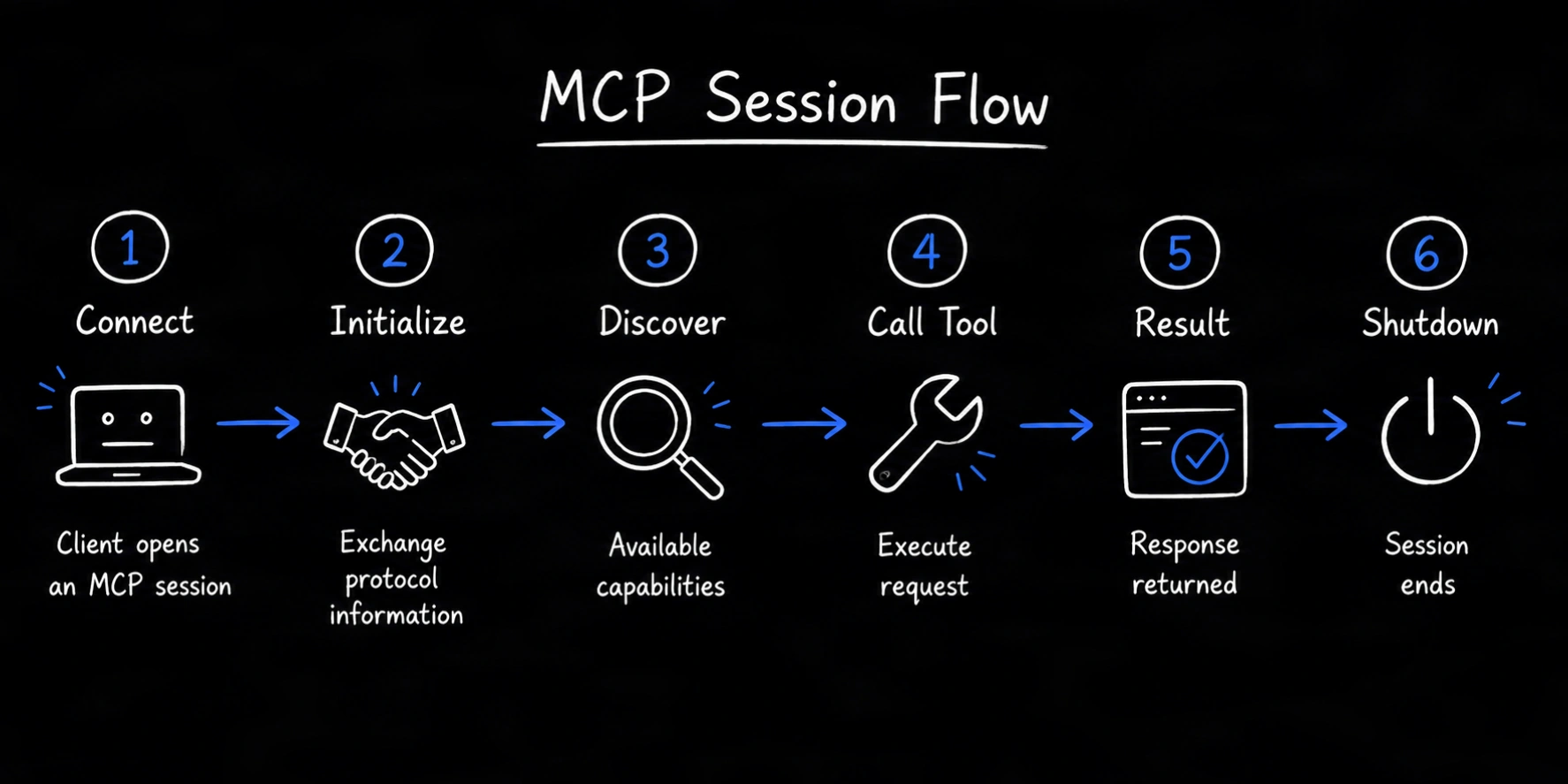
## The MCP request flow
A typical MCP session follows this sequence:
1. The host creates an MCP client.
2. The client connects to an MCP server.
3. The client and server initialize the session.
4. Both sides declare the protocol features they support.
5. The client discovers available server capabilities.
6. The AI application selects a capability when needed.
7. The client sends a request to the server.
8. The server performs the operation and returns a result.
9. Either side may send supported notifications during the session.
10. The connection closes when the session ends.
The exact messages depend on the features and transport in use.
## Step 1: The host creates a client
The host is the AI application that manages the model, user interaction, permissions, and connections.
When the host needs to connect to a server, it creates an MCP client instance. Each client maintains a connection to one server.
```text theme={null}
User -> Host application -> MCP client
```
The client handles protocol communication. It does not replace the host or the model.
## Step 2: The client connects to the server
The client uses a supported transport to reach the server.
Common choices are:
* `stdio` for a local server process
* Streamable HTTP for a remote server
The transport carries MCP messages. The protocol defines the message behavior above that transport.
Read [local MCP servers](/learn/fundamentals/local-mcp-servers) and [remote MCP servers](/learn/fundamentals/remote-mcp-servers) for the deployment differences.
## Step 3: The session initializes
Initialization is the first protocol exchange.
The client sends an `initialize` request containing information such as its supported protocol version and client capabilities. The server responds with its selected protocol version, server capabilities, and implementation information.
After the response, the client sends an initialized notification. Normal operations can then begin.
Initialization prevents the client and server from assuming that the other side supports a feature that was never declared.
## Step 4: The client discovers capabilities
After initialization, the client can request lists of the features the server exposes.
A server may provide:
* [Tools](/learn/core-concepts/tools) for model-invoked actions
* [Resources](/learn/core-concepts/resources) for readable context
* [Prompts](/learn/core-concepts/prompts) for user-selectable templates
For example, a client can request the tool list. Each returned tool includes a name, description, and input schema. These details help the AI application decide whether the tool fits the user's request.
## Step 5: The AI application chooses an operation
The host provides relevant capability definitions to the model or uses application logic to choose one.
Suppose a user asks:
> What is the status of order 1042?
The model may select a tool named `get_order` because its description and schema match the request. The host remains responsible for its approval and permission experience.
## Step 6: The client sends a JSON-RPC request
MCP uses JSON-RPC 2.0 message structures. A simplified tool request looks like this:
```json theme={null}
{
"jsonrpc": "2.0",
"id": 7,
"method": "tools/call",
"params": {
"name": "get_order",
"arguments": {
"order_id": "1042"
}
}
}
```
The request ID lets the client match the response to the original request.
## Step 7: The server executes the capability
The server validates the request and runs the underlying operation.
The implementation might:
* Call an API
* Query a database
* Read an approved file
* Run a calculation
* Trigger a business workflow
If the server wraps an API, the API still enforces its normal authentication, authorization, validation, and business rules.
## Step 8: The server returns a structured result
The server sends either a result or a JSON-RPC error.
```json theme={null}
{
"jsonrpc": "2.0",
"id": 7,
"result": {
"content": [
{
"type": "text",
"text": "Order 1042 has shipped."
}
]
}
}
```
The host gives the result to the model or application. The model can then present an answer, request more information, or continue a multi-step workflow.
## Step 9: The session may exchange notifications
Notifications are messages that do not expect a response.
Depending on negotiated capabilities, they can communicate events such as progress, logging information, resource changes, or updated tool lists.
Clients and servers should only use features declared during initialization.
## Step 10: The session closes
When the interaction ends, the client and server release the connection and related resources.
Local server processes may terminate when the host closes them. Remote connections may end while the remote service remains available for other authorized clients.
## How errors move through MCP
Errors can occur at several layers:
* The transport cannot connect
* The JSON-RPC message is invalid
* The requested method is unavailable
* The input does not match the schema
* Authentication or authorization fails
* The underlying API returns an error
* The operation times out
A good implementation preserves useful error details without exposing secrets. Use [MCP Inspector](/learn/fundamentals/mcp-inspector-guide) to inspect requests and responses during development.
## Key takeaway
**MCP works through an initialized client-server session: discover capabilities, send structured requests, execute operations, and return structured results.**
# Local MCP servers
Source: https://docs.0mcp.io/learn/fundamentals/local-mcp-servers
Learn what a local MCP server is, how stdio connections work, common use cases, setup considerations, and local security risks.
A **local [MCP server](https://modelcontextprotocol.io/specification)** is a program that runs on the same device as the MCP host or within the user's local environment.
Local servers commonly give AI applications controlled access to files, command-line tools, source code, desktop software, and development services.
```text theme={null}
Desktop AI host -> local MCP client -> local server process
```
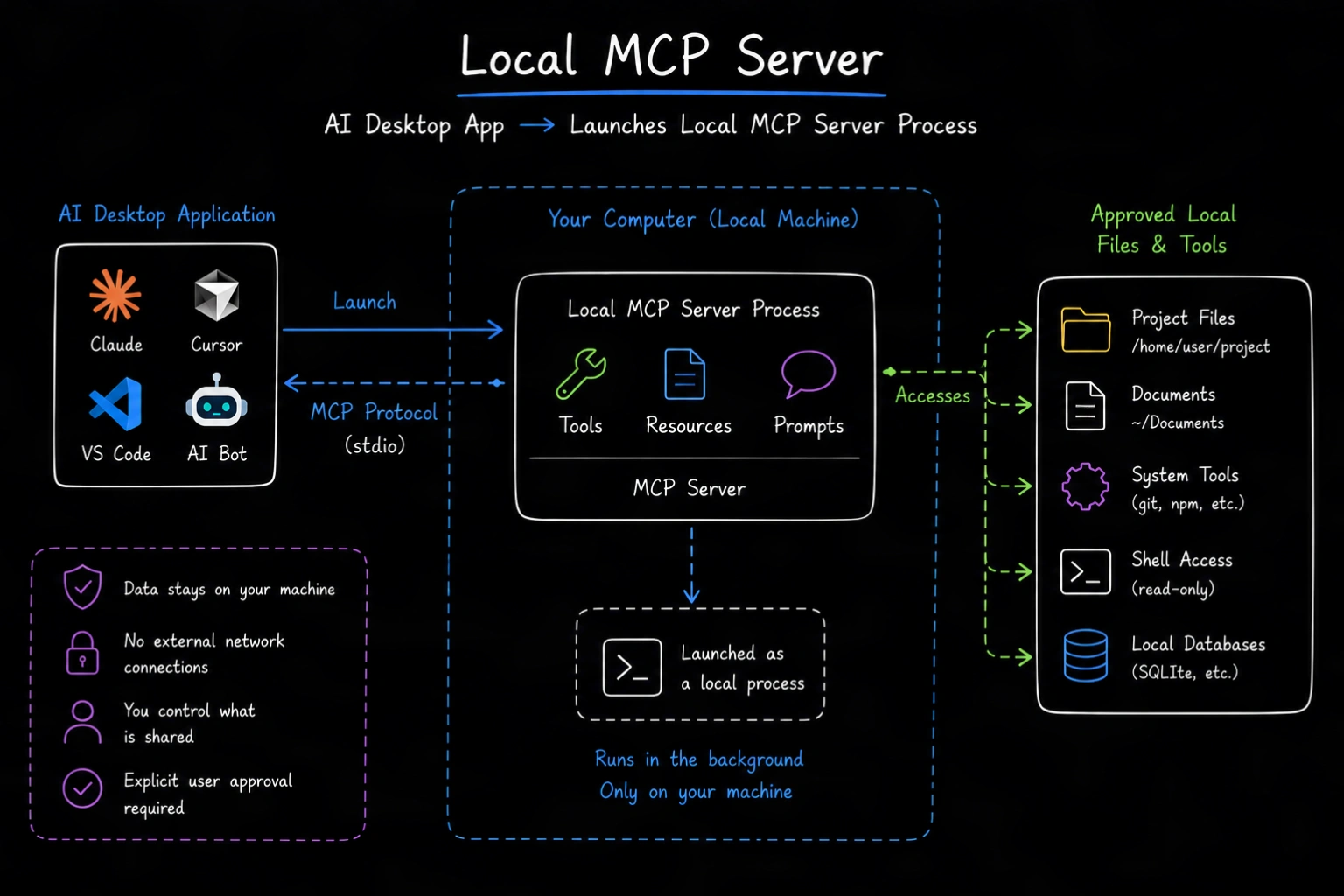
## How local MCP servers connect
A host often launches a local server as a child process and communicates with it through `stdio`.
With `stdio`:
* The client writes MCP messages to the server's standard input.
* The server writes MCP messages to standard output.
* The host manages the process lifecycle.
* Diagnostic logs should go to standard error, not standard output.
Standard output must contain only valid protocol messages. An ordinary debug print can break the connection.
## Common local MCP use cases
Local servers are useful when capabilities depend on the user's device.
Examples include:
* Reading and writing approved files
* Searching a local source repository
* Running development commands
* Querying a local database
* Interacting with installed desktop software
* Using device-specific hardware
* Reaching services available only on a private network
These workloads are difficult or inappropriate to expose through a public remote server.
## Benefits of a local MCP server
### Direct access to local resources
The server can work with resources that are not available over the internet.
### Fast development loop
Developers can change, restart, inspect, and debug a local process without deploying it.
### User-specific configuration
Each user can configure paths, credentials, and tools for their own environment.
### Reduced hosting needs
There is no shared server infrastructure to operate.
Local does not automatically mean private or safe. The host, model provider, or connected services may still process data. Review the complete data flow for your client and server.
## Local server setup
A local setup generally requires:
1. A compatible MCP host
2. A server executable or package
3. A command that starts the server
4. Any required command-line arguments
5. Environment variables or local credentials
6. Explicit access to approved files or services
The exact configuration format depends on the host. Some desktop applications support installable extensions. Others use a JSON configuration that defines the command, arguments, and environment.
## Example configuration shape
The following conceptual configuration shows how a host might start a server:
```json theme={null}
{
"mcpServers": {
"example-local-server": {
"command": "node",
"args": ["path/to/server.js"],
"env": {
"EXAMPLE_API_KEY": "${EXAMPLE_API_KEY}"
}
}
}
}
```
Do not commit real secrets to a configuration file. Use the secure credential mechanism supported by the host.
## Local MCP security
A local MCP server usually runs with the permissions of the user who launched it. That can include access to sensitive files, shell commands, credentials, and network services.
Reduce risk by:
* Restricting file access to specific directories
* Exposing only necessary tools
* Validating every input
* Requiring approval for destructive actions
* Avoiding unrestricted shell execution
* Keeping dependencies updated
* Installing servers only from trusted sources
* Reviewing source code and package integrity
* Using separate credentials with limited scopes
Treat a local MCP server like any other program you install. It can perform actions with the permissions available to its process.
## Debugging local connections
If a local server does not connect:
* Run its startup command directly
* Check that the executable and file paths exist
* Verify required environment variables
* Send logs to `stderr`
* Confirm that `stdout` contains only MCP messages
* Check protocol and SDK compatibility
The [MCP Inspector](/learn/fundamentals/mcp-inspector-guide) can start a local server and display its capabilities and messages.
## When a local server is the wrong choice
Local servers become difficult to manage when many users need the same integration.
Each user may need installation, configuration, credentials, upgrades, and troubleshooting. A [remote MCP server](/learn/fundamentals/remote-mcp-servers) may be better for a shared SaaS API or centrally managed production capability.
## Key takeaway
**A local MCP server runs near the user and is best for device-specific resources, private development environments, and individually managed workflows.**
# Local vs remote MCP: Which should you choose?
Source: https://docs.0mcp.io/learn/fundamentals/local-vs-remote-mcp
Compare local and remote MCP servers across privacy, access, performance, maintenance, authentication, scaling, and production readiness.
Choose a **local [MCP server](https://modelcontextprotocol.io/specification)** when the capability depends on one device or private local resources. Choose a **remote MCP server** when multiple users need a shared, centrally operated service.
Many teams use both: local servers for development and device access, and remote servers for shared production integrations.
## Local vs remote MCP at a glance
| Factor | Local MCP server | Remote MCP server |
| ------------------ | -------------------------------------- | ------------------------------------ |
| Runs on | User device or private environment | Hosted network infrastructure |
| Common transport | `stdio` | Streamable HTTP |
| Typical users | One user or one machine | Multiple authorized users |
| Best access | Local files, apps, and developer tools | SaaS APIs and shared services |
| Installation | Required on each device | Central deployment |
| Updates | Per device | Update once on the server |
| Network dependency | Often low | Requires network access |
| Authentication | Local configuration or credentials | Web authentication and authorization |
| Scaling | Limited by the device | Can scale across infrastructure |
| Operations | User-managed | Service-owner managed |
## Choose local MCP for device-specific access
A [local MCP server](/learn/fundamentals/local-mcp-servers) is usually the better choice when the server must interact with:
* Files on the user's machine
* A local source repository
* Installed command-line tools
* Desktop applications
* Local development databases
* Hardware attached to the device
* Internal resources reachable only from the local network
Local deployment keeps the server close to those resources and avoids exposing them through a public service.
## Choose remote MCP for shared services
A [remote MCP server](/learn/fundamentals/remote-mcp-servers) is usually the better choice when:
* A team needs one consistent integration
* Customers need to connect to a SaaS product
* The source system is already an API
* Central authentication is required
* You need monitoring, rate limits, and audit logs
* Updates should reach every client immediately
* The workload needs high availability or horizontal scaling
Remote deployment works like operating another production web service.
## Compare security and privacy
Local and remote servers have different security risks.
### Local security
A local server often inherits the user's operating-system permissions. It may be able to access sensitive files, credentials, processes, and local network services.
Use restricted paths, narrow tools, isolated credentials, and explicit approval for sensitive actions.
### Remote security
A remote server receives traffic over a network and may serve many tenants. It needs HTTPS, caller authentication, authorization, tenant isolation, rate limiting, monitoring, and secure secret storage.
Remote does not automatically mean less private. Local does not automatically mean more private. Evaluate the complete data path, including what the AI host and model provider receive.
## Compare performance
Local servers avoid internet round trips when accessing local resources. This can help with large files, repository searches, and repeated device operations.
Remote servers add network latency, but they may run closer to the upstream API and use more powerful infrastructure. They can also cache shared data and scale independently.
Measure the full workflow. The slowest part may be the model, upstream API, or external service rather than the MCP transport.
## Compare maintenance
Local distribution creates per-device work:
* Installation
* Runtime dependencies
* Configuration
* Credential setup
* Updates
* Operating-system differences
* User troubleshooting
Remote distribution creates service operations work:
* Deployment pipelines
* Availability
* Capacity planning
* Authentication
* Incident response
* Observability
* Backward compatibility
Choose the maintenance model your team can support.
## Compare credential handling
Local servers often receive credentials through environment variables, operating-system keychains, or host-managed extension settings.
Remote servers commonly use delegated authorization, scoped access tokens, or service credentials stored in a secret manager.
Never place production secrets directly in source code or shared configuration.
## Use a hybrid approach
You do not have to choose one model for every capability.
A hybrid architecture might use:
* A local server for files and terminal tools
* A remote server for CRM and billing APIs
* Local development before remote production deployment
* A local bridge for private-network access and a remote public service for general tools
The MCP host can maintain separate clients for these servers while preserving connection boundaries.
> \[Image placeholder: Hybrid MCP architecture with local file tools and a remote SaaS API server connected to one AI host]
## Decision checklist
Answer these questions:
1. Does the capability need direct access to a user's device?
2. Will more than one person use it?
3. Can the data cross a network boundary?
4. Does the integration require centralized policy and auditing?
5. Who will install and update the server?
6. Does it need production availability?
7. Can your team operate secure remote infrastructure?
If device access dominates, start local. If shared access and centralized operations dominate, start remote.
For API-backed products, a hosted MCP server is usually the natural fit. [0mcp](https://0mcp.io) can publish an [OpenAPI-defined API](/api-sources/openapi) as a remote MCP endpoint.
## Key takeaway
**Use local MCP for device-bound capabilities and individual control. Use remote MCP for shared, centrally managed, production capabilities. Use both when the system needs both kinds of access.**
# MCP architecture explained
Source: https://docs.0mcp.io/learn/fundamentals/mcp-architecture-explained
Understand MCP hosts, clients, servers, capability negotiation, security boundaries, and the flow of context and tool requests.
MCP uses a **[host-client-server architecture](https://modelcontextprotocol.io/docs/learn/architecture)**. The host runs the AI experience, each MCP client manages one server connection, and MCP servers provide focused capabilities such as tools, resources, and prompts.
```text theme={null}
+-> MCP client <-> MCP server A
User <-> MCP host ---|
+-> MCP client <-> MCP server B
```
This structure keeps orchestration in the host and separates external integrations into independently managed servers.
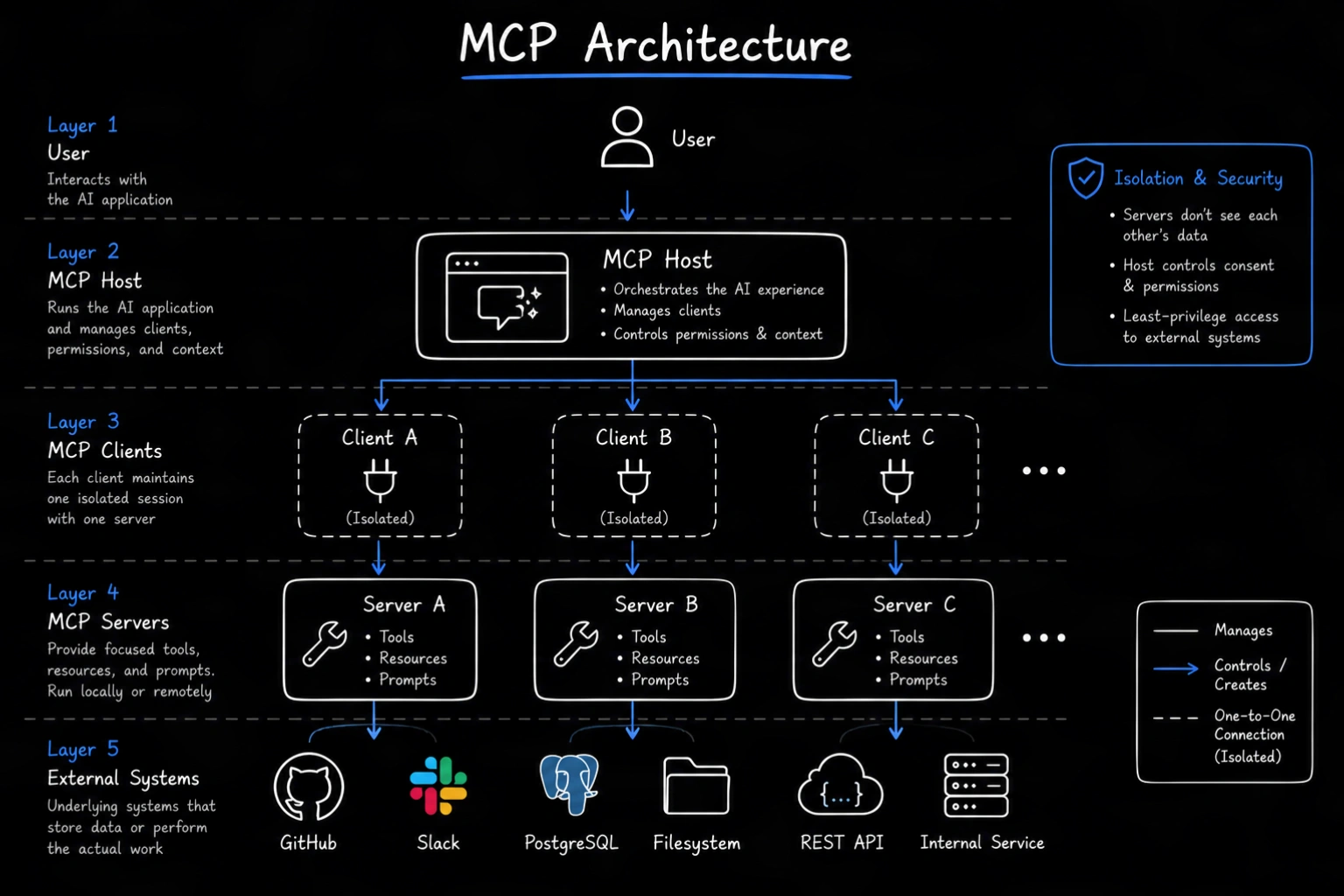
## The four architectural layers
You can understand an MCP system as four layers:
| Layer | Responsibility |
| --------------- | ----------------------------------------------------------- |
| Host | Runs the AI application and coordinates the user experience |
| Client | Maintains one protocol session with one server |
| Server | Exposes a focused set of context and capabilities |
| External system | Performs the underlying work or stores the underlying data |
The external system may be an API, database, SaaS platform, file system, or internal service. It is not itself required to implement MCP when an MCP server wraps it.
## MCP host
The host is the application the user interacts with.
It may be an AI assistant, coding environment, desktop application, or internal agent platform. The host typically:
* Creates and manages MCP clients
* Controls which servers can connect
* Coordinates model interactions
* Presents permission and approval interfaces
* Combines context from approved sources
* Enforces application-level security policies
The host owns the conversation. An MCP server should receive only the information needed for its operation.
## MCP client
An MCP client is the protocol component inside the host.
Each client normally maintains a one-to-one connection with a server. It:
* Initializes the session
* Negotiates supported capabilities
* Routes requests, responses, and notifications
* Tracks the server connection
* Preserves isolation from other server connections
One host can run several clients at the same time. This allows an AI application to use multiple servers without giving those servers direct access to one another.
## MCP server
An MCP server provides context or actions to clients.
A server may run as a local process or as a remote service. It can expose:
* [Tools](/learn/core-concepts/tools) that the model can request
* [Resources](/learn/core-concepts/resources) that the application can read
* [Prompts](/learn/core-concepts/prompts) that users can select
Servers should have focused responsibilities. A server that wraps a billing API, for example, should expose only the billing capabilities its users need.
## Server and client features
MCP supports features on both sides of the connection.
Common server features include tools, resources, and prompts. Client features can include roots, sampling, and elicitation.
These are not assumed. The client and server declare supported capabilities during initialization.
## Capability negotiation
Capability negotiation lets both sides agree on available protocol features.
During initialization:
1. The client declares the features it supports.
2. The server declares the features it supports.
3. Both sides use only the capabilities available for that session.
This design allows implementations to add features progressively. A simple tool server does not need to implement every part of MCP.
## Message layer
MCP messages use JSON-RPC 2.0 structures:
* **Requests** expect a response.
* **Responses** contain a result or error.
* **Notifications** do not expect a response.
The message layer is separate from the transport. The same protocol behavior can run over `stdio` for local processes or Streamable HTTP for remote services.
Read [The MCP specification](/learn/fundamentals/mcp-specification-explained) for the normative protocol requirements.
## Transport layer
The transport moves messages between the client and server.
The standard transports are:
* `stdio`
* Streamable HTTP
`stdio` commonly connects a host to a child process on the same machine. Streamable HTTP supports network-accessible servers and normal HTTP infrastructure.
Transport choice affects deployment, authentication, latency, and operational responsibility. Compare these tradeoffs in [Local vs remote MCP](/learn/fundamentals/local-vs-remote-mcp).
## Security boundaries
The host-client-server design creates important boundaries:
* Servers should not automatically receive the full conversation.
* One server should not see another server's data.
* The host should control user consent.
* Tool descriptions and results should be treated as untrusted input.
* Sensitive actions should require clear authorization.
* Servers should apply least-privilege access to underlying systems.
MCP defines communication behavior, but implementation security remains the responsibility of the host and server developers.
## Example architecture for an API-backed server
An API-backed MCP deployment may look like this:
```text theme={null}
User
|
AI host
|
MCP client
|
Hosted MCP server
|
Existing REST API
|
Database and business logic
```
The MCP server translates an MCP capability request into an API request. The API remains the authority for business logic and data access.
[0mcp](https://0mcp.io) uses this pattern to turn an [OpenAPI specification](/api-sources/openapi) into a hosted MCP interface.
## Architecture vs request lifecycle
Architecture describes the components and their boundaries. The lifecycle describes the order of messages inside one connection.
For the message sequence from initialization to results, read [How MCP works, step by step](/learn/fundamentals/how-mcp-works).
## Key takeaway
**MCP architecture separates the AI host, protocol connections, and external capabilities so each part can remain focused, composable, and governed.**
# MCP Inspector: A guide to testing and debugging
Source: https://docs.0mcp.io/learn/fundamentals/mcp-inspector-guide
Use MCP Inspector to connect to local and remote servers, inspect capabilities, call tools, test resources and prompts, and diagnose protocol errors.
**[MCP Inspector](https://modelcontextprotocol.io/docs/tools/inspector)** is an interactive developer tool for testing and debugging MCP servers without relying on a full AI application.
It can connect to a server, display negotiated capabilities, list tools, inspect resources, preview prompts, execute requests, and show protocol messages.
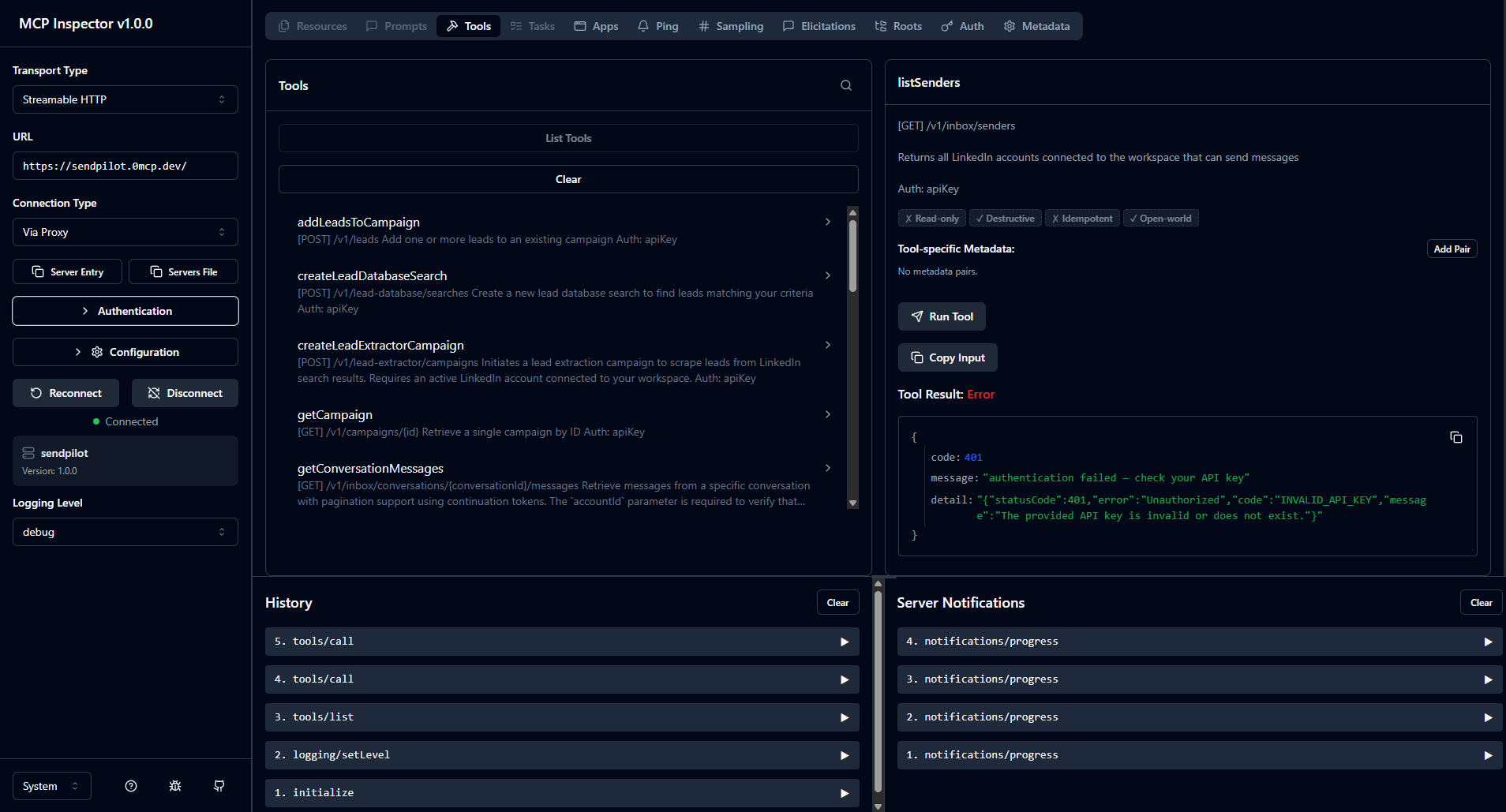
## When to use MCP Inspector
Use Inspector when you need to:
* Verify that a server starts
* Test initialization
* Check the selected transport
* Review tool names and schemas
* Call a tool with controlled input
* Inspect resource contents
* Preview prompt templates
* View notifications and logs
* Diagnose protocol errors
* Test changes before opening an AI client
Inspector verifies protocol behavior. It does not fully reproduce how a particular model chooses tools.
## Requirements
You need:
* Node.js and `npx`
* A local server startup command or remote MCP URL
* Any required environment variables or authentication credentials
Run Inspector only in a trusted development environment.
## Start MCP Inspector
Run:
```bash theme={null}
npx @modelcontextprotocol/inspector
```
This starts the Inspector interface and its local proxy.
To start Inspector with a local TypeScript server:
```bash theme={null}
npx @modelcontextprotocol/inspector node path/to/server/index.js
```
For a Python package run through `uv`:
```bash theme={null}
npx @modelcontextprotocol/inspector uv --directory path/to/server run package-name
```
Follow the server's own README for the correct startup command.
## Connect to a local server
For a [local MCP server](/learn/fundamentals/local-mcp-servers):
1. Select the `STDIO` transport.
2. Enter the executable command.
3. Add command arguments.
4. Add required environment variables.
5. Click **Connect**.
Inspector launches the process and exchanges messages through standard input and output.
If the server disconnects immediately, run the command directly in a terminal and inspect its error output.
## Connect to a remote server
For a [remote MCP server](/learn/fundamentals/remote-mcp-servers):
1. Select Streamable HTTP.
2. Enter the full MCP endpoint URL.
3. Configure authentication if required.
4. Click **Connect**.
Avoid testing destructive tools against production. Use a test account and a staging server.
## Inspect tools
Open the **Tools** tab to:
* List available tools
* Read their descriptions
* Inspect input schemas
* Enter arguments
* Execute a tool
* Review the raw result
Test:
* Valid input
* Missing required input
* Invalid types
* Boundary values
* Empty results
* Upstream failures
* Authorization failures
* Timeouts
Good tool errors should help the client understand what failed without revealing secrets.
## Inspect resources
Open the **Resources** tab to:
* List resources
* Review names, URIs, descriptions, and MIME types
* Read resource contents
* Test resource templates
* Test subscriptions when supported
Confirm that the server exposes only intended information.
## Inspect prompts
Open the **Prompts** tab to:
* List prompt templates
* Review arguments
* Supply test values
* Preview generated messages
Check that prompt names and descriptions help a user understand when to choose them.
## Read the notification and log panes
Inspector displays protocol events and server logs.
Use them to confirm:
* Initialization completes
* The expected protocol version is selected
* Capabilities are declared
* Request IDs match responses
* Progress notifications are valid
* Errors use the expected structure
Never write ordinary logs to `stdout` in a `stdio` server. Use `stderr` so log text does not corrupt MCP messages.
## Debug common failures
### Connection refused
* Confirm the remote URL and port
* Verify the server is running
* Check firewall and proxy rules
* Confirm TLS configuration
### Local process exits
* Run the command directly
* Check file paths and dependencies
* Verify environment variables
* Inspect `stderr`
### Transport mismatch
Use `STDIO` for a process command and Streamable HTTP for a modern remote endpoint. Legacy servers may still use the older SSE transport.
### Initialization fails
* Compare supported protocol versions
* Validate the initialize response
* Check capability shapes
* Confirm the initialized notification
### Tool validation fails
* Review the input schema
* Test required properties
* Remove ambiguous or unsupported schema constructs
* Confirm argument names match the implementation
### Authentication fails
* Check token validity and scope
* Confirm required headers
* Verify the OAuth flow
* Avoid logging the credential
## A practical testing workflow
1. Start with successful initialization.
2. Confirm the capability lists.
3. Test one read-only tool.
4. Test invalid inputs.
5. Test upstream errors.
6. Test write operations in a safe environment.
7. Test cancellation and timeouts.
8. Connect a real AI client for end-to-end behavior.
9. Add regression tests to CI.
Use Inspector together with [logs](/guides/logs) and [analytics](/guides/analytics) when testing a [0mcp](https://0mcp.io) server.
## What Inspector cannot prove
Inspector cannot prove that:
* Every AI client supports the same features
* A model will select the correct tool
* Tool descriptions are understandable in every context
* Production authorization is correct
* The underlying API is reliable
Test the protocol, the real client, and the upstream system separately.
# Comparing MCP SDKs: Python vs TypeScript vs Go
Source: https://docs.0mcp.io/learn/fundamentals/mcp-sdk-comparison
Compare official MCP SDKs for Python, TypeScript, and Go by ecosystem, type system, deployment, concurrency, and team fit.
Choose an [MCP SDK](https://modelcontextprotocol.io/docs/sdk) based on your team's language, existing systems, deployment target, and operational requirements.
The official MCP project currently classifies **TypeScript, Python, and Go as Tier 1 SDKs**. All three can implement MCP clients and servers. Their main differences come from their language ecosystems and runtime models.
SDK APIs and feature maturity change. Check the official SDK documentation and release notes before implementation.
## Quick comparison
| Factor | Python | TypeScript | Go |
| ----------- | --------------------------------------------- | --------------------------------- | ---------------------------------------- |
| Strong fit | AI, data, scripting, backend services | Web, Node.js, full-stack products | Infrastructure, services, compiled tools |
| Type model | Dynamic with type hints and validation models | Static structural typing | Static nominal typing with structs |
| Concurrency | `asyncio` and processes | Node.js event loop and workers | Goroutines and channels |
| Packaging | Python package and environment | npm package and Node.js runtime | Compiled binary |
| Startup | Runtime-dependent | Runtime-dependent | Fast compiled executable |
| Ecosystem | AI and data libraries | Web and JavaScript ecosystem | Cloud and infrastructure tooling |
## Python MCP SDK
Python is a natural choice for teams already building AI, data, automation, or scientific systems.
### Strengths
* Familiar to many AI engineers
* Strong data and machine-learning ecosystem
* Concise server implementations
* Mature validation and serialization tools
* Good fit for scripts and internal services
* Async support for I/O-heavy operations
### Considerations
* Environment and dependency management need discipline
* CPU-heavy work may need processes or external workers
* Runtime type checking depends on the libraries and patterns you choose
### Choose Python when
* The MCP server wraps a Python AI or data workflow
* Your team already uses FastAPI, Pydantic, or `asyncio`
* You need rapid experimentation
* The server calls Python-native libraries
## TypeScript MCP SDK
TypeScript is a strong choice for Node.js services, web product teams, and developers who want rich editor feedback.
### Strengths
* Strong type inference and editor tooling
* Large npm ecosystem
* Natural fit for web protocols and JSON
* Shared types across frontend and backend projects
* Event-driven model for I/O-heavy services
* Broad examples and community adoption
### Considerations
* Requires a Node.js runtime unless bundled into another target
* CPU-heavy work may require workers or separate services
* Package supply-chain controls are important in large npm dependency trees
### Choose TypeScript when
* Your product already runs on Node.js
* Your team builds web APIs and SaaS applications
* You want strong tool-schema types and editor completion
* You need to share code with a TypeScript SDK or application
## Go MCP SDK
Go is well suited to infrastructure services, compiled command-line tools, and highly concurrent network workloads.
### Strengths
* Single compiled binaries
* Fast startup
* Predictable deployment
* Built-in concurrency primitives
* Strong standard library for network services
* Good fit for containers and infrastructure tooling
### Considerations
* More explicit code can slow early prototyping
* The AI and data ecosystem is smaller than Python's
* Generic JSON and schema handling may require more structure
### Choose Go when
* You want a self-contained binary
* The server belongs to an infrastructure platform
* Concurrency and resource predictability matter
* Your organization already operates Go services
## Compare server deployment
### Python
Deploy with a Python runtime, isolated environment, and locked dependencies. Containers make environments more repeatable.
### TypeScript
Deploy with Node.js and a lockfile. Build TypeScript before runtime or use a supported execution strategy.
### Go
Compile the server and deploy the binary. Multi-stage container builds can produce small runtime images.
All three can run as [local MCP servers](/learn/fundamentals/local-mcp-servers) or [remote MCP servers](/learn/fundamentals/remote-mcp-servers), subject to the transports implemented by the SDK version.
## Compare performance carefully
Language benchmarks rarely predict full MCP performance.
Most MCP tools spend time waiting for:
* Model decisions
* Network requests
* Databases
* External APIs
* File systems
Measure the actual workload. Schema quality, response size, upstream latency, and retry behavior can matter more than language runtime speed.
## Compare maintainability
The best SDK is usually the one your team can operate confidently.
Evaluate:
* Existing expertise
* Testing conventions
* Dependency policy
* Observability tooling
* Deployment platform
* Security review process
* Long-term ownership
Introducing another language for a small theoretical gain can increase operational cost.
## Can clients and servers use different languages?
Yes.
MCP is a protocol, so a Python client can connect to a TypeScript server, and a Go client can connect to a Python server, as long as both implement compatible protocol versions and transports.
```text theme={null}
Go client -> MCP -> TypeScript server
Python client -> MCP -> Go server
```
Language choice does not need to be the same on both sides.
## Decision guide
* Choose **Python** for AI, data, and rapid backend development.
* Choose **TypeScript** for Node.js, SaaS, and web-focused teams.
* Choose **Go** for infrastructure, compiled distribution, and concurrent services.
* Keep your existing language when it already meets the requirements.
## Key takeaway
**Python, TypeScript, and Go are all strong official MCP SDK choices. Team fit and deployment context matter more than a universal ranking.**
# Deploying an MCP server on Kubernetes
Source: https://docs.0mcp.io/learn/fundamentals/mcp-server-on-kubernetes
Deploy a remote MCP server on Kubernetes with containers, Services, Ingress, secrets, health checks, scaling, observability, and least-privilege security.
You can deploy a remote [MCP server](https://modelcontextprotocol.io/) on Kubernetes when you need repeatable releases, horizontal scaling, service discovery, centralized secrets, and production observability.
A typical deployment places a Streamable HTTP MCP server behind a Kubernetes Service and an HTTPS ingress or gateway.
```text theme={null}
MCP client -> HTTPS ingress -> Service -> MCP server Pods -> API
```
## Before you deploy
Prepare:
* A container image for the MCP server
* A Streamable HTTP endpoint
* A Kubernetes cluster
* A container registry the cluster can access
* A DNS name and TLS certificate
* Authentication for MCP clients
* Credentials for upstream systems
* Health endpoints
Test the server locally with [MCP Inspector](/learn/fundamentals/mcp-inspector-guide) before deploying it.
## Containerize the server
The container should:
* Start one server process
* Listen on a configurable address and port
* Write logs to standard output and error
* Stop gracefully on `SIGTERM`
* Avoid running as root
* Include only runtime dependencies
* Expose health endpoints that do not require MCP authentication
Do not bake secrets into the image.
## Create a Deployment
The following example is a starting point. Replace the image, port, command, and health paths with values from your server.
```yaml theme={null}
apiVersion: apps/v1
kind: Deployment
metadata:
name: mcp-server
spec:
replicas: 2
selector:
matchLabels:
app: mcp-server
template:
metadata:
labels:
app: mcp-server
spec:
containers:
- name: mcp-server
image: registry.example.com/mcp-server:1.0.0
ports:
- name: http
containerPort: 8080
env:
- name: PORT
value: "8080"
- name: UPSTREAM_API_KEY
valueFrom:
secretKeyRef:
name: mcp-server-secrets
key: upstream-api-key
readinessProbe:
httpGet:
path: /ready
port: http
livenessProbe:
httpGet:
path: /health
port: http
resources:
requests:
cpu: 100m
memory: 128Mi
limits:
cpu: 500m
memory: 512Mi
securityContext:
allowPrivilegeEscalation: false
readOnlyRootFilesystem: true
runAsNonRoot: true
capabilities:
drop: ["ALL"]
```
Pin versioned image tags or digests. Avoid `latest` in production.
## Expose the Pods with a Service
```yaml theme={null}
apiVersion: v1
kind: Service
metadata:
name: mcp-server
spec:
selector:
app: mcp-server
ports:
- name: http
port: 80
targetPort: http
```
The Service gives the Pods a stable internal address.
## Add HTTPS ingress
Use your cluster's Ingress or Gateway implementation to expose the MCP endpoint.
Configure:
* TLS
* The public hostname
* The MCP path, such as `/mcp`
* Request and streaming timeouts
* Maximum body size
* Forwarded headers
* Authentication integration where appropriate
Confirm that the proxy supports the streaming behavior your server uses.
## Store secrets safely
Kubernetes Secrets are configuration objects, not a complete secret-management strategy.
For production:
* Enable encryption at rest
* Restrict Secret access with RBAC
* Use a cloud secret manager or external secrets operator when appropriate
* Rotate credentials
* Avoid exposing secrets in logs
* Give the server only the credentials it needs
If the upstream API supports per-user authorization, avoid replacing it with one unrestricted shared credential.
## Handle MCP sessions across replicas
Multiple replicas create a state-management decision.
If your server keeps session state:
* Store state in a shared system, or
* Configure session affinity, and
* Plan for Pod termination and reconnection
Stateless tool execution is easier to scale, but not every MCP feature or application workflow is stateless.
## Configure health checks correctly
Use:
* A startup probe for slow initialization
* A readiness probe to control traffic
* A liveness probe only for unrecoverable process failure
Do not make a liveness probe depend on every upstream API. A dependency outage should not cause Kubernetes to restart all healthy server processes repeatedly.
## Scale safely
Add a HorizontalPodAutoscaler only after measuring useful signals.
CPU may not represent load for I/O-heavy tool calls. Consider:
* Concurrent MCP sessions
* Active requests
* Request latency
* Queue depth
* Upstream API limits
Scaling the MCP layer cannot remove a rate limit imposed by the upstream system.
## Apply least privilege
Most API-backed MCP servers do not need access to the Kubernetes API. Disable automatic service-account token mounting when it is unnecessary.
If the server does manage cluster resources:
* Create a dedicated service account
* Prefer namespace-scoped Roles
* Grant only required verbs and resources
* Avoid wildcards
* Avoid `cluster-admin`
* Audit every tool that changes cluster state
An AI application can request any Kubernetes action allowed by the server's identity. Start with read-only tools and narrow RBAC permissions.
## Add observability
Capture:
* Request count and latency
* Tool name
* Result status
* Authentication failures
* Upstream API errors
* Timeouts and cancellations
* Pod restarts
* Saturation and queue depth
Do not log access tokens, full secrets, or sensitive tool inputs.
## Production checklist
* [ ] Versioned container image
* [ ] Non-root security context
* [ ] Resource requests and limits
* [ ] Readiness and liveness probes
* [ ] TLS
* [ ] Authentication and authorization
* [ ] Secret rotation
* [ ] NetworkPolicy
* [ ] Pod disruption strategy
* [ ] Session-state plan
* [ ] Monitoring and alerts
* [ ] Tested rollback
For simpler API-backed deployments, [0mcp](https://0mcp.io) provides a hosted [remote MCP server](/learn/fundamentals/remote-mcp-servers) without requiring you to operate Kubernetes.
# The MCP specification explained
Source: https://docs.0mcp.io/learn/fundamentals/mcp-specification-explained
Learn how the Model Context Protocol specification defines messages, lifecycle, transports, features, versioning, and security requirements.
The **[MCP specification](https://modelcontextprotocol.io/specification)** is the authoritative technical definition of the Model Context Protocol. It tells client and server developers which messages exist, how protocol behavior is negotiated, how capabilities are discovered, and what compliant implementations must do.
Use the specification when implementation behavior must be exact. Use explanatory documentation when you first need a conceptual overview.
## What the MCP specification defines
The specification covers:
* Client-host-server architecture
* JSON-RPC message structures
* Connection lifecycle
* Protocol version negotiation
* Standard transports
* Authorization for HTTP-based connections
* Server features
* Client features
* Shared utilities
* Security and trust considerations
It does not define the business logic behind a tool or the database behind a resource.
## The base protocol
The base protocol defines the common communication layer.
It uses JSON-RPC 2.0 and includes:
* Requests
* Responses
* Notifications
* Initialization or discovery, depending on the negotiated protocol era
* Capability negotiation
* Progress
* Cancellation
* Error reporting
* Logging
Every feature builds on this common message behavior.
## Lifecycle and initialization
MCP lifecycle behavior depends on the negotiated protocol era.
Older clients begin with initialization. The client proposes a protocol version and declares its capabilities. The server selects a compatible version and declares its own capabilities. Normal requests begin only after initialization completes.
Modern MCP 2026-07-28 clients use discovery and request-contained metadata instead of the older session-oriented flow.
This exchange lets implementations evolve without assuming feature support.
Read [How MCP works](/learn/fundamentals/how-mcp-works) for a step-by-step walkthrough.
## Standard transports
The current specification defines:
* `stdio` for communication with a local process
* Streamable HTTP for network communication
The transport carries JSON-RPC messages. It does not change what those messages mean.
Older implementations may use the previous HTTP+SSE transport. New network implementations should follow the current Streamable HTTP requirements unless they need backward compatibility.
## Server features
Servers can expose features such as:
* **Tools:** Functions the model can request
* **Resources:** Context and data the application can read
* **Prompts:** Templated messages and workflows for users
Each feature has its own methods, schemas, and optional behaviors.
## Client features
Clients can expose features to servers, including:
* **Roots:** Boundaries that identify relevant files or URIs
* **Sampling:** Requests for model generation through the client
* **Elicitation:** Requests for additional user information
A server must not use a client feature unless the client declared support for it.
## Utilities
The specification includes shared utilities that make protocol exchanges more usable:
* Progress notifications
* Request cancellation
* Completion suggestions
These utilities support reliability and user experience but do not replace application-specific observability.
Some utilities differ by protocol version. See [MCP 2026-07-28 compatibility](/guides/mcp-2026-07-28) for the current 0mcp guidance.
## Protocol versions
MCP versions use date-based identifiers.
The client and server negotiate a version during initialization. Implementations should:
* Declare versions accurately
* Reject incompatible behavior clearly
* Test against supported clients
* Read the key changes for each new version
* Avoid linking product logic to undocumented behavior
Use the `/latest` specification URL when you want the newest stable specification. Pin a dated version in implementation tests when reproducibility matters.
## Normative language
The specification uses words such as `MUST`, `SHOULD`, and `MAY` with formal meanings.
* `MUST` indicates a requirement.
* `SHOULD` indicates a strong recommendation with possible exceptions.
* `MAY` indicates an optional behavior.
Do not treat examples or explanatory prose as stronger than a normative requirement.
## What compliance means
A compliant implementation:
* Produces valid protocol messages
* Follows lifecycle requirements
* Advertises supported capabilities accurately
* Uses methods according to their schemas
* Respects negotiated protocol versions
* Implements its selected transport correctly
* Handles errors and cancellation as required
Compliance does not guarantee that every client interprets tool descriptions equally well. Test protocol correctness and real-client behavior separately.
Use [MCP Inspector](/learn/fundamentals/mcp-inspector-guide) for interactive protocol testing.
## Security in the specification
MCP can provide access to sensitive data and actions. The specification emphasizes user consent, data privacy, tool safety, and clear authorization.
Implementers should:
* Keep users in control
* Avoid exposing unnecessary data
* Treat tool metadata as untrusted
* Require approval for sensitive operations
* Apply access controls to connected systems
The specification provides a foundation. Each host and server must still implement a complete security model.
## How to read the specification
A practical reading order is:
1. [Architecture](/learn/fundamentals/mcp-architecture-explained)
2. Base protocol overview
3. Lifecycle
4. Transports
5. The server or client features you need
6. Authorization and security
7. Schema reference
Start with only the features your implementation requires.
## Key takeaway
**The MCP specification is the contract that lets independent clients and servers communicate predictably.**
# MCP vs traditional AI SDKs: What builders should know
Source: https://docs.0mcp.io/learn/fundamentals/mcp-vs-traditional-sdks
Compare MCP servers with traditional API and AI SDKs, including consumers, interfaces, distribution, authentication, and when to use both.
[MCP](https://modelcontextprotocol.io/) and traditional SDKs solve different integration problems.
* An **SDK** gives developers language-specific code for calling an API or platform.
* An **MCP server** gives compatible AI applications a protocol-based interface for discovering and using external capabilities.
Most API providers do not need to choose one. SDKs serve developers writing application code. MCP serves AI applications selecting tools and context at runtime.
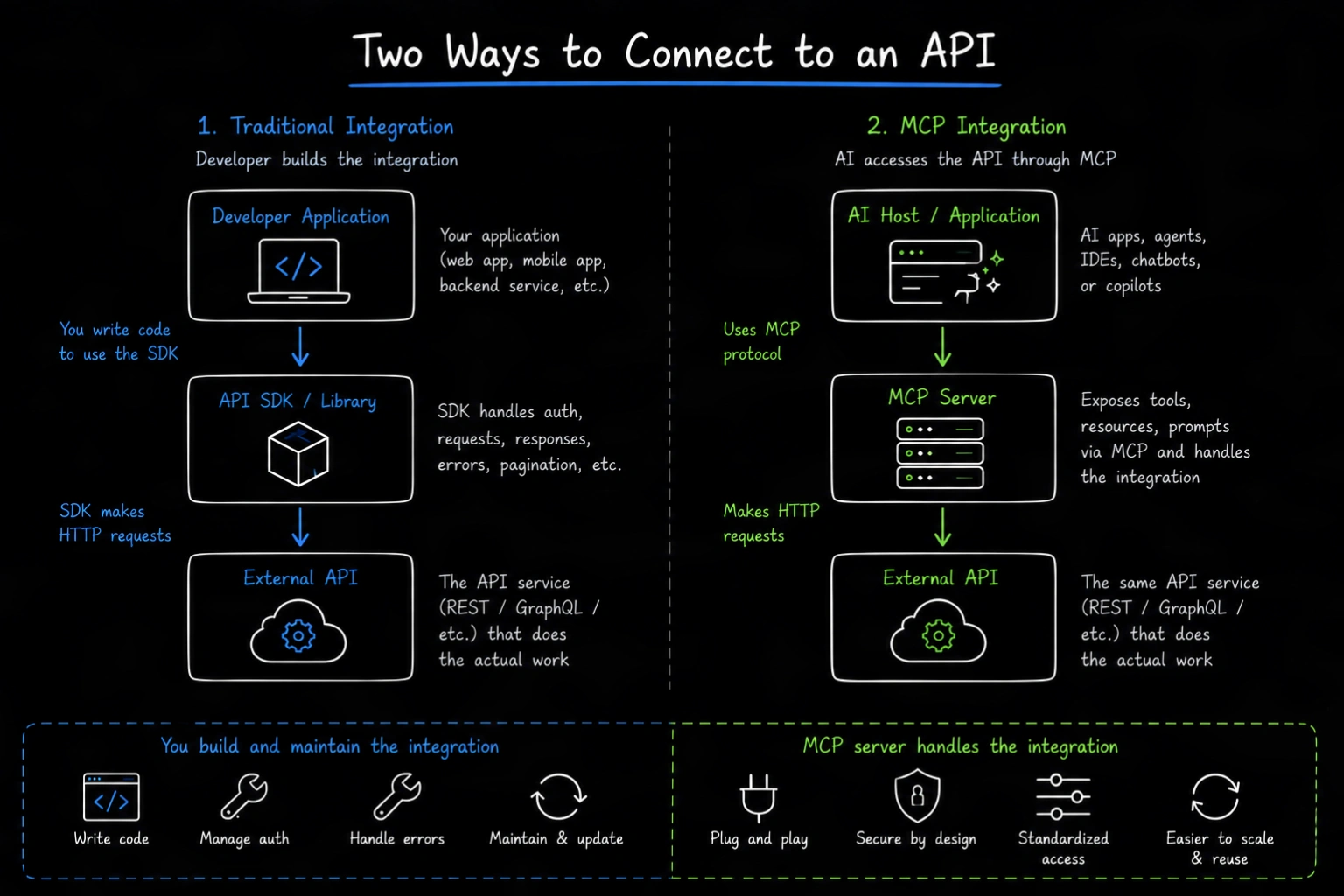
## MCP vs SDK at a glance
| Factor | Traditional SDK | MCP server |
| ------------------ | ------------------------------------- | ----------------------------------------------- |
| Primary consumer | Software developer | MCP-compatible AI application |
| Interface | Language-specific methods and types | Protocol methods and JSON schemas |
| Usage | Explicit calls written in code | Capabilities discovered and selected at runtime |
| Distribution | Package registry or source repository | Local executable or remote service |
| Typical connection | Direct API request | MCP session, often followed by an API request |
| Versioning | Package and API versions | Protocol, server, and underlying API versions |
| Best for | Building deterministic applications | Giving AI applications tools and context |
## How a traditional SDK works
A developer installs a package, creates a client, and calls methods.
```text theme={null}
Developer code -> SDK method -> HTTP API
```
The developer decides exactly which method runs and when. The programming language provides types, editor completion, and familiar error handling.
SDKs are ideal for:
* Product application code
* Backend services
* Scripts and automation
* Mobile and web clients
* Deterministic workflows
* High-volume programmatic API access
## How an MCP integration works
An AI host connects to an MCP server and discovers its capabilities.
```text theme={null}
User -> AI host -> MCP client -> MCP server -> API
```
The model or application logic may select a tool based on its name, description, and schema. The host then controls approval and execution.
MCP is ideal for:
* AI assistants
* Coding agents
* Natural-language workflows
* Reusable integrations across compatible AI clients
* Runtime capability discovery
Read [How MCP works](/learn/fundamentals/how-mcp-works) for the protocol sequence.
## Different consumers require different design
SDK users read documentation and write code. AI applications interpret capability metadata.
An SDK method may work well with a concise method name because the developer has types and documentation. An MCP tool needs a description that helps a model decide:
* When to use the tool
* When not to use it
* Which inputs are required
* What effect the action has
* What the result contains
Do not expose an entire API mechanically without reviewing the AI-facing interface.
## MCP does not replace your SDK
An MCP server is not a general replacement for a language SDK.
Developers still need SDKs when they want:
* Compile-time types
* Direct control over execution
* Native language conventions
* Efficient bulk operations
* Application-specific retry logic
* Fine-grained API coverage
MCP adds an interface for AI systems. It does not make traditional application integration unnecessary.
## SDKs can power MCP servers
An MCP server can use an existing SDK internally:
```text theme={null}
MCP tool -> Server implementation -> SDK -> API
```
This lets the server reuse:
* Authentication helpers
* Request and response types
* Pagination
* Retry behavior
* API error handling
Keep the MCP tool interface focused even when the SDK exposes hundreds of methods.
## Authentication differences
SDKs often receive an API key or access token directly from application code.
MCP authentication depends on deployment:
* Local servers may receive credentials through host configuration or the operating-system credential store.
* Remote servers may use OAuth, scoped tokens, or service credentials.
* The underlying API may still require its normal credentials.
In both cases, the upstream API should remain the authority for data access and business permissions.
## Versioning differences
An SDK has its own package version and depends on an API version.
An MCP integration may involve:
* MCP protocol version
* MCP server version
* Tool schema version
* Underlying API version
* Client-specific feature support
Test changes at every affected boundary. Renaming a tool or changing its schema can alter model behavior even when the API endpoint remains compatible.
## When to ship an SDK
Ship an SDK when developers need to embed your API in software.
Prioritize:
* Strong types
* Language conventions
* Complete API coverage
* Code examples
* Stable versioning
* Predictable errors
## When to ship an MCP server
Ship an MCP server when AI applications need to discover and use your product.
Prioritize:
* Focused capabilities
* Descriptive tool metadata
* Safe defaults
* Clear approval boundaries
* Structured results
* Client compatibility
* Observability
## When to ship both
Ship both when your API serves developers and AI applications.
Use one API and one source of truth where possible:
```text theme={null}
+-> SDKs -> Developer applications
OpenAPI + API ---|
+-> MCP server -> AI applications
```
[0mcp](https://0mcp.io) can turn an [OpenAPI specification](/api-sources/openapi) into a hosted MCP server while your existing SDKs and API remain unchanged.
## Key takeaway
**SDKs help developers call your API in code. MCP helps AI applications discover and use selected capabilities. Strong API products can support both.**
# RAG vs MCP: Differences and when to combine them
Source: https://docs.0mcp.io/learn/fundamentals/rag-vs-mcp
Compare retrieval-augmented generation with the Model Context Protocol and learn when an AI system needs RAG, MCP, or both.
**Retrieval-augmented generation (RAG)** is a pattern for finding relevant information and adding it to a model's context. **[MCP](https://modelcontextprotocol.io/)** is a protocol for connecting AI applications to external capabilities.
They are not competing versions of the same technology.
* RAG answers: “Which information should the model receive?”
* MCP answers: “How can the AI application connect to this external capability?”
An MCP server can expose a RAG retriever as a tool or resource. It can also expose actions that have nothing to do with RAG.
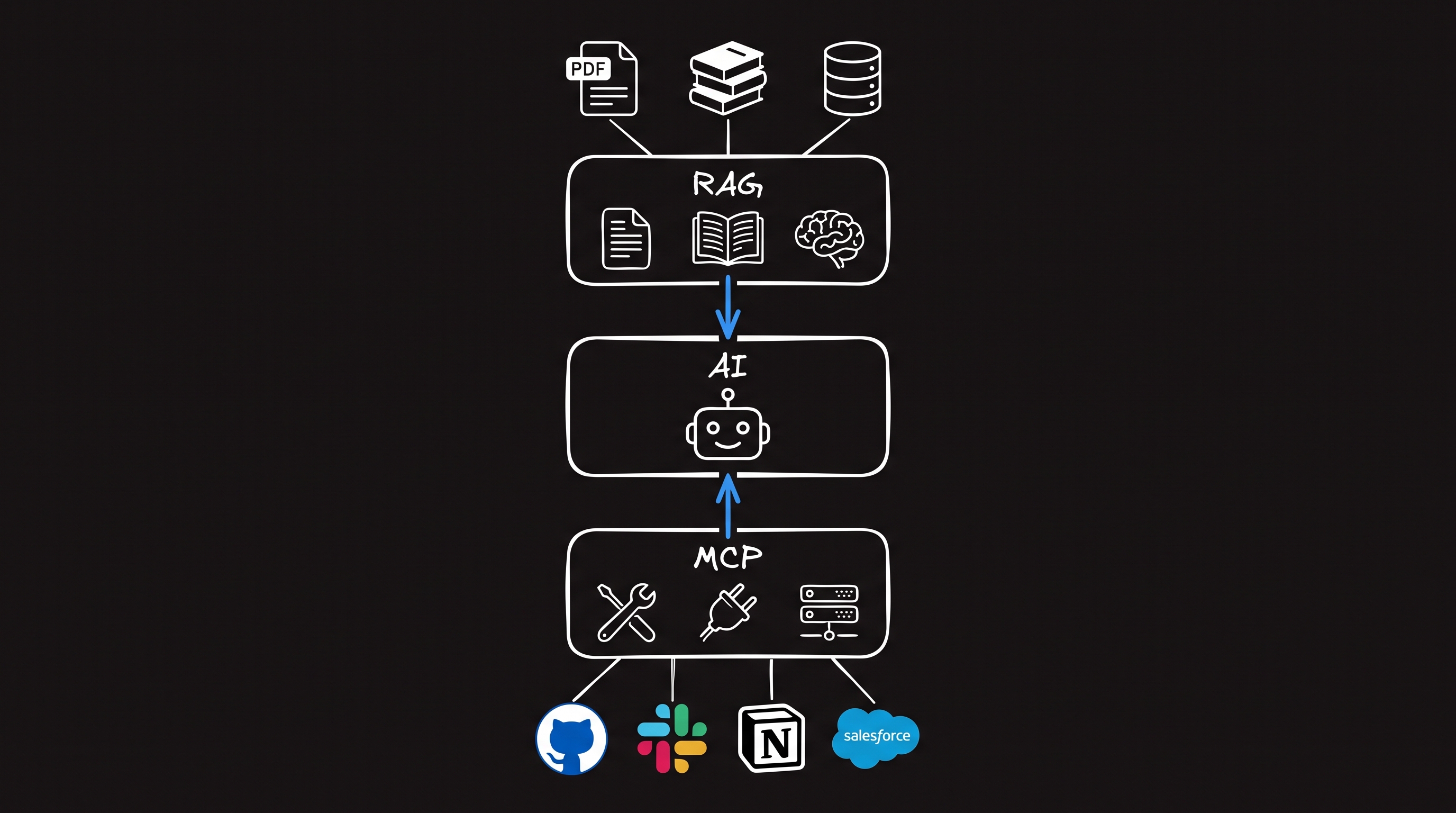
## RAG vs MCP at a glance
| Factor | RAG | MCP |
| ------------------ | --------------------------------------------- | ------------------------------------------------ |
| Type | AI application pattern | Communication protocol |
| Primary purpose | Retrieve relevant knowledge for generation | Connect AI applications to external capabilities |
| Typical data | Documents, chunks, embeddings, search results | Tools, resources, prompts, and protocol messages |
| Common backend | Search index or vector database | API, service, database, file system, or workflow |
| Can perform writes | Not usually part of retrieval itself | Tools can expose read or write operations |
| Requires MCP | No | No |
| Can work together | Yes | Yes |
## What RAG does
A RAG pipeline usually:
1. Receives a user question.
2. Converts the question into a search query or embedding.
3. Retrieves relevant passages.
4. Adds those passages to the model context.
5. Generates an answer grounded in the retrieved information.
RAG is useful for:
* Documentation search
* Knowledge assistants
* Policy questions
* Support content
* Research over private documents
* Information that changes after model training
The retrieval system must still manage relevance, freshness, permissions, and citations.
## What MCP does
MCP standardizes communication between an AI host and external servers.
An MCP server can expose:
* [Tools](/learn/core-concepts/tools)
* [Resources](/learn/core-concepts/resources)
* [Prompts](/learn/core-concepts/prompts)
MCP is useful for:
* Calling live APIs
* Reading structured data
* Triggering workflows
* Updating external systems
* Connecting reusable capabilities to compatible clients
MCP does not define how to create embeddings, rank documents, or generate an answer.
## The most important difference
RAG is a retrieval design. MCP is an integration interface.
A system can implement RAG without MCP:
```text theme={null}
User question -> Application retriever -> Vector database -> Model
```
A system can use MCP without RAG:
```text theme={null}
User request -> MCP tool -> Billing API -> Result
```
A system can also expose its RAG pipeline through MCP:
```text theme={null}
AI host -> MCP search tool -> RAG service -> Relevant passages
```
## When to use RAG alone
Use RAG without MCP when:
* One application owns the entire retrieval pipeline
* The main task is answering questions from documents
* You do not need to share the retriever across MCP clients
* The application does not need external actions
Example: an internal support bot that searches a fixed knowledge base and returns cited answers.
## When to use MCP alone
Use MCP without RAG when:
* The AI application needs structured API data
* The main task is taking actions
* The source system already supports precise queries
* Document similarity search adds no value
Example: an assistant that checks an order through an API and requests a delivery-address update.
## When to combine RAG and MCP
Use both when the AI application needs retrieved knowledge and external actions.
### Pattern 1: Expose retrieval through MCP
Create an MCP tool such as `search_knowledge_base`.
The tool accepts a query and returns relevant passages with source metadata. Any compatible client can use the same retrieval service.
### Pattern 2: Retrieve, then act
The application retrieves policies or instructions before calling an action tool.
```text theme={null}
Question
-> Retrieve refund policy
-> Determine allowed action
-> Call refund tool
-> Return result with evidence
```
Do not rely on model reasoning alone for hard business rules. The underlying API must still validate the action.
### Pattern 3: Act, then retrieve context
The application may first fetch a structured record, then retrieve related documents.
Example:
1. Use an MCP tool to retrieve a support case.
2. Use RAG to find relevant troubleshooting articles.
3. Draft a response grounded in both sources.
### Pattern 4: Use MCP resources for curated context
An MCP server can expose reference content as resources. This may be sufficient for small, known documents.
For large corpora requiring semantic search and ranking, a dedicated RAG pipeline is usually more appropriate.
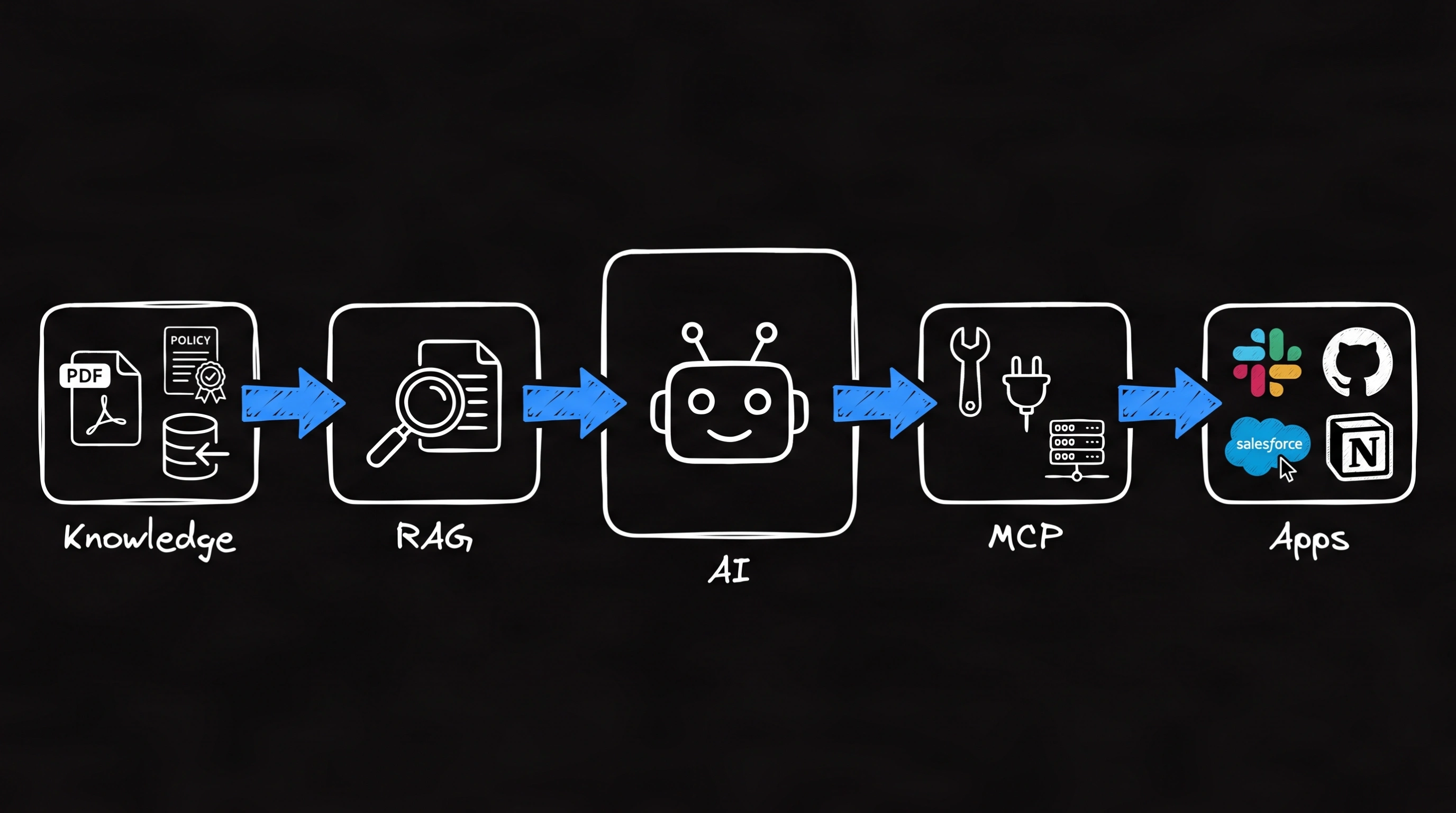
## Security and permissions
Both systems need access control.
For RAG:
* Filter retrieval by user permissions
* Prevent cross-tenant search results
* Preserve source metadata
* Remove sensitive content from logs
For MCP:
* Authenticate clients and users
* Scope tools and data
* Require approval for sensitive actions
* Validate every operation in the source system
Combining them must not weaken either boundary. Retrieved text should be treated as untrusted input because it may contain prompt-injection instructions.
## Avoid common design mistakes
### Treating MCP as a vector database
MCP can connect to a vector database, but it is not one.
### Treating RAG as an action framework
Retrieval supplies information. It does not define safe execution of external actions.
### Exposing raw retrieval without sources
Return document identifiers, URLs, timestamps, or other provenance when possible.
### Letting retrieved text authorize actions
Authorization must come from trusted application policy and source-system permissions, not retrieved instructions.
## Decision guide
* Need answers from a document collection? Use RAG.
* Need a reusable connection to external capabilities? Use MCP.
* Need live actions based on retrieved knowledge? Use both.
* Need simple curated context? Consider MCP resources before building a full RAG pipeline.
## Key takeaway
**RAG retrieves relevant knowledge. MCP connects AI applications to external capabilities. Combine them when an assistant must understand information and then use real systems safely.**
# Remote MCP servers
Source: https://docs.0mcp.io/learn/fundamentals/remote-mcp-servers
Learn what a remote MCP server is, when to use one, how clients connect, and what production security and operations require.
A **remote [MCP server](https://modelcontextprotocol.io/specification)** is an MCP server that runs on network-accessible infrastructure instead of the user's device. Authorized clients connect to it over HTTP, usually through a secure HTTPS endpoint.
Remote servers are well suited to shared APIs, SaaS products, team workflows, and production integrations.
```text theme={null}
MCP client -> HTTPS -> Remote MCP server -> API or service
```
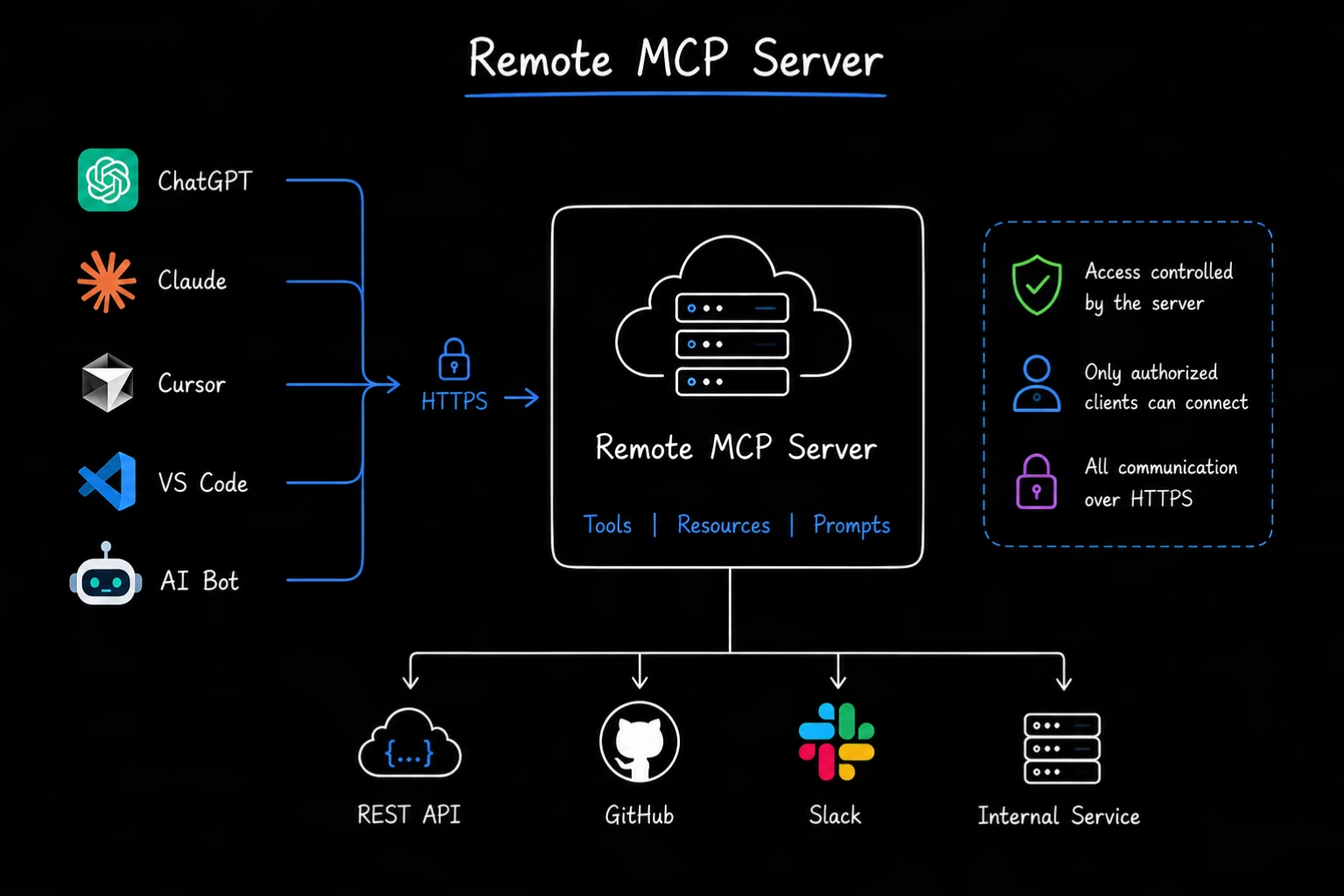
## What makes an MCP server remote?
The server runs outside the client environment and remains available independently of one user's computer.
It may run on:
* A virtual machine
* A container platform
* Kubernetes
* A serverless platform
* An edge runtime
* A managed MCP hosting service
The defining property is network access. The client reaches a URL rather than starting a local server process.
## How remote MCP connections work
Modern remote MCP servers commonly use Streamable HTTP.
The client sends MCP messages through HTTP requests. The server may return a complete response or stream supported messages. The server can maintain an MCP session when its implementation requires one.
Remote deployment does not change the core protocol concepts. Clients still initialize, negotiate capabilities, discover features, and send JSON-RPC requests.
Read [How MCP works](/learn/fundamentals/how-mcp-works) for the full session sequence.
## When to use a remote MCP server
Choose a remote server when:
* Several users or applications need the same capabilities
* The underlying system is already an internet-accessible API
* You need centralized updates and configuration
* You need production monitoring and availability
* The workload requires scalable infrastructure
* A SaaS product wants to publish an MCP endpoint
Remote hosting lets every authorized client use the same deployed version. Teams do not need to install and update the server separately on every device.
## Benefits of remote MCP servers
### Shared access
One deployment can serve multiple authorized users and clients.
### Centralized maintenance
You can update tools, fix bugs, rotate credentials, and apply policies in one place.
### Production operations
Hosted infrastructure can support logging, metrics, alerts, rate limits, load balancing, and regional deployment.
### API proximity
A remote MCP server can run near its upstream API or data services, reducing internal network hops and keeping service credentials on controlled infrastructure.
## Remote server responsibilities
A production remote server needs more than protocol support.
Plan for:
* HTTPS
* Authentication and authorization
* Secure token handling
* Tenant isolation
* Input validation
* Rate limiting
* Request timeouts
* Structured logs and metrics
* Health checks
* Version management
* Safe error responses
MCP does not replace these web-service responsibilities.
## Authentication and authorization
A remote server must identify callers and decide which capabilities they may use.
Use the authentication model supported by your clients and deployment. OAuth-based authorization is common for user-facing remote servers. Service-to-service environments may use scoped tokens or other established credentials.
The server should apply least privilege. A user who can read orders should not automatically receive access to refund tools.
If your MCP server wraps an API, the upstream API should continue enforcing its own authorization rules. Review the [0mcp authentication model](/concepts/authentication-model) for API-backed servers.
## Stateless and stateful deployment
Some MCP interactions use session state. If you run more than one server replica, decide where that state lives.
Common approaches include:
* Keep state in a shared store
* Route a session consistently to one replica
* Design operations to minimize server-side session state
Do not assume that adding replicas automatically creates a reliable deployment. Test reconnection, timeouts, server restarts, and partial failures.
## Scaling a remote MCP server
AI applications may call tools in bursts or chains. Protect the server and upstream systems with:
* Concurrency limits
* Per-user and per-tool rate limits
* Bounded response sizes
* Pagination
* Caching for safe read operations
* Queues for long-running work
* Idempotency for retryable write operations
Monitor the upstream API separately from the MCP layer. A healthy MCP endpoint can still return failures if its dependency is unavailable.
## Remote MCP with 0mcp
[0mcp](https://0mcp.io) turns an existing API definition into a hosted remote MCP server.
You can import an [OpenAPI specification](/api-sources/openapi), select operations, publish an MCP endpoint, and monitor it with [logs](/guides/logs) and [analytics](/guides/analytics).
This keeps the protocol and hosting layer separate from your existing API.
## Remote vs local
A remote server is not always the right choice. Local servers can access device resources directly and may be simpler for personal workflows or development.
Use [Local vs remote MCP](/learn/fundamentals/local-vs-remote-mcp) to choose based on access, privacy, maintenance, and scale.
## Key takeaway
**A remote MCP server provides centrally hosted capabilities through a network endpoint, making it the natural model for shared and production AI integrations.**
# How to use Claude with MCP
Source: https://docs.0mcp.io/learn/fundamentals/using-claude-with-mcp
Connect Claude to local and remote MCP servers through connectors, desktop extensions, Claude Desktop configuration, or Claude Code.
Claude can use [MCP](https://modelcontextprotocol.io/) servers through several surfaces. The right setup depends on whether the server is remote or local and whether you use Claude on the web, Claude Desktop, or Claude Code.
| Claude surface | Remote MCP | Local MCP |
| --------------------- | ---------------- | ---------------------------------------- |
| Claude web and mobile | Custom connector | Not available directly |
| Claude Desktop | Custom connector | Desktop extension or local configuration |
| Claude Code | HTTP server | `stdio` server |
Availability and organization controls can vary by plan. Check the current [Anthropic MCP documentation](https://docs.anthropic.com/en/docs/mcp) before a production rollout.
> \[Image placeholder: Screenshot showing where MCP connectors appear in Claude's Customize and Connectors settings]
## Before connecting a server
Confirm:
* The server comes from a trusted provider
* You understand its tools and data access
* The URL or startup command is correct
* Authentication uses appropriate scopes
* Destructive actions require clear review
Connecting an MCP server can allow Claude to read or change data through your account.
## Connect a remote MCP server to Claude
Remote MCP servers appear as custom connectors in Claude.
For an individual account:
1. Open **Customize**.
2. Select **Connectors**.
3. Click the add button.
4. Select **Add custom connector**.
5. Enter the connector name and remote MCP URL.
6. Add OAuth client settings if the provider requires them.
7. Complete authentication.
Enable the connector for a conversation from the connector controls in the chat interface.
For Team or Enterprise accounts, an owner may need to add the connector at the organization level before members can authenticate.
Claude reaches a remote custom connector from Anthropic's cloud infrastructure. The server must meet Anthropic's current network requirements.
## Connect a local server with a desktop extension
Claude Desktop supports installable local extensions.
To install one from the directory:
1. Open **Settings** in Claude Desktop.
2. Select **Extensions**.
3. Browse available extensions.
4. Review the requested capabilities.
5. Click **Install**.
6. Configure required credentials or paths.
Organizations can control which extensions members may install.
> \[Image placeholder: Screenshot of Claude Desktop Settings showing the Extensions directory and an MCP extension installation]
## Connect a local developer server manually
Developers may use Claude Desktop's local MCP configuration for a server process.
The traditional configuration file is named `claude_desktop_config.json`. Common locations are:
* macOS: `~/Library/Application Support/Claude/claude_desktop_config.json`
* Windows: `%APPDATA%\Claude\claude_desktop_config.json`
A conceptual local configuration looks like this:
```json theme={null}
{
"mcpServers": {
"example": {
"command": "node",
"args": ["C:/path/to/server.js"]
}
}
}
```
Restart Claude Desktop after changing the file. Use the developer settings and logs to check the connection.
Do not paste secrets directly into a file that may be shared or committed.
## Connect Claude Code to a remote server
Use the Claude Code CLI:
```bash theme={null}
claude mcp add --transport http example https://mcp.example.com/mcp
```
Then verify the configuration:
```bash theme={null}
claude mcp list
claude mcp get example
```
Inside Claude Code, open the MCP panel:
```text theme={null}
/mcp
```
If the server uses OAuth, the panel can guide you through authentication.
## Connect Claude Code to a local server
Use `stdio` and place options before the server name:
```bash theme={null}
claude mcp add --transport stdio example -- node path/to/server.js
```
You can pass required environment variables with `--env`, but avoid placing long-lived secrets in shell history.
For team-shared configuration, Claude Code supports project-scoped MCP settings. Review and approve project-provided servers before running them.
## Test the connection
After connecting:
1. Confirm the server reports as connected.
2. Review the available tools.
3. Start with a read-only request.
4. Check whether Claude selects the correct tool.
5. Review the input before approving an action.
6. Confirm the result against the source system.
Example:
> List the available projects, but do not modify anything.
This tests discovery and read access without starting with a destructive operation.
## Troubleshoot common problems
### The server does not connect
* Verify the URL or command
* Confirm the server is running
* Check runtime dependencies
* Review Claude's MCP logs
* Confirm the selected transport
### Authentication fails
* Reconnect the connector
* Check token scopes
* Confirm OAuth metadata
* Verify organization policies
* Make sure the remote server is reachable from Anthropic's infrastructure
### Tools do not appear
* Confirm initialization succeeds
* Check that the server declares tool support
* Inspect the tool list with [MCP Inspector](/learn/fundamentals/mcp-inspector-guide)
* Restart the local client after configuration changes
### Claude chooses the wrong tool
Improve tool names, descriptions, and input schemas. Keep capabilities focused and avoid exposing duplicate operations with ambiguous descriptions.
## Connect Claude to a 0mcp server
[0mcp](https://0mcp.io) provides a hosted MCP URL for an API. Add that URL as a remote connector or HTTP server, then authenticate according to the API's configuration.
Start by importing your [OpenAPI specification](/api-sources/openapi), or follow the [quick start](/get-started/quick-start).
## Security checklist
* Connect only to trusted servers
* Review requested permissions
* Prefer read-only scopes at first
* Keep tokens out of source control
* Revoke unused connectors
* Require confirmation for writes
* Audit sensitive tool calls
# What is MCP?
Source: https://docs.0mcp.io/learn/fundamentals/what-is-mcp
Learn what the Model Context Protocol (MCP) is, what the name means, and how it connects AI applications to external data, tools, and workflows.
The **[Model Context Protocol](https://modelcontextprotocol.io/) (MCP)** is an open standard for connecting AI applications to external systems.
It gives AI applications a consistent way to access data, use [tools](/learn/core-concepts/tools), and work with reusable instructions. These external capabilities can come from APIs, databases, files, SaaS products, developer tools, or internal business systems.
In plain English, MCP is a shared connection language for AI applications.
```text theme={null}
AI application <-> MCP <-> External system
```
You can think of MCP as a universal connector. The same type of connection can work across different AI applications and external services, as long as both support the protocol.
![Model Context Protocol diagram showing an AI application connecting to external data, tools, and workflows]() ## What does MCP stand for?
MCP stands for **Model Context Protocol**:
* **Model** refers to the AI model or AI-powered application that needs outside information or capabilities.
* **Context** means the data, tools, and instructions that help the AI understand a request and respond usefully.
* **Protocol** is an agreed set of rules that lets different software systems communicate.
Together, these words describe a standard way to give AI applications access to useful context beyond what the model already knows.
## What does MCP connect?
MCP connects an AI application to an external system through an MCP-compatible interface.
The AI application might be:
* An AI assistant
* A coding assistant
* An autonomous agent
* An internal company chatbot
* An AI feature inside a SaaS product
The external system might be:
* An API
* A database
* A file system
* A source code repository
* A CRM or support platform
* A search service
* An internal business application
MCP does not turn these systems into AI models. It makes their approved information and capabilities available to AI applications in a standard format.
## What can an MCP server provide?
An MCP server can expose three common types of capabilities:
| Capability | What it provides | Simple example |
| ------------- | ------------------------------------------ | -------------------------- |
| **Tools** | Actions an AI application can request | Create a support ticket |
| **Resources** | Data or content an AI application can read | Retrieve a product policy |
| **Prompts** | Reusable instruction templates | Prepare a customer summary |
These capabilities describe what an external system makes available through MCP. The system owner controls which data and actions the server exposes.
## A simple MCP example
Imagine an AI assistant that needs current order information.
The order data lives in an e-commerce API, not inside the AI model. An MCP server can expose an approved capability for retrieving an order. The assistant can then use that capability when a user asks:
> Where is order 1042?
The AI assistant still handles the conversation. The external system remains the source of the order data. MCP provides the standard connection between them.
## Is MCP the same as an API?
No. MCP and APIs are related, but they are not the same.
An API defines how software interacts with a particular service. MCP defines a standard interface that AI applications can use to discover and access external capabilities.
An MCP server often sits in front of an existing API:
```text theme={null}
AI application <-> MCP server <-> API
```
The API continues to handle the underlying business data and operations. The MCP server presents selected capabilities in a format designed for MCP-compatible AI applications.
## What MCP is not
MCP is not:
* An AI model
* A replacement for an API
* A database or knowledge base
* A guarantee that an AI application can access every connected system
* A permission to bypass authentication or security controls
MCP is the communication standard between compatible AI applications and external capabilities. Access still depends on the server configuration, authentication, permissions, and user approval.
## MCP in one sentence
**MCP is an open standard that lets AI applications connect to external data, tools, and workflows through a consistent interface.**
# Why MCP matters?
Source: https://docs.0mcp.io/learn/fundamentals/why-mcp-matters
Understand why the Model Context Protocol matters for AI builders, API providers, product teams, and people who use AI applications.
The **[Model Context Protocol](https://modelcontextprotocol.io/) (MCP)** matters because it gives AI applications a shared way to connect to external data, tools, and workflows.
Before MCP, each AI application needed a custom integration for every external system. MCP replaces much of that repeated connector work with a common protocol.
```text theme={null}
Without a shared protocol: many clients x many custom integrations
With MCP: compatible clients x one standard interface
```
If MCP is new to you, start with [What is MCP?](/learn/fundamentals/what-is-mcp).
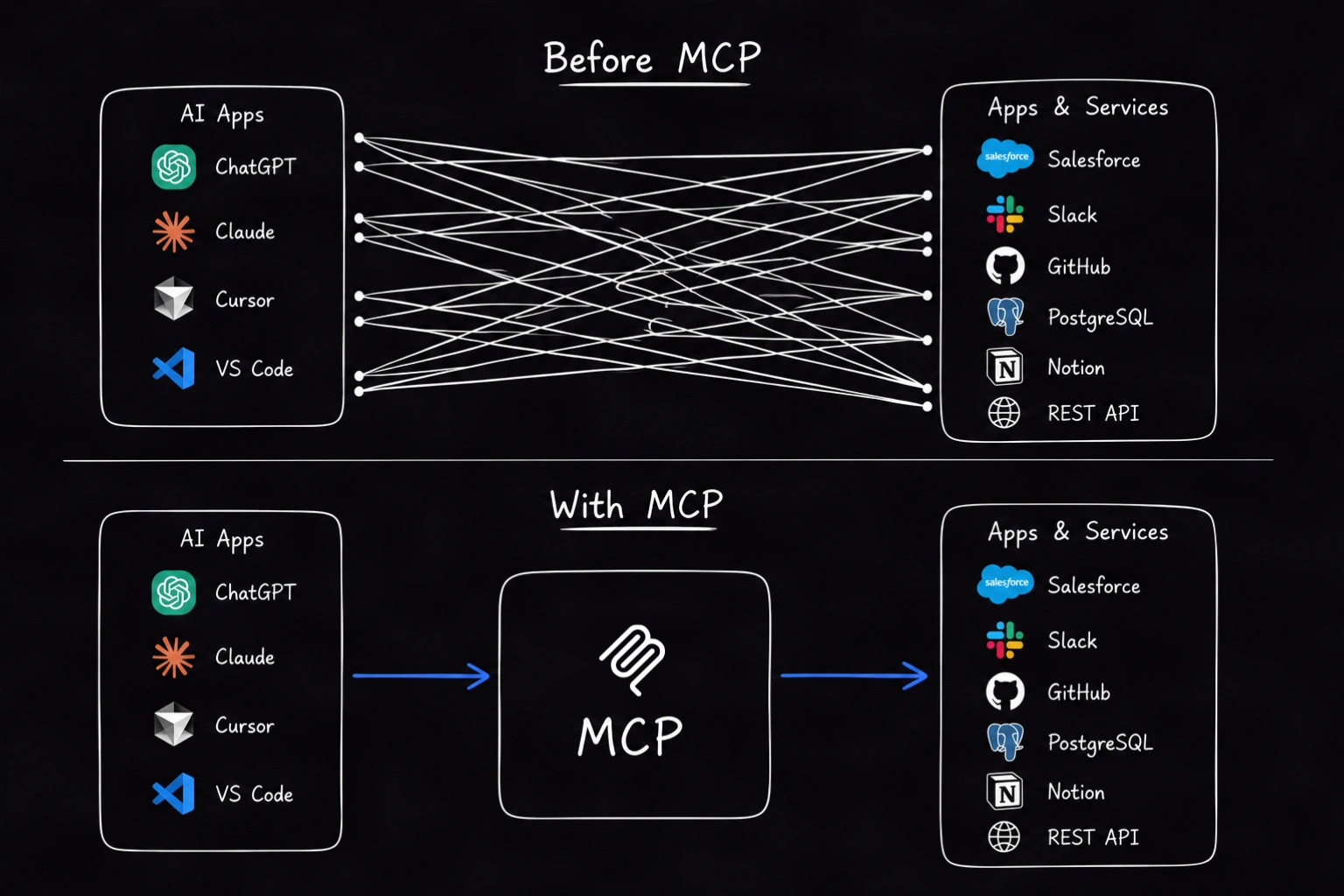
## MCP reduces integration fragmentation
AI applications become more useful when they can work with current information and real systems. They may need to read a file, search a database, inspect an account, or call an API.
Custom integrations make this possible, but they create repeated work. Every integration may need its own connection logic, capability definitions, authentication flow, error handling, and maintenance plan.
MCP standardizes the interface between compatible AI applications and external systems. A server can describe its capabilities once. Compatible clients can then discover and use those capabilities through the same protocol.
This does not eliminate all integration work. You still need to design safe tools, configure authentication, and maintain the underlying system. It does reduce the amount of client-specific plumbing.
## Why MCP matters for AI builders
MCP gives AI builders a reusable integration layer.
Instead of writing a different connector for each application, you can connect to MCP servers that expose well-defined [tools](/learn/core-concepts/tools), [resources](/learn/core-concepts/resources), and [prompts](/learn/core-concepts/prompts).
This helps builders:
* Add capabilities without embedding every integration in the application
* Separate AI orchestration from business logic
* Reuse servers across compatible clients
* Test protocol behavior independently from the model
* Add or remove integrations without redesigning the entire application
The result is a more modular AI system. The host manages the user experience and model interaction. Each MCP server remains focused on a specific system or responsibility.
## Why MCP matters for API providers
APIs were designed primarily for developers writing deterministic software. AI applications are different consumers. They need clear capability descriptions, structured inputs, predictable outputs, and enough context to choose the right operation.
An MCP server gives an API provider an AI-facing interface. Selected API operations can become tools that compatible AI clients can discover and call.
For an API-first company, this creates another distribution channel:
```text theme={null}
Existing API -> MCP server -> Compatible AI applications
```
You do not need to replace the API. The API continues to own its data, business rules, authentication, and authorization.
With [0mcp](https://0mcp.io), you can turn an [OpenAPI specification](/api-sources/openapi) into a hosted MCP server while keeping your API unchanged.
## Why MCP matters for product teams
MCP lets product teams add useful AI capabilities without coupling every workflow to one model vendor or client.
A support product might expose tools for retrieving a customer, creating a ticket, and updating a case. A project platform might expose tasks, comments, and status changes. A commerce platform might expose products, orders, and refunds.
Clear protocol boundaries make these capabilities easier to govern. Teams can decide:
* Which operations an AI application may discover
* Which actions require user approval
* Which credentials and scopes are required
* What information a tool returns
* How calls are logged and monitored
MCP provides the connection standard. Your product still defines the permissions and business rules.
## Why MCP matters for users
MCP can make AI applications more relevant to a user's actual work.
With approved connections, an assistant can use current information instead of relying only on model training or pasted context. It can also request actions in connected systems.
Examples include:
* Finding the status of an order
* Reading a project document
* Creating a support ticket
* Checking a calendar
* Updating a CRM record
The user benefit depends on safe implementation. A useful MCP integration should make access visible, request approval for sensitive actions, and follow least-privilege permissions.
## The larger impact of a shared standard
Standards become valuable when independent products can implement the same interface.
MCP allows clients, servers, tools, and developer libraries to evolve around a common protocol. A growing ecosystem can give builders more reusable integrations and give service providers access to more AI surfaces.
Compatibility is not automatic. Clients may support different MCP features or protocol versions. Server developers should test their implementation against the clients they plan to support.
## Key takeaway
**MCP matters because it reduces repeated integration work and gives AI applications a consistent, governable way to use external systems.**
# API key management best practices for MCP servers
Source: https://docs.0mcp.io/learn/security/api-key-management
Store, scope, rotate, monitor, and revoke API keys safely without exposing credentials to models, logs, source code, or client configuration.
**API key management** covers the complete lifecycle of an API key: creation, storage, distribution, use, monitoring, rotation, revocation, and deletion.
An MCP server may use API keys to authenticate to an upstream service or, in some private deployments, to identify callers. Because API keys are bearer secrets, anyone who obtains a valid key can usually use it. Apply the official [MCP security best practices](https://modelcontextprotocol.io/docs/tutorials/security/security_best_practices) at every credential boundary.
Do not rely only on static API keys to protect sensitive, critical, or high-value public capabilities. Prefer short-lived, scoped OAuth access tokens or workload identity when available.
## Identify what each key protects
Do not treat every secret as the same credential.
| Credential | Intended recipient | Purpose |
| ------------------ | ---------------------- | ---------------------------------------------- |
| MCP access token | MCP server | Authorize access to the protected MCP resource |
| Upstream API key | External API | Authenticate requests made to that API |
| AI provider key | Model provider | Pay for and authorize model requests |
| Service credential | Infrastructure service | Authenticate the server workload |
Never forward a credential to a service for which it was not issued.
## Prefer stronger credential options
Choose the strongest option the upstream system supports:
1. Workload identity or managed service identity
2. Short-lived, scoped OAuth token
3. Short-lived generated credential
4. Rotatable static API key
Static keys are sometimes unavoidable. Limit their scope and lifetime as much as the provider allows.
## Generate strong keys
If you issue API keys:
* Use a cryptographically secure random generator.
* Generate enough entropy to resist guessing.
* Add a non-secret prefix that identifies the environment or key type.
* Show the full secret only once.
* Store only a secure hash when the server needs to verify, but not reuse, the key.
* Give each key a unique identifier for rotation and audit.
Do not build keys from usernames, timestamps, sequential IDs, or other predictable values.
## Store keys safely
### Production
Prefer:
* A cloud secret manager
* A dedicated vault
* A hardware-backed key service
* Workload identity that avoids stored keys
Grant the server permission to retrieve only the secrets it needs.
### Local development
Environment variables or a client credential store can be acceptable when access is restricted.
Do not commit `.env` files. Keep them out of logs, crash reports, shell history, and shared screenshots.
### Avoid
* Source code
* Git history
* Container images
* Public client configuration
* Database rows in plaintext
* Tool descriptions or prompt templates
* Command-line arguments visible to other processes
* URLs and query strings
## Scope keys narrowly
Use a separate key for each:
* Environment
* Application or MCP server
* External provider
* Team or workload when practical
* Permission level
Do not reuse a production key in development or staging.
If the provider supports restrictions, limit:
* Allowed operations
* Resources or accounts
* Source networks
* Domains or applications
* Usage volume
* Expiration date
## Keep keys away from the model
The model should not need to see an API key.
The MCP server or host should attach credentials after the model creates a structured tool request.
```text theme={null}
Model creates tool arguments
|
v
Server validates request
|
Server adds API key internally
|
v
Upstream API
```
Never return a key in tool output, resource content, an error message, or a sampling request.
## Rotate API keys safely
A safe rotation avoids downtime:
1. Create a new key.
2. Store it in the secret manager.
3. Allow the application to accept or use both keys temporarily.
4. Deploy the new configuration.
5. Verify successful traffic with the new key.
6. Revoke the old key.
7. Remove the old value from all stores.
8. Record the rotation event.
Rotate immediately after suspected exposure, employee or vendor access changes, or a compromise of the system that stored the key.
Scheduled rotation can reduce long-lived exposure, but automation and tested revocation matter more than changing a secret without verifying the rollout.
## Monitor key usage
Track:
* Key identifier, never the full key
* Timestamp
* Calling service
* Target API or operation
* Success or failure
* Source network when appropriate
* Rate and volume anomalies
Alert on:
* Use from an unexpected environment
* Sudden traffic spikes
* Repeated authorization failures
* Access to unusual endpoints
* Use of a retired key
* Changes to secret-manager permissions
Make logs useful for investigation without recording the credential.
## Redact secrets from logs
Redact:
* `Authorization` headers
* API-key headers
* Cookies
* Query parameters that may contain credentials
* Environment dumps
* Request and response payload fields marked as secrets
Use allowlisted logging fields instead of recording complete headers or objects and trying to remove secrets afterward.
0mcp activity logs are designed not to store authorization headers, bearer tokens, API keys, request bodies, or response bodies. Read [Logs](/guides/logs) for details.
## Respond to a leaked key
If a key may be exposed:
1. Revoke or disable it immediately.
2. Issue a replacement with minimum scope.
3. Search source control, CI logs, chat, tickets, and telemetry for exposure.
4. Review usage records for unauthorized activity.
5. Rotate related credentials if the affected system was compromised.
6. Remove cached copies and update deployments.
7. Document the incident and preventive changes.
Do not wait for proof of misuse before revoking a leaked key.
## Incoming API keys
If your MCP server accepts API keys from callers:
* Transmit them only over HTTPS.
* Require a header, not a query parameter.
* Store a keyed hash rather than plaintext when possible.
* Compare values using constant-time logic.
* Associate each key with an owner and policy.
* Support expiration and revocation.
* Apply per-key rate limits.
* Avoid exposing whether a specific key identifier exists.
For public remote MCP servers, use the standard [MCP authorization](/learn/security/authorization) flow when possible.
## Upstream API keys in 0mcp
[0mcp](https://0mcp.io) can forward an API key that the MCP client provides for your upstream API. The key is placed according to the authentication configuration for the selected source:
* An OpenAPI 3.x or Swagger 2.0 security scheme
* A directly configured REST API
* A GraphQL API
Use the secure gateway header when an upstream API requires a query key. Do not place the key directly in the MCP endpoint URL.
Read the [0mcp authentication model](/concepts/authentication-model) and [authentication troubleshooting](/troubleshooting/authentication-errors).
## API key checklist
* [ ] Every key has one documented purpose
* [ ] Production keys use a secret manager or workload identity
* [ ] Keys are separate by environment and service
* [ ] Permissions follow least privilege
* [ ] Keys never enter model context
* [ ] Logs redact credentials
* [ ] Rotation is automated and tested
* [ ] Revocation is immediate and documented
* [ ] Usage is monitored by key identifier
* [ ] Leak response has been rehearsed
## Key takeaway
**A well-managed API key is narrowly scoped, securely stored, invisible to the model, monitored by identifier, easy to rotate, and immediately revocable.**
# MCP authentication
Source: https://docs.0mcp.io/learn/security/authentication
Understand identity and credential verification in MCP, including remote OAuth access, local server credentials, and upstream API authentication.
**Authentication** verifies the identity associated with a request. In an MCP system, identity may need to be verified at more than one boundary.
```text theme={null}
User or client -> MCP server -> Upstream API
identity access separate credential
```
Authentication answers **“Who is making this request?”** Authorization answers **“What may that identity do?”**
## Authentication and authorization are different
| Authentication | Authorization |
| ------------------------------------------------------ | ---------------------------------------------------- |
| Establishes identity | Grants or denies permission |
| May involve login, certificates, or signed credentials | Uses scopes, roles, ownership, and policy |
| Usually occurs before protected access | Must be checked for every protected operation |
| A valid credential can succeed | A valid credential can still receive `403 Forbidden` |
MCP's standard for protected HTTP servers is formally an **[authorization](https://modelcontextprotocol.io/specification)** specification built on OAuth conventions. User authentication usually happens at the authorization server and may use passwords, passkeys, enterprise identity, or OpenID Connect.
## Three credential boundaries
### User to authorization server
The authorization server authenticates the user and obtains consent. The exact login method is outside the MCP specification.
### MCP client to MCP server
For a protected remote server, the client sends an access token:
```http theme={null}
Authorization: Bearer ACCESS_TOKEN
```
The MCP server validates the token before serving protected requests.
### MCP server to upstream API
An MCP server may need a separate credential for the external API it wraps.
That credential may be:
* A user-specific OAuth token
* A service-account token
* An API key
* A credential obtained through token exchange
The upstream credential must be intended for the upstream system. Do not forward an MCP access token to another API unchanged.
## Remote MCP server authentication
For HTTP-based transports, the current MCP specification defines an OAuth-based access flow.
The main roles are:
| Role | Responsibility |
| -------------------- | ----------------------------------------------- |
| Resource owner | Grants access, often the user |
| MCP client | Requests authorization and calls the server |
| Authorization server | Authenticates the user and issues access tokens |
| MCP server | Acts as the protected resource server |
The authorization server can be operated by the same organization as the MCP server or by a separate identity provider.
## What the MCP server validates
For each protected request, validate:
* The token signature or introspection result
* The trusted issuer
* The intended audience or resource
* Expiration and not-before times
* Required scopes or claims
* Revocation status when supported
* The token type and allowed algorithm
Reject a token issued for another service, even if its signature is valid.
Decoding a JWT is not validation. Verify its signature, issuer, audience, time claims, and authorization data with trusted configuration.
## Local MCP server credentials
The MCP OAuth authorization flow is intended for HTTP-based transports. A local `stdio` server normally obtains credentials through its environment or a secure local credential mechanism.
For local servers:
* Pass only required environment variables.
* Use the client's secure credential store when available.
* Keep secrets out of shared configuration files.
* Restrict configuration file permissions.
* Do not print credentials to `stdout` or `stderr`.
* Treat the local server package as code running with the user's privileges.
## Authentication for API-backed MCP servers
An API-backed server needs a deliberate upstream credential model.
### User credential forwarding
The client supplies a credential issued for the upstream API. The MCP layer forwards it to that API.
This preserves upstream identity and permissions, but the credential must remain confidential and must not appear in model-visible content or logs.
### Service credential
The MCP server uses its own service identity.
This simplifies upstream access but requires the MCP server to enforce user-level authorization. Every action may otherwise appear to originate from one highly privileged account.
### OAuth delegation or token exchange
The system obtains an upstream token with a specific audience and limited scope.
This is appropriate when the MCP server must act on behalf of a user without reusing the MCP token.
## How 0mcp handles upstream credentials
[0mcp](https://0mcp.io) uses a pass-through model for credentials explicitly provided for your upstream API.
It can forward bearer tokens or API keys according to your configured API source:
* The published security scheme for OpenAPI 3.x or Swagger 2.0
* The authentication configuration for a directly connected REST API
* The authentication configuration for a GraphQL API
All three source types use the same credential-forwarding model. Your API remains responsible for validating the credential and authorizing the request.
This upstream credential is conceptually separate from any access token used to protect the MCP endpoint itself.
Read the [0mcp authentication model](/concepts/authentication-model) for supported forwarding patterns.
## Common authentication failures
| Result | Typical cause |
| ----------------------------------------- | ------------------------------------------------------------------ |
| `401 Unauthorized` | Missing, malformed, expired, invalid, or wrong-audience credential |
| `403 Forbidden` | Credential is accepted but lacks permission |
| Repeated browser login | Redirect URI, client registration, cookies, or token storage issue |
| Token works at API but not MCP server | Token was issued for the upstream API, not the MCP resource |
| MCP call works but upstream returns `401` | Missing or invalid upstream credential |
See [Authentication errors](/troubleshooting/authentication-errors) for 0mcp troubleshooting.
## Authentication best practices
* Use HTTPS for remote MCP traffic.
* Prefer short-lived, audience-restricted tokens.
* Use PKCE in authorization code flows.
* Never put credentials in URLs.
* Store refresh tokens and long-lived credentials securely.
* Redact credentials from logs and telemetry.
* Rotate credentials after suspected compromise.
* Rate-limit authentication failures.
* Keep MCP and upstream API credentials separate.
* Use multi-factor authentication at the identity provider for sensitive access.
## What authentication does not solve
Authentication does not:
* Decide which tools a user may call
* Limit which records a user may access
* Prevent prompt injection
* Make tool arguments safe
* Replace user confirmation
* Protect a server that ignores token scopes
Apply [MCP authorization](/learn/security/authorization), input validation, and least privilege after identity is established.
## Key takeaway
**MCP authentication establishes the identities and credentials at each boundary, while authorization and server policy decide what those identities can do.**
# MCP authorization
Source: https://docs.0mcp.io/learn/security/authorization
Learn how MCP authorization protects remote servers with OAuth, resource metadata, access tokens, audience validation, scopes, and least privilege.
**[MCP authorization](https://modelcontextprotocol.io/specification)** controls whether a client may access a protected MCP server and which capabilities it may use.
For HTTP-based transports, the MCP authorization specification uses established OAuth standards. The MCP server acts as a resource server, the MCP client acts as an OAuth client, and an authorization server issues access tokens.
```text theme={null}
Resource owner
|
Authorization server -> access token -> MCP client
|
v
Protected MCP server
```
Authorization is optional at the protocol level, but it is strongly recommended when a remote server accesses private data, performs user-specific actions, or needs per-user audit records.
## MCP authorization roles
| Role | What it does |
| -------------------- | ---------------------------------------------------------------- |
| Resource owner | Grants permission to access protected capabilities |
| MCP client | Requests permission and sends the access token |
| Authorization server | Authenticates the user, collects consent, and issues tokens |
| MCP server | Validates tokens and enforces access as an OAuth resource server |
The authorization server and MCP server can be separate services.
## When to use authorization
Use authorization when the server:
* Reads user-specific or confidential information
* Creates, updates, or deletes data
* Exposes administrative or financial operations
* Needs per-user scopes, rate limits, or audit records
* Serves multiple organizations or tenants
* Is available through a remote HTTP endpoint
A public, read-only server may not need user authorization, but it still needs abuse prevention and secure implementation.
## The authorization flow
### 1. The client contacts the MCP server
If the request has no valid token, the protected server responds with `401 Unauthorized` and identifies its protected resource metadata.
### 2. The client discovers protected resource metadata
The metadata describes the MCP resource and the authorization servers that can issue tokens for it.
### 3. The client discovers authorization server metadata
The client retrieves the authorization endpoint, token endpoint, supported registration methods, PKCE methods, and other capabilities from trusted metadata.
### 4. The client is registered
Depending on the authorization server, the client can use:
* A Client ID Metadata Document
* Pre-registration
* Dynamic Client Registration
The client must follow the method supported by that authorization server.
### 5. The user grants access
The client opens the authorization endpoint. The authorization server authenticates the user and asks for consent.
The authorization request includes the MCP server's canonical resource URI. The client uses PKCE to bind the authorization response to the original request.
### 6. The client obtains an access token
The client exchanges the authorization code for a token intended for the MCP server.
### 7. The client calls the MCP server
```http theme={null}
Authorization: Bearer ACCESS_TOKEN
```
The server validates the token and applies its authorization policy before handling the MCP request.
## Token validation requirements
A protected MCP server should validate:
* Signature or token introspection
* Issuer
* Audience or resource indicator
* Expiration and activation time
* Required scopes
* Token type
* Revocation or status when supported
The server must reject tokens that were issued for another resource.
## Token passthrough is prohibited
An MCP server must not accept a token intended for itself and pass that same token to an upstream API.
Token passthrough can:
* Bypass audience validation
* Give the upstream API a token not intended for it
* Hide which service is using the token
* Break least privilege
* Create confused-deputy vulnerabilities
Use a separate upstream credential, OAuth delegation, or token exchange that produces a token for the upstream resource.
## Design scopes around capabilities
Scopes should express the minimum access required.
```text theme={null}
orders:read
orders:write
customers:read
support-tickets:create
```
Avoid one broad scope such as `all` or `admin` for normal use.
Map scopes to server-side policy:
| Capability | Minimum scope |
| ----------------------- | ------------------------ |
| `get_order` | `orders:read` |
| `update_order` | `orders:write` |
| `get_customer` | `customers:read` |
| `create_support_ticket` | `support-tickets:create` |
Scopes are not a replacement for object-level authorization. A user with `orders:read` should still see only orders they are permitted to access.
## Incremental and step-up authorization
Request the smallest initial scope set.
If a later operation needs more permission, the server can return an insufficient-scope challenge. The client can then ask the user to grant the additional scope.
High-risk operations may also require fresh authentication, stronger authentication, or an explicit confirmation even when the token has the required scope.
## Authorization at every layer
Authorization may be required at several boundaries:
1. The MCP server verifies access to the capability.
2. The tool handler verifies the requested object and action.
3. The upstream API enforces its own policy.
4. The host asks the user to confirm sensitive side effects.
Do not rely on the model, tool description, or client UI as the only control.
## Multi-tenant authorization
For multi-tenant servers:
* Derive tenant identity from validated claims, not model arguments.
* Bind every query and mutation to the tenant.
* Prevent users from selecting another tenant through a tool parameter.
* Use tenant-specific rate limits and audit records.
* Test for cross-tenant access.
An object ID alone is not proof that the caller may access that object.
## Common authorization mistakes
* Accepting a token without validating its audience
* Forwarding the MCP token to an upstream API
* Requesting every scope at initial login
* Treating tool annotations as permissions
* Trusting tenant or user IDs supplied by the model
* Checking access only during `[tools](/learn/core-concepts/tools)/list`
* Using one administrator credential for every caller
* Returning sensitive authorization details in errors
* Treating `401` and `403` as interchangeable
## Authorization response guide
| Situation | Response |
| --------------------------------------- | -------------------------------------- |
| Missing or invalid credential | `401 Unauthorized` |
| Valid identity lacks permission | `403 Forbidden` |
| More scope can be requested | Insufficient-scope challenge |
| Target object does not belong to caller | Deny without leaking private existence |
| Sensitive action needs confirmation | Pause and request explicit approval |
## Local `stdio` servers
The MCP OAuth flow is intended for HTTP-based transports. Local `stdio` implementations should use secure environment or local credential mechanisms appropriate to the application.
Local does not mean trusted. The server still needs authorization for files, operating-system actions, and upstream APIs.
## Key takeaway
**MCP authorization uses OAuth resource-server patterns to give remote clients limited, audience-bound access while the MCP server and upstream systems enforce least privilege for every operation.**
# MCP Server Security
Source: https://docs.0mcp.io/learn/security/mcp-server-security
Protect an MCP server from prompt injection, token theft, SSRF, command injection, session hijacking, excessive permissions, and supply-chain attacks.
**[MCP server security](https://modelcontextprotocol.io/docs/tutorials/security/security_best_practices)** is the set of controls that protects an MCP server, its users, connected systems, and credentials from unauthorized access or misuse.
An MCP server sits between an AI application and external capabilities. It must handle traditional API risks plus AI-specific risks such as prompt injection, unsafe tool selection, and untrusted model output.
```text theme={null}
User -> AI host -> MCP client -> MCP server -> External API or system
| |
untrusted security
content boundary
```
Security must be enforced by code and policy. A model's decision to call a tool is never proof that the operation is safe or authorized.
## Start with a threat model
Identify:
* Who can connect to the server
* Which tools, resources, and prompts are exposed
* Which data crosses each trust boundary
* Which credentials the server can access
* Which operations create side effects
* Which systems the server can reach over the network
* What happens if the client, server, model, or upstream system is compromised
Classify each capability by impact:
| Risk level | Example | Expected controls |
| ---------- | -------------------------------- | --------------------------------------------------------------------- |
| Low | Read public documentation | Input limits and safe output handling |
| Medium | Read a user's private records | Authentication, authorization, audit logging |
| High | Send messages or change records | Least privilege, confirmation, idempotency controls |
| Critical | Payments, deletion, admin access | Strong approval, step-up authorization, strict policy, detailed audit |
## Main MCP security risks
### Prompt injection
Instructions hidden in user input, documents, web pages, or tool results can manipulate the model into calling a tool or disclosing data.
Treat all external content as untrusted. Do not let retrieved text override authorization policy. Require user confirmation for sensitive actions and validate the final tool arguments independently of the conversation.
### Tool poisoning
A malicious or compromised server can publish deceptive tool names or descriptions. A trusted server can also change behavior after a user approves it.
Show users which server provides each tool. Review tool changes, pin trusted versions where possible, and monitor unexpected changes to names, schemas, or descriptions.
### Command and query injection
Model-provided arguments can reach shells, SQL queries, file paths, templates, or downstream APIs.
* Avoid shell execution when a library API exists.
* Use parameterized database queries.
* Resolve and restrict file paths.
* Allowlist hosts, operations, and values.
* Apply length, type, range, and format limits.
Never place untrusted text directly into a command string.
### Excessive permissions
A read-only tool does not need an administrator token. Broad credentials increase the impact of prompt injection, implementation bugs, and credential theft.
Use separate identities and scopes for separate functions. Enforce permissions at the MCP server and again at the upstream system.
### Token theft and token passthrough
Access tokens are bearer credentials. Anyone who obtains one may be able to use it until it expires or is revoked.
The official MCP security guidance prohibits accepting an MCP access token and forwarding it unchanged to an upstream API. The MCP server must validate that tokens are intended for itself. If it needs to access another protected service, it should use a separate, audience-appropriate credential or a secure token-exchange design.
An upstream API credential explicitly provided for that API is not the same as an MCP access token. Keep the two credential purposes and audiences separate.
### Server-side request forgery
Tools that fetch user-provided URLs can be abused to reach internal services, cloud metadata endpoints, or unauthorized hosts.
Use strict URL parsing, allowlisted schemes and domains, DNS and IP checks, redirect validation, egress filtering, timeouts, and response-size limits.
### Session hijacking
If a remote server uses sessions, an attacker who steals or predicts a session identifier may impersonate another connection or inject messages.
Use cryptographically secure identifiers, bind session state to the authenticated identity, never use sessions as authentication, rotate or terminate them appropriately, and protect all traffic with TLS.
### Local server compromise
A local `stdio` server runs with the user's operating-system permissions. A malicious package or server command may read files, environment variables, browser data, or developer credentials.
Install local servers only from trusted sources. Pin dependencies, inspect startup commands, minimize environment variables, sandbox processes, and restrict filesystem and network access.
## Secure authentication and authorization
For a protected remote server:
* Use HTTPS.
* Follow the MCP OAuth-based [authorization specification](https://modelcontextprotocol.io/specification).
* Validate token issuer, audience, expiry, signature, and required scopes.
* Use protected resource metadata for authorization-server discovery.
* Use PKCE for authorization code flows.
* Reject tokens not issued for the MCP server.
* Apply least privilege and incremental scope requests.
Read [MCP authentication](/learn/security/authentication) and [MCP authorization](/learn/security/authorization) for the distinction.
## Secure tools
Every tool handler should:
1. Authenticate the caller when required.
2. Authorize the tool and target object.
3. Validate the complete input schema.
4. Apply business rules and state checks.
5. Request confirmation for sensitive side effects.
6. Call the upstream system with minimum privilege.
7. Filter the result before returning it.
8. Record a safe audit event.
Tool annotations such as `readOnlyHint` and `destructiveHint` are display hints. They are not enforceable security controls.
## Secure resources and prompts
For [resources](/learn/core-concepts/resources):
* Authorize each URI, not only `resources/list`.
* Prevent path traversal.
* Avoid exposing sensitive metadata in list responses.
* Limit resource size.
* Treat returned content as untrusted.
For [prompts](/learn/core-concepts/prompts):
* Validate all arguments.
* Make generated messages visible when appropriate.
* Do not embed credentials.
* Prevent prompt templates from silently expanding access.
* Treat server-provided instructions as untrusted input to the host.
## Protect secrets
* Prefer a managed secret store or workload identity in production.
* Never commit secrets to source control.
* Do not place secrets in tool descriptions, arguments, URLs, or results.
* Redact authorization headers and API keys from logs.
* Rotate credentials after suspected exposure.
* Separate development, staging, and production credentials.
Read [API key management](/learn/security/api-key-management) for rotation and storage guidance.
## Network and transport controls
For Streamable HTTP:
* Validate the `Origin` header.
* Use TLS and secure HTTP defaults.
* Bind local-only services to loopback.
* Limit request body and response sizes.
* Set connection and upstream timeouts.
* Apply rate and concurrency limits.
* Restrict outbound network access.
For `stdio`:
* Reserve `stdout` for MCP messages.
* Send logs to `stderr`.
* Pass only required environment variables.
* Use an explicit executable path.
* Avoid starting commands through an unnecessary shell.
See [MCP transports](/learn/core-concepts/transports).
## Logging and incident response
Log:
* Authenticated actor or service identity
* Tool or resource name
* Authorization decision
* Timestamp and request correlation ID
* Outcome, latency, and safe error category
* Administrative configuration changes
Do not log tokens, API keys, full authorization headers, or sensitive payloads.
Prepare an incident process for revoking credentials, disabling tools, pausing the server, preserving audit data, notifying affected users, and restoring a reviewed version.
## Production security checklist
* [ ] Threat model completed
* [ ] Only required capabilities exposed
* [ ] Authentication and authorization tested
* [ ] Token audiences and scopes validated
* [ ] Input and output limits enforced
* [ ] Sensitive actions require confirmation
* [ ] SSRF and injection protections applied
* [ ] Secrets stored and rotated safely
* [ ] Dependencies scanned and pinned
* [ ] Logs exclude credentials and payload secrets
* [ ] Rate limits and timeouts configured
* [ ] Incident and rollback procedures tested
* [ ] Server tested with multiple MCP clients
## Key takeaway
**A secure MCP server treats the model, client input, server metadata, retrieved content, and upstream responses as untrusted while enforcing identity, permission, validation, and least privilege at every boundary.**
# Blog
Source: https://docs.0mcp.io/resources/blog
Read 0mcp product updates, practical MCP guides, API integration tutorials, and articles about building and operating hosted MCP servers.
# FAQ
Source: https://docs.0mcp.io/resources/faq
Answers about 0mcp, security, clients, usage, and plans.
## Product
### What is 0mcp?
0mcp is a managed platform that turns an existing API source into a hosted MCP server. It handles conversion, hosting, monitoring, and [versioning](/guides/versioning), so you do not need to build that server yourself.
### What is MCP?
Model Context Protocol is a shared way for AI apps to discover and use outside capabilities. Read [What is MCP?](/learn/fundamentals/what-is-mcp) for a plain explanation of clients, servers, tools, resources, and prompts.
### Do I need to change my existing API?
No. Your API and its business rules stay in place. Import an [OpenAPI specification](/api-sources/openapi), configure [REST endpoints](/api-sources/rest-api), or import a [Postman collection](/api-sources/postman). Then choose the operations to expose and publish them as MCP tools.
### Which API formats work today?
0mcp accepts OpenAPI 3.x and Swagger 2.0 in JSON or YAML. You can upload a file, paste the document, or provide a public URL. You can also configure a [direct REST API](/api-sources/rest-api) or import a [Postman Collection v2](/api-sources/postman). [GraphQL import](/api-sources/graphql) is coming soon.
### Can I expose only selected endpoints?
Yes. You choose exactly which operations become [tools](/learn/core-concepts/tools). Leave internal, administrative, payment, or sensitive operations out unless clients truly need them.
### Can I create more than one MCP server?
Yes. You can create servers for different products, customers, partners, or teams. Each server has its own capabilities, published version, endpoint, and settings.
### Does 0mcp host the server?
Yes. 0mcp hosts the Streamable HTTP endpoint shown on the server Setup page. You can also connect a [custom domain](/guides/custom-domain).
### Which MCP clients can connect?
0mcp provides setup for Claude Code, Claude Desktop, Cursor, Codex, and VS Code. Other clients can connect when they support remote Streamable HTTP servers and the required headers. Start with [Client setup](/guides/setup), then choose your app from the Setup group in the sidebar. For modern protocol behavior, see [MCP 2026-07-28 compatibility](/guides/mcp-2026-07-28).
### How quickly can I get started?
A small, clear OpenAPI document can become a working server in minutes. Follow the [Quick start](/get-started/quick-start) to import, publish, try, and connect it.
## Security and data
### Does 0mcp store API request or response payloads?
No. Your API remains the source of truth. 0mcp records safe operational details such as status, response time, data size, and errors for [Analytics](/guides/analytics) and [Logs](/guides/logs), without saving request or response payloads.
### Does 0mcp store my upstream API key?
Upstream credentials are provided by the caller for each request. 0mcp passes them to your API and leaves them out of activity records. Learn which headers are supported in the [authentication model](/concepts/authentication-model).
### Can I keep my existing authentication and permissions?
Yes. Your upstream API still decides what a Bearer token or API key can do. A valid [0mcp](https://0mcp.io) account does not give a caller extra access to your API.
### Can I stop calls without deleting a server?
Yes. Pause serving in the server settings. This stops calls without removing the server or changing its published version.
### Is 0mcp suitable for a production API?
0mcp includes managed hosting, saved versions, custom domains, authentication forwarding, analytics, and activity logs. Before production use, review every exposed tool, test with limited credentials, and follow the [safe first-server blueprint](/#a-safe-first-server).
## Versions and usage
### When do my edits become live?
Draft edits do not change the endpoint. Create a version and publish it. Connected clients may need to reconnect before they see the new capability list. See [Versioning](/guides/versioning).
### What counts as a capability use?
One tool call, resource read, or prompt read counts as one capability use. The count works the same regardless of which compatible AI client made the request.
### Are capability uses shared across servers and workspaces?
Yes. Included capability uses are counted across the MCP servers and workspaces in the same account during the billing period.
### Does 0mcp charge for each AI client?
No. Usage is based on capabilities consumed, not the number of connected clients, users, or integrations.
### Do unused included capabilities roll over?
No. Included capabilities reset at the start of the next billing period.
### What happens when I need more capabilities?
You can purchase an additional capability pack for the current billing period without changing your main plan.
## Plans and billing
### Can I upgrade or downgrade my plan?
Yes. Upgrades take effect immediately. Downgrades apply at the start of the next billing cycle.
### Do I need a credit card to start?
No. You can explore 0mcp without a credit card. Payment details are needed when you choose a paid plan.
### Can I cancel at any time?
Yes. After cancellation, the subscription remains active until the end of the current billing period.
For current allowances, plan features, and prices, visit the [0mcp pricing page](https://0mcp.io/pricing).
# Tutorials
Source: https://docs.0mcp.io/resources/tutorials
Follow practical 0mcp tutorials for creating your first server, preparing an OpenAPI document, designing safe tools, and publishing versioned changes.
Use these [0mcp](https://0mcp.io) learning paths to start with the goal that matches your project.
Follow practical 0mcp walkthroughs on YouTube.
Import, publish, try, and connect an API.
Learn what makes an import clear and useful.
Choose operations and improve tool details.
Use saved versions and return to a known setup.
Prefer video? Open the [0mcp tutorial channel](https://www.youtube.com/@0mcpIO) for direct walkthroughs.
For your first project, use a small API with one or two read-only operations. Add write operations only after you are comfortable with authentication, logs, and versioning.
A small read-only API is the easiest way to learn the full import, publish, test, and connect workflow safely.
# Authentication errors
Source: https://docs.0mcp.io/troubleshooting/authentication-errors
Troubleshoot 401, 403, and missing credential errors.
Authentication errors usually happen when your upstream API doesn't receive the credentials it expects, or when the provided credentials don't have permission to access the requested operation.
For protected remote MCP servers, the official [MCP authorization specification](https://modelcontextprotocol.io/specification) defines the protocol-level authentication and token requirements.
0mcp uses pass-through authentication for upstream API credentials. For OAuth-protected MCP tools, the server **Setup** page may also require issuer configuration before client setup is usable.
## Common error types
### 401 Unauthorized
A `401` response usually means:
* A credential is missing
* The token or API key is invalid
* The token has expired
* The required authentication header wasn't sent correctly
### 403 Forbidden
A `403` response usually means:
* The credential is valid
* It doesn't have permission to access the requested API operation
This often happens when the token lacks the required scopes, roles, or access policies.
A `401` usually points to credential identity or formatting. A `403` usually points to permission.
## Quick checks
### Verify the client configuration
Open the [**Setup** page](/guides/setup) and confirm that:
* All required headers are configured
* Environment variables are correctly named
* Credentials are being passed to the client
### Check Bearer token formatting
If your API uses Bearer authentication, make sure the value includes the required prefix:
```http theme={null}
Authorization: Bearer YOUR_TOKEN
```
### Verify API key header names
Header names must match exactly, including capitalization, spelling, and dashes.
Example:
```http theme={null}
X-API-Key: YOUR_API_KEY
```
### Replace expired credentials
Ensure the token or API key:
* Has not expired
* Has not been revoked
* Is still active in your upstream system
### Confirm permissions
Verify that the credential is allowed to access the selected API operation.
A valid token can still return `403 Forbidden` if it lacks the required permissions.
### Reconnect the client
After updating environment variables or credentials:
* Restart the MCP client
* Or reconnect the server
Some clients cache configuration until restarted.
### Query API keys
If your API expects authentication as a query parameter:
* Use the gateway header provided by [0mcp](https://0mcp.io)
* Do not place secrets directly in the MCP endpoint URL
0mcp automatically converts the secure header into the required query parameter before forwarding the request upstream.
Never add an API key directly to the MCP endpoint URL or commit it to a shared client configuration.
Read the [authentication model](/concepts/authentication-model) for details about pass-through credentials and supported methods.
## Still not working?
To continue debugging:
1. Review the failed request in [**Logs**](/guides/logs).
2. Compare the timestamp with your upstream API logs.
3. Confirm your [OpenAPI security scheme](/api-sources/openapi) matches your actual API authentication requirements.
4. If Setup reports an OAuth configuration issue, add the issuer and JWKS settings from server **Settings**.
Your upstream API logs are the best source for diagnosing detailed authentication failures.
# Invalid OpenAPI
Source: https://docs.0mcp.io/troubleshooting/invalid-openapi
Troubleshoot OpenAPI documents that can't be imported or previewed.
If [0mcp](https://0mcp.io) can't parse your API specification, the document may contain formatting errors, unsupported structures, or missing required fields.
The checks below resolve most import issues.
## Verify the file format
Make sure your specification:
* Is in **JSON** or **YAML**
* Uses a `.json`, `.yaml`, or `.yml` extension
* Is **10 MB or smaller**
## Verify the OpenAPI version
Your document must contain one of the following top-level fields:
* `openapi` for **OpenAPI 3.x**
* `swagger` for **Swagger 2.0**
Do not upload a GraphQL schema through the OpenAPI source. Use the dedicated [Postman source](/api-sources/postman) for Postman Collection v2 JSON files.
## Check for syntax errors
Invalid syntax is one of the most common causes of failed imports.
Verify that:
* JSON is well-formed
* YAML indentation is consistent
* Brackets, braces, and quotation marks are balanced
## Review your operations
For the best import experience:
* Give every operation a unique `operationId`
* Write clear summaries and descriptions
* Remove duplicate operation IDs
Unique operation IDs help 0mcp generate clear [MCP tool names](/learn/core-concepts/tools).
## Validate references
Check that all referenced schemas and components exist.
Common issues include:
* Missing `$ref` targets
* Broken schema references
* Circular references that cannot be resolved
## Verify your server URL
Ensure your specification defines a valid upstream API endpoint.
For example:
* OpenAPI 3.x uses the `servers` section.
* Swagger 2.0 uses `host`, `basePath`, and `schemes`.
0mcp uses this information when generating requests to your API.
## Importing from a URL
If you're importing from a public URL:
* The URL must be publicly accessible.
* It should return the OpenAPI document directly.
* It must not redirect to a login page or HTML documentation.
A quick test is to open the URL in a private browser window. If you see the raw JSON or YAML document, 0mcp should be able to access it as well.
A URL that works only after you sign in to a browser is not publicly accessible to the importer.
## Isolate the problem
If the error isn't obvious:
1. Create a smaller version of the specification containing a single endpoint.
2. Import the reduced document.
3. Gradually add paths and components back until the error reappears.
This approach makes it much easier to identify the section causing the import to fail.
See [OpenAPI specification](/api-sources/openapi) for supported import methods and quality recommendations.
# MCP connection issues
Source: https://docs.0mcp.io/troubleshooting/mcp-connection-issues
Troubleshoot clients that can't connect to your MCP server.
If your client can't establish a connection, work through the checks below in order. The official [MCP debugging guide](https://modelcontextprotocol.io/docs/tools/debugging) can help you inspect client, server, and transport behavior.
## 1. Verify your server is published
Only [**published versions**](/guides/versioning) can be accessed by MCP clients.
If your server only has draft changes, publish a version before attempting to connect.
Creating or editing a draft does not update the live MCP endpoint.
## 2. Check that serving is enabled
If your server is paused, it won't accept incoming MCP requests.
Resume serving and try connecting again.
## 3. Verify the endpoint
Open the [**Setup** page](/guides/setup) and copy the endpoint again.
Small differences in the URL, such as an incorrect hostname or path, can prevent clients from connecting.
## 4. Verify the transport
[0mcp](https://0mcp.io) uses **Streamable HTTP**.
Make sure your MCP client is configured to use the hosted HTTP endpoint instead of a local command or an unsupported transport.
Do not place a hosted 0mcp URL in a client field that expects a local command.
## 5. Check protocol compatibility
Modern MCP clients may use MCP 2026-07-28 discovery and request headers.
If a browser-based client fails before any log appears in 0mcp, check whether the browser request completed its CORS preflight and whether the client supports remote Streamable HTTP.
Use the generated configuration from **Setup** whenever possible.
See [MCP 2026-07-28 compatibility](/guides/mcp-2026-07-28) for more detail.
## 6. Review authentication
If your server requires authentication, confirm that:
* Required environment variables are configured.
* Authentication headers are present.
* Credentials are valid.
* OAuth issuer settings are configured when Setup reports they are required.
See [**Authentication errors**](/troubleshooting/authentication-errors) if requests are being rejected with `401` or `403`.
## 7. Restart your client
Many MCP clients load their configuration only when they start.
After updating your configuration or credentials, restart or reconnect the client before testing again.
## 8. Check the logs
Open [**Logs**](/guides/logs) and look for activity at the time you attempted to connect.
* **A matching log entry exists:** The request reached 0mcp. Review the error details to continue troubleshooting.
* **No log entry exists:** The request never reached 0mcp. The problem is likely in the client configuration, network, DNS, or endpoint URL.
No matching log entry is a useful signal. Check the client and network path before changing your tools or upstream API.
## Common HTTP responses
| Status | What it usually means |
| --------------------------- | ----------------------------------------------------------------------- |
| **404 Not Found** | The endpoint or hostname is incorrect. |
| **401 Unauthorized** | Authentication credentials are missing or invalid. |
| **403 Forbidden** | The credentials don't have permission to access the requested resource. |
| **503 Service Unavailable** | The server is paused or temporarily unavailable. |
## Using a custom domain
If you're connecting through a [custom domain](/guides/custom-domain):
* Wait until the domain status is **Active**.
* Update your client to use the custom endpoint.
* Verify that DNS propagation and TLS provisioning have completed before reconnecting.
# Tool discovery problems
Source: https://docs.0mcp.io/troubleshooting/tool-discovery-problems
Troubleshoot missing or outdated tools in your MCP client.
If your client connects successfully but doesn't show the tools you expect, the issue is usually related to publishing, tool configuration, or the client's cached capability list.
Use the official [MCP Inspector](https://modelcontextprotocol.io/docs/tools/inspector) when you need to verify the tool list independently of your normal client.
## 1. Verify the tool is enabled
Open [**Tools**](/learn/core-concepts/tools) and confirm that the tool is enabled.
Disabled tools aren't advertised to MCP clients.
## 2. Check the published version
Only the [**published version**](/guides/versioning) of your MCP server is visible to connected clients.
If you've recently added or edited a tool, make sure the version containing those changes has been published.
Saving a draft or creating a version alone isn't enough.
A saved draft does not update the tools available at the live MCP endpoint. You must publish the version that contains the changes.
## 3. Confirm the API operation was imported
If a tool doesn't exist at all, verify that the corresponding API operation was selected during the [OpenAPI import](/api-sources/openapi).
Operations that weren't imported won't appear as MCP tools.
## 4. Review the tool configuration
Check that the tool has:
* A valid name
* A clear description
* No duplicate tool names
Invalid or conflicting tool definitions can prevent clients from displaying them correctly.
## 5. Refresh the client
Many MCP clients cache the list of available capabilities.
After publishing changes:
* Restart or reconnect the MCP server.
* Refresh the tool list if your client supports it.
* Start a new conversation or session if tools still don't appear.
Reconnecting forces the client to request the published capability list again. Modern clients may discover capabilities through the MCP 2026-07-28 discovery flow, while older clients may use legacy initialization behavior.
## 6. Check client compatibility
Some MCP clients may not support every possible input schema.
If a tool has a complex or unsupported input shape, the client may choose not to display it.
Review your tool's input definition and, if possible, simplify it.
## Still missing?
If the tool still doesn't appear:
1. Confirm the latest version is published.
2. Verify the tool is enabled.
3. Reconnect the client.
4. Check [**Logs**](/guides/logs) to confirm the client successfully refreshed the server's capabilities.
If the client is connected but continues to display an outdated tool list, completely remove the MCP server from the client, add it again using [Client setup](/guides/setup), and start a new conversation.